CSS white-space Property
Use the white-space CSS property to specify how the white space should be handled inside an element. Read about property values and see examples.
The CSS white-space property controls two things at once: how sequences of whitespace (spaces, tabs, and newlines written in the HTML source) are collapsed or preserved, and whether text wraps when it reaches the edge of its container.
By default, browsers are aggressive about whitespace. Any run of spaces, tabs, or line breaks in your markup collapses into a single space, and the text wraps as needed to fit its box. That is why this:
<p>Hello world</p>renders as Hello world with a single space, no matter how many spaces you typed. The white-space property lets you change that behavior — for example, to keep the formatting of source code, preserve a poem's line breaks, or stop a label from wrapping onto two lines.
When to use it
nowrap— keep a button label, table cell, or navigation item on a single line.pre/pre-wrap— display preformatted text (code, ASCII art, indentation) where the spaces and newlines you typed must survive. This is what the<pre>element uses by default.pre-line— preserve the line breaks you wrote in the source while still collapsing extra spaces — handy for addresses or short multi-line messages stored as plain text.
If your goal is to break long unbreakable words (like a URL) rather than to control source whitespace, reach for overflow-wrap or word-break instead.
How each value behaves
The table below summarizes how every value treats new lines, spaces and tabs, and text wrapping.
| Value | New lines | Spaces & tabs | Text wrapping |
|---|---|---|---|
normal | Collapse | Collapse | Wrap |
nowrap | Collapse | Collapse | No wrap |
pre | Preserve | Preserve | No wrap |
pre-wrap | Preserve | Preserve | Wrap |
pre-line | Preserve | Collapse | Wrap |
break-spaces | Preserve | Preserve | Wrap (also wraps after every space) |
| Initial Value | normal |
|---|---|
| Applies to | Inline-level and table-cell elements, also applies to ::first-letter and ::first-line. |
| Inherited | No. |
| Animatable | Yes. The white-space property is animatable. |
| Version | CSS1 |
| DOM Syntax | object.style.whiteSpace = "nowrap"; |
Syntax
Syntax of CSS white-space Property
white-space: normal | nowrap | pre | pre-line | pre-wrap | break-spaces | initial | inherit;Example of the white-space property with the "normal" value
<!DOCTYPE html>
<html>
  <head>
    <title>Title of the document</title>
    <style>
      div {
        white-space: normal;
      }
    </style>
  </head>
  <body>
    <h2>White-space property example</h2>
    <div>
      Lorem Ipsum is simply dummy text.Lorem Ipsum is simply dummy text. Lorem Ipsum is simply dummy text. Lorem Ipsum is simply dummy text. Lorem Ipsum is simply dummy text. Lorem Ipsum is simply dummy text. Lorem Ipsum is simply dummy text. Lorem Ipsum is simply dummy text.
    </div>
  </body>
</html>Result
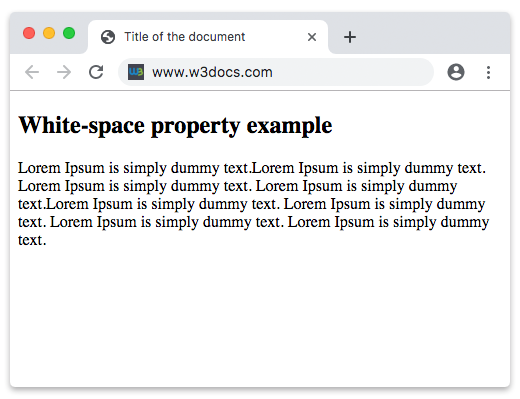
With normal, the runs of whitespace in the source collapse to single spaces and the text wraps to a new line whenever it reaches the edge of the <div>.
Example of the white-space property with the "nowrap" value
With nowrap, the text still collapses whitespace but never wraps. It runs off the side of the container instead of breaking onto a second line, which usually triggers horizontal overflow (often paired with text-overflow to add an ellipsis).
<!DOCTYPE html>
<html>
  <head>
    <title>Title of the document</title>
    <style>
      div {
        white-space: nowrap;
      }
    </style>
  </head>
  <body>
    <h2>White-space property example</h2>
    <div>
      Lorem Ipsum is simply dummy text.Lorem Ipsum is simply dummy text. Lorem Ipsum is simply dummy text. Lorem Ipsum is simply dummy text. Lorem Ipsum is simply dummy text. Lorem Ipsum is simply dummy text. Lorem Ipsum is simply dummy text. Lorem Ipsum is simply dummy text.
    </div>
  </body>
</html>Example of the white-space property with the "pre-line" value
With pre-line, sequences of spaces still collapse to one, but any line breaks written in the HTML source are preserved and the text continues to wrap as needed.
<!DOCTYPE html>
<html>
  <head>
    <title>Title of the document</title>
    <style>
      div {
        white-space: pre-line;
      }
    </style>
  </head>
  <body>
    <h2>White-space property example</h2>
    <div>
      Lorem Ipsum is simply dummy text.Lorem Ipsum is simply dummy text. Lorem Ipsum is simply dummy text. Lorem Ipsum is simply dummy text.Lorem Ipsum is simply dummy text. Lorem Ipsum is simply dummy text. Lorem Ipsum is simply dummy text. Lorem Ipsum is simply dummy text.
    </div>
  </body>
</html>In the next example, you can see the difference between the nowrap, normal and pre-wrap values side by side.
Example of the white-space property with three values
<!DOCTYPE html>
<html>
  <head>
    <title>Title of the document</title>
    <style>
      p.t1 {
        white-space: nowrap;
      }
      p.t2 {
        white-space: normal;
      }
      p.t3 {
        white-space: pre-wrap;
      }
    </style>
  </head>
  <body>
    <h2>White-space property example</h2>
    <h3>white-space: nowrap;</h3>
    <p class="t1">
      Lorem Ipsum is dummy text. Lorem Ipsum is dummied text. Lorem Ipsum is dummied text. Lorem Ipsum is dummied text. Lorem Ipsum is simply dummy text. Lorem Ipsum is simply dummy text.
    </p>
    <h3>white-space: normal;</h3>
    <p class="t2">
      Lorem Ipsum is dummied text. Lorem Ipsum is dummied text. Lorem Ipsum is dummied text. Lorem Ipsum is dummied text. Lorem Ipsum is simply dummy text. Lorem Ipsum is simply dummy text.
    </p>
    <h3>white-space: pre-wrap;</h3>
    <p class="t3">
      Lorem Ipsum is dummied text. Lorem Ipsum is dummied text. Lorem Ipsum is dummied text. Lorem Ipsum is dummied text. Lorem Ipsum is simply dummy text. Lorem Ipsum is simply dummy text.
    </p>
  </body>
</html>Values
| Value | Description | Play it |
|---|---|---|
| normal | Breaks lines as necessary to fill line boxes. This is the default value of this property. | Play it » |
| nowrap | With this value the text will never wrap to the next line. | Play it » |
| pre | Preserves both spaces and line breaks. Text will not wrap to the next line. | Play it » |
| pre-line | Sequences of whitespace collapse into a single whitespace. Text will wrap when necessary, and on line breaks. | Play it » |
| pre-wrap | Whitespace is preserved by the browser. Text will wrap when necessary, and on line breaks. | Play it » |
| break-spaces | The same behavior as "pre-wrap" except: any sequence of preserved white space always takes up space (including at the end of a line), a line-breaking opportunity exists after every preserved white-space character, and those spaces affect the box's intrinsic size instead of hanging. | Play it » |
| initial | Makes the property use its default value. | Play it » |
| inherit | Inherits the property from its parents element. |
Related properties
- overflow-wrap and word-break — control where long, unbreakable strings break.
- text-overflow — pair with
white-space: nowrapto clip text with an ellipsis. - word-wrap — the legacy alias for
overflow-wrap. - overflow — decide what happens to content that runs past its container when it does not wrap.