CSS background-repeat Property
The background-repeat is a CSS property which sets how the background-image will be repeated. Learn the values and try examples with each of them.
The background-repeat property controls how a background image is tiled across an element's painting area. By default a background image is too small to cover a full element, so the browser repeats it like wallpaper — across both axes — until the box is filled.
This page covers every value of background-repeat, when to reach for each one, and the subtle difference between space and round (the two values people get wrong most often).
The values fall into three groups:
- Tile or don't:
repeat(the default) tiles in both directions;no-repeatshows the image once. - Tile one axis:
repeat-xtiles horizontally only;repeat-ytiles vertically only. - Tile without partial tiles:
spacekeeps every tile whole and spreads extra room as gaps between them;roundstretches or shrinks the tiles so a whole number of them fits with no gaps.
background-repeat works together with background-image (which supplies the image) and background-position (which sets the starting point of the tiling). It is also one of the values you can set with the background shorthand.
When would I use it?
no-repeatis the most common in modern layouts — a single hero photo, logo, or icon that you then size withbackground-sizeand place withbackground-position.repeatis ideal for seamless textures and patterns (paper grain, noise, dot grids) where you want them to fill any size of box.repeat-x/repeat-ysuit decorative strips: a repeating top border, a vertical divider, or a gradient that should tile along one axis.space/roundmatter when the image has clear edges (like tiles or thumbnails) and you don't want them cut off where the box edge falls mid-tile.
By default, the image will be displayed in the top left corner without background-position property.
| Initial Value | repeat |
|---|---|
| Applies to | All elements. It also applies to ::first-letter and ::first-line. |
| Inherited | No. |
| Animatable | No. |
| Version | CSS1 |
| DOM Syntax | element.style.backgroundRepeat = "repeat-x"; |
Syntax
Syntax of CSS background-repeat Property
background-repeat: repeat | repeat-x | repeat-y | no-repeat | space | round | initial | inherit;Example of the background-repeat property:
Example of CSS background-repeat Property with repeat value
<!DOCTYPE html>
<html>
  <head>
    <title>Title of the document</title>
    <style>
      body {
        background-image: url("/uploads/media/default/0001/02/668fdd72934232cdeff7a45a89be805113c916b5.jpeg");
        background-repeat: repeat;
      }
    </style>
  </head>
  <body>
    <h2>This is some heading for an example.</h2>
    <p>Some paragraph for an example.</p>
  </body>
</html>Result
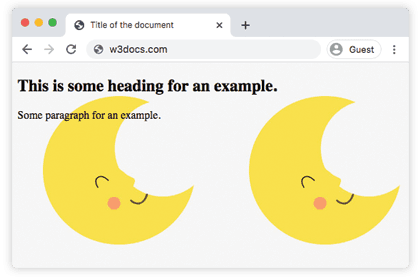
In the following example, the background image is shown only once because no-repeat is set.
Example of the background-repeat property with the "no-repeat" value:
Example of CSS background-repeat Property with no-repeat value
<!DOCTYPE html>
<html>
  <head>
    <title>Title of the document</title>
    <style>
      body {
        background-image: url("/uploads/media/default/0001/02/668fdd72934232cdeff7a45a89be805113c916b5.jpeg");
        background-repeat: no-repeat;
      }
    </style>
  </head>
  <body>
    <h2>This is some heading for an example.</h2>
    <p>Some paragraph for an example.</p>
  </body>
</html>In the next example, the background-image is repeated only horizontally.
Example of the background-repeat property with the "repeat-x" value:
Example of CSS background-repeat Property with repeat-x value
<!DOCTYPE html>
<html>
  <head>
    <title>Title of the document</title>
    <style>
      body {
        background-image: url("/uploads/media/default/0001/02/668fdd72934232cdeff7a45a89be805113c916b5.jpeg");
        background-repeat: repeat-x;
      }
    </style>
  </head>
  <body>
    <h2>This is some heading for an example.</h2>
    <p>Some paragraph for an example.</p>
  </body>
</html>Here, the "repeat-y" value makes the image be repeated only vertically.
Example of the background-repeat property with the "repeat-y" value:
Example of CSS background-repeat Property with repeat-y value
<!DOCTYPE html>
<html>
  <head>
    <title>Title of the document</title>
    <style>
      body {
        background-image: url("/uploads/media/default/0001/02/668fdd72934232cdeff7a45a89be805113c916b5.jpeg");
        background-repeat: repeat-y;
      }
    </style>
  </head>
  <body>
    <h2>This is some heading for an example.</h2>
    <p>Some paragraph for an example.</p>
  </body>
</html>With space, the image keeps its original size — the browser fits as many whole tiles as it can and spreads the remaining room as even gaps between them, so no tile is ever cut off.
Example of the background-repeat property with the "space" value:
Example of CSS background-repeat Property with space value
<!DOCTYPE html>
<html>
  <head>
    <title>Title of the document</title>
    <style>
      body {
        background-image: url("/uploads/media/default/0001/02/668fdd72934232cdeff7a45a89be805113c916b5.jpeg");
        background-repeat: space;
      }
    </style>
  </head>
  <body>
    <h2>This is some heading for an example.</h2>
    <p>Some paragraph for an example.</p>
  </body>
</html>With round, there are no gaps at all: the browser resizes the image up or down so that a whole number of tiles exactly fills the area. This can slightly distort the image, which is the trade-off round makes to avoid gaps.
Example of the background-repeat property with the "round" value:
Example of CSS background-repeat Property with round value
<!DOCTYPE html>
<html>
  <head>
    <title>Title of the document</title>
    <style>
      body {
        background-image: url("/uploads/media/default/0001/02/668fdd72934232cdeff7a45a89be805113c916b5.jpeg");
        background-repeat: round;
      }
    </style>
  </head>
  <body>
    <h2>This is some heading for an example.</h2>
    <p>Some paragraph for an example.</p>
  </body>
</html>Values
| Value | Description | Play it |
|---|---|---|
| repeat | The background image is repeated both horizontally and vertically. This is the default value. | Play it » |
| repeat-x | The background image is repeated only horizontally. | Play it » |
| repeat-y | The background image is repeated only vertically. | Play it » |
| no-repeat | The background image is not repeated. | Play it » |
| space | The image is repeated as many whole times as fit without being clipped; any leftover space is distributed as equal gaps between the tiles (the first and last tiles touch the edges). | Play it » |
| round | The image is rescaled so a whole number of tiles fills the area with no gaps; tiles are stretched or squashed to make them fit. | Play it » |
| initial | Sets the property to its default value. | Play it » |
| inherit | Inherits the property from its parent element. |
Common pitfalls
spaceandroundare real values. Both are part of the standard and tile without partial tiles —spaceadds gaps,roundrescales the image.no-repeatdoes not resize the image. To make a single image cover the box, pairno-repeatwith background-size.- Position sets where tiling starts. When repeating,
background-positionshifts the whole tile grid, so two tilings can look different even with the same image — set background-position intentionally. - Two-value syntax exists too. You can pass one keyword per axis, e.g.
background-repeat: repeat-x;is equivalent tobackground-repeat: repeat no-repeat;.