CSS list-style-type Property
The CSS list-style-type property sets the marker of a list item — bullet, number, or letter. Learn its values, when to use them, and see examples.
The CSS list-style-type property sets the marker of a list item — the bullet, number, or letter shown before each item. It lets you switch an unordered list from the default solid bullet to a hollow circle or square, change an ordered list from 1, 2, 3 to Roman numerals or letters, or remove the marker entirely.
What this property covers
A list marker can be one of three kinds:
- Glyphs — a simple shape:
disc(the default filled bullet),circle(a hollow ring), orsquare. - Numbering systems — counters such as
decimal,decimal-leading-zero,lower-roman,upper-roman,armenian,georgian,cjk-ideographic,hebrew,hiragana, andkatakana. - Alphabetic systems — letter sequences such as
lower-alpha/lower-latin(a, b, c) andupper-alpha/upper-latin(A, B, C), pluslower-greek(α, β, γ).
The marker's color matches the computed color of the element it applies to, so styling the text color also recolors the marker. You can pick a color from the HTML color reference.
When and where to use it
Only elements whose display value is list-item show a marker. By default that means the <li> and <summary> elements, but you can apply the behaviour to any element by setting display: list-item. In practice you set list-style-type on the parent <ul> or <ol> and let it inherit down to each <li> — the property inherits, so the children don't need it.
Use list-style-type: none when you want a clean navigation menu or a custom layout with no bullets. The numbering and alphabetic values work on both <ul> and <ol>, but they are most meaningful on <ol>, where each item represents a step or a ranked position.
list-style-type is one of three list properties that the shorthand list-style rolls up — the other two are list-style-position (marker inside or outside the content box) and list-style-image (a custom image marker, which overrides the type when set).
| Initial Value | disc |
|---|---|
| Applies to | List items. |
| Inherited | Yes. |
| Animatable | No. |
| Version | CSS1 |
| DOM Syntax | object.style.listStyleType = "armenian"; |
Syntax
Syntax of CSS list-style-type Property
list-style-type: disc | armenian | circle | cjk-ideographic | decimal | decimal-leading-zero | georgian | hebrew | hiragana | hiragana-iroha | katakana | katakana-iroha | lower-alpha | lower-greek | lower-latin | lower-roman | none | square | upper-alpha | upper-latin | upper-roman | initial | inherit;Example of the list-style-type property:
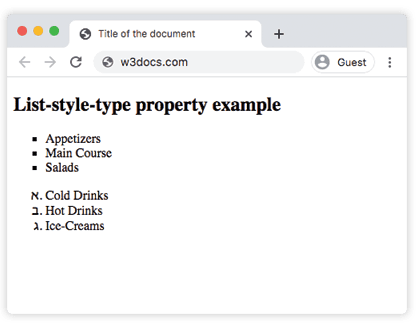
Example of CSS list-style-type Property with square and hebrew values
<!DOCTYPE html>
<html>
  <head>
    <title>Title of the document</title>
    <style>
      ul.list-styles {
        list-style-type: square;
      }
      ul.list-styles2 {
        list-style-type: hebrew;
      }
    </style>
  </head>
  <body>
    <h2>List-style-type property example</h2>
    <ul class="list-styles">
      <li>Appetizers</li>
      <li>Main Course</li>
      <li>Salads</li>
    </ul>
    <ul class="list-styles2">
      <li>Cold Drinks</li>
      <li>Hot Drinks</li>
      <li>Ice-Creams</li>
    </ul>
  </body>
</html>Result
Example of the list-style-type property with the "disc" value:
<!DOCTYPE html>
<html>
  <head>
    <title>Title of the document</title>
    <style>
      .text {
        list-style-type: disc;
      }
    </style>
  </head>
  <body>
    <h1>
      Example of the list-style-type property with "disc" value.
    </h1>
    <ul class="text">
      <li>Barcelona</li>
      <li>Madrid</li>
      <li>London</li>
    </ul>
  </body>
</html>Example of the list-style-type property with the "decimal" value:
<!DOCTYPE html>
<html>
  <head>
    <title>Title of the document</title>
    <style>
      .text {
        list-style-type: decimal;
      }
    </style>
  </head>
  <body>
    <h1>
      Example of the list-style-type property
    </h1>
    <ul class="text">
      <li>Barcelona</li>
      <li>Madrid</li>
      <li>London</li>
    </ul>
  </body>
</html>Example of the list-style-type property with ordered lists:
Example of CSS list-style-type Property with circle,square,upper-roman,lower-alpha,armenian,decimal,cjk-ideographic,georgian, upper-alpha and other values
<!DOCTYPE html>
<html>
  <head>
    <title>Title of the document</title>
    <style>
      ul.a {
        list-style-type: circle;
      }
      ul.b {
        list-style-type: square;
      }
      ol.c {
        list-style-type: upper-roman;
      }
      ol.d {
        list-style-type: lower-alpha;
      }
      ol.e {
        list-style-type: armenian;
      }
      ol.f {
        list-style-type: decimal;
      }
      ol.g {
        list-style-type: cjk-ideographic;
      }
      ol.h {
        list-style-type: decimal-leading-zero;
      }
      ol.i {
        list-style-type: georgian;
      }
      ol.j {
        list-style-type: hebrew;
      }
      ol.k {
        list-style-type: hiragana;
      }
      ol.l {
        list-style-type: hiragana-iroha;
      }
      ol.m {
        list-style-type: katakana;
      }
      ol.n {
        list-style-type: katakana-iroha;
      }
      ol.o {
        list-style-type: lower-greek;
      }
      ol.p {
        list-style-type: lower-latin;
      }
      ol.q {
        list-style-type: lower-roman;
      }
      ol.r {
        list-style-type: none;
      }
      ol.s {
        list-style-type: upper-alpha;
      }
      ol.t {
        list-style-type: upper-latin;
      }
    </style>
  </head>
  <body>
    <h2>List-style-type property example</h2>
    <p>Examples of unordered lists:</p>
    <h3>Circle</h3>
    <ul class="a">
      <li>New York</li>
      <li>Las Vegas</li>
      <li>Washington</li>
    </ul>
    <h3>Square</h3>
    <ul class="b">
      <li>San Francisco</li>
      <li>Los Angeles</li>
      <li>Miami</li>
    </ul>
    <p>Examples of ordered lists:</p>
    <h3>Upper-roman</h3>
    <ol class="c">
      <li>Barcelona</li>
      <li>Madrid</li>
      <li>London</li>
    </ol>
    <h3>Lower-alpha</h3>
    <ol class="d">
      <li>Dubai</li>
      <li>Anu Dhabi</li>
      <li>Qatar</li>
    </ol>
    <h3>Armenian</h3>
    <ol class="e">
      <li>Yerevan</li>
      <li>Paris</li>
      <li>Rome</li>
    </ol>
    <h3>Decimal</h3>
    <ol class="f">
      <li>Sydney</li>
      <li>Honk Kong</li>
      <li>Moscow</li>
    </ol>
    <h3>Cjk-ideographic</h3>
    <ol class="g">
      <li>Kiev</li>
      <li>Saint-Petersburg</li>
      <li>Tula</li>
    </ol>
    <h3>Decimal-leading-zero</h3>
    <ol class="h">
      <li>Bangkok</li>
      <li>Gyumri</li>
      <li>Valencia</li>
    </ol>
    <h3>Georgian</h3>
    <ol class="i">
      <li>Madrid</li>
      <li>Barcelona</li>
      <li>Prague</li>
    </ol>
    <h3>Hebrew</h3>
    <ol class="j">
      <li>Jerusalem</li>
      <li>Toronto</li>
      <li>Prague</li>
    </ol>
    <h3>Hiragana</h3>
    <ol class="k">
      <li>Cairo</li>
      <li>Tokyo</li>
      <li>Athens</li>
    </ol>
    <h3>Hiragana-iroha</h3>
    <ol class="l">
      <li>Tehran</li>
      <li>Tavriz</li>
      <li>Tel Aviv</li>
    </ol>
    <h3>Katakana</h3>
    <ol class="m">
      <li>Munich</li>
      <li>Berlin</li>
      <li>Bavaria</li>
    </ol>
    <h3>Katakana-iroha</h3>
    <ol class="n">
      <li>Brussels</li>
      <li>Istanbul</li>
      <li>Sydney</li>
    </ol>
    <h3>Lower-greek</h3>
    <ol class="o">
      <li>Seville</li>
      <li>Granada</li>
      <li>Venice</li>
    </ol>
    <h3>Lower-latin</h3>
    <ol class="p">
      <li>Budapest</li>
      <li>Vienna</li>
      <li>Amsterdam</li>
    </ol>
    <h3>Lower-roman</h3>
    <ol class="q">
      <li>Buenos Aires</li>
      <li>Rio de Janeiro</li>
      <li>San Paolo</li>
    </ol>
    <h3>None</h3>
    <ol class="r">
      <li>Vilnius</li>
      <li>Tallin</li>
      <li>Riga</li>
    </ol>
    <h3>Upper-alpha</h3>
    <ol class="s">
      <li>Montreal</li>
      <li>Melbourne</li>
      <li>Edinburgh</li>
    </ol>
    <h3>Upper-latin</h3>
    <ol class="t">
      <li>Dublin</li>
      <li>Mexico</li>
      <li>Florence</li>
    </ol>
  </body>
</html>Things to keep in mind
- The marker color follows the text color. There is no separate property for the bullet's color; set the
colorof the<li>(or its parent) and the marker changes with it. To color the marker independently, use the::markerpseudo-element. list-style-imagewins overlist-style-type. If a list also has alist-style-image, the image is shown and the type only acts as a fallback when the image fails to load.- Removing the marker doesn't remove the indent.
list-style-type: nonehides the bullet, but the list still has default left padding from the browser. Addpadding-left: 0(and oftenmargin: 0) to fully flatten a list — a common step when building navigation menus. - Use the right list element for ordered values. Numbering and letter values render on
<ul>too, but for accessibility and semantics, ranked or sequential content belongs in an<ol>.
Values
| Value | Description | Play it |
|---|---|---|
| disc | Creates marker as a filled circle. It is the default value of this property. | Play it » |
| armenian | Creates marker as a traditional Armenian numbering. | Play it » |
| circle | Creates marker as a circle. | Play it » |
| cjk-ideographic | Creates marker which is a plain ideographic numbers. | Play it » |
| decimal | Creates marker as a number. | Play it » |
| decimal-leading-zero | Creates marker as a number with leading zero such as 01,02,05... | Play it » |
| georgian | Creates marker as a traditional Georgian numbering. | Play it » |
| hebrew | Creates marker as a traditional Hebrew numbering. | Play it » |
| hiragana | Creates marker as a traditional Hiragana numbering. | Play it » |
| hiragana-iroha | Creates marker as a traditional Hiragana iroha numbering. | Play it » |
| katakana | Creates marker as a traditional Katakana numbering. | Play it » |
| katakana-iroha | Creates marker as a traditional Katakana iroha numbering. | Play it » |
| lower-alpha | Creates marker as lower-alpha such as a,b,c,d... | Play it » |
| lower-greek | Creates marker as lower-greek. | Play it » |
| lower-latin | Creates marker as lower-latin such as a,b,c,d... | Play it » |
| lower-roman | Creates marker as lower-roman such as i,ii,iii,iv... | Play it » |
| none | Means that the marker won't be shown. | Play it » |
| square | Creates marker as a square. | Play it » |
| upper-alpha | Creates marker as upper-alpha such as A,B,C,D... | Play it » |
| upper-latin | Creates marker as upper-latin such as A,B,C,D... | Play it » |
| upper-roman | Creates marker as upper-roman such as I,II,III,IV,V... | Play it » |
| initial | Makes the property use its default value. | Play it » |
| inherit | Inherits the property from its parents element. |