CSS :first-of-type Pseudo Class
The :first-of-type CSS pseudo-class selects the first element of its type among other sibling elements. Read about the pseudo-class and try examples.
The CSS :first-of-type pseudo-class selects an element that is the first element of its type among its siblings. It is equivalent to [:nth-of-type(1)](/learn-css/nth-of-type).
The selector counts siblings by their HTML tag name, not by class, attribute, or role. For every distinct element type inside a parent, exactly one element can match :first-of-type — the first one of that tag. This means a single parent may have several :first-of-type matches at once (one per tag), which is the behavior that most often surprises people coming from :first-child.
:first-of-type vs :first-child
The :first-of-type selector is often compared to :first-child, but they differ in scope. While :first-child matches an element only when it is the very first child of its parent regardless of type, :first-of-type matches the first sibling of a given type even when other elements come before it. Both selectors share the same CSS specificity.
Consider this markup:
<div>
  <h2>Heading</h2>
  <p>First paragraph</p>
  <p>Second paragraph</p>
</div>p:first-childmatches nothing — the first child is the<h2>, not a<p>.p:first-of-typematches the first<p>("First paragraph"), because it is the first paragraph among its siblings.
Use :first-of-type when you want "the first heading", "the first list", or "the first paragraph" inside a container regardless of what tags precede it. Reach for :first-child only when the element must literally be the opening child.
When to use it
A few practical patterns:
- Style the lead paragraph of an article without adding a class to the markup.
- Remove the top margin or border from the first item of a repeated component (e.g. the first
<figure>in a gallery). - Pair it with
:last-of-typeto trim the outer edges of a stack, or with:nth-of-type()when you need a position other than the first.
If a parent contains only one element of a type, that element is both its :first-of-type and its :only-of-type.
Starting with Selectors Level 4, the selected element does not strictly require a parent node in the DOM to match.
Version
Syntax
CSS :first-of-type syntax
:first-of-type {
  css declarations;
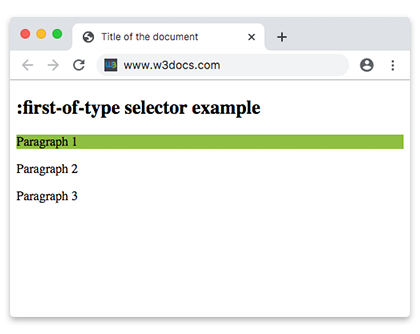
}Example of the :first-of-type selector:
<!DOCTYPE html>
<html>
  <head>
    <title>Title of the document</title>
    <style>
      p:first-of-type {
        background: #8ebf42;
      }
    </style>
  </head>
  <body>
    <h2>:first-of-type selector example</h2>
    <p>Paragraph 1</p>
    <p>Paragraph 2</p>
    <p>Paragraph 3</p>
  </body>
</html>Example of the :first-of-type selector with the <article> tag:
<!DOCTYPE html>
<html>
  <head>
    <title>Title of the document</title>
    <style>
      p:first-of-type {
        font-size: 22px;
        color: #777777;
      }
    </style>
  </head>
  <body>
    <h2>:first-of-type selector example</h2>
    <article>
      <h2>This is a title.</h2>
      <p>Lorem Ipsum is simply dummy text of the printing and typesetting industry. </p>
      <p>Lorem Ipsum is simply dummy text of the printing and typesetting industry. .</p>
      <p>Lorem Ipsum is simply dummy text of the printing and typesetting industry. .</p>
    </article>
  </body>
</html>Example of the :first-of-type selector with some HTML tags:
Here article:first-of-type matches only the first <article>, so its dark background is not applied to the second one. The selector is scoped per parent and per tag, which makes it ideal for styling the leading instance of a repeated block.
<!DOCTYPE html>
<html>
  <head>
    <title>Title of the document</title>
    <style>
      p {
        margin: 0;
      }
      article:first-of-type {
        background-color: #777777;
        color: #ffffff;
      }
    </style>
  </head>
  <body>
    <h2>:first-of-type selector example</h2>
    <article>
      <p>This is a first element!</p>
      <p>This <em>nested 'em' is first</em>!</p>
      <p>This <strong>nested 'strong' is first</strong>, but this <strong>nested 'strong' is last</strong>!</p>
      <p>This <span>nested 'span' gets styled</span>!</p>
      <q>This is a 'q' element!</q>
      <p>This is a last element.</p>
    </article>
    <article>
      <p>This is a second article.</p>
    </article>
  </body>
</html>Browser Compatibility
| Browser | Version |
|---|---|
| Chrome | 1.0 |
| Firefox | 1.0 |
| Safari | 1.0 |
| Edge | 12.0 |
| Opera | 7.0 |
| IE | 9.0 |