CSS float Property
The float CSS property defines if a box or an element should float or not. See examples and practice yourself.
The CSS float property takes an element out of the normal document flow and pushes it to the left or right of its container, letting the following text and inline content wrap around it. It was originally created to flow text around images (just like a magazine layout), and that remains its clearest use today.
This page covers what float does, its values, how it interacts with the clear property, the "collapsed parent" problem and the clearfix fix, and when to reach for Flexbox instead.
When an element is floated:
- It is removed from the normal flow, so block-level elements after it move up to fill the space.
- Inline content (text, inline images) wraps along the floated element's side.
- The float shrinks to fit its content unless you give it an explicit
width.
The clear property is the natural companion to float: it tells an element to drop below any preceding floats instead of sitting beside them.
The float property is ignored on absolutely positioned elements (position: absolute or position: fixed), because those are already removed from normal flow.
| Initial Value | none |
|---|---|
| Applies to | All elements. |
| Inherited | No. |
| Animatable | No. |
| Version | CSS1 |
| DOM Syntax | object.style.cssFloat = "right"; |
Syntax
Syntax of CSS float Property
float: none | left | right | initial | inherit;Example of the float property:
Example of CSS float Property with right value
<!DOCTYPE html>
<html>
  <head>
    <title>Title of the document</title>
    <style>
      img {
        float: right;
        background: #ccc;
      }
    </style>
  </head>
  <body>
    <h2>Float property example</h2>
    <img src="/uploads/media/default/0001/01/003e5c463668d174ab70bea245c192d81901a4a6.png" alt="W3dcos" />
    <p>
      Lorem Ipsum is simply dummy text of the printing and typesetting industry. Lorem Ipsum has been the industry's standard dummy text ever since the 1500s, when an unknown printer took a galley of type and scrambled it to make a type specimen book. It has survived not only five centuries, but also the leap into electronic typesetting, remaining essentially unchanged.
    </p>
  </body>
</html>Result
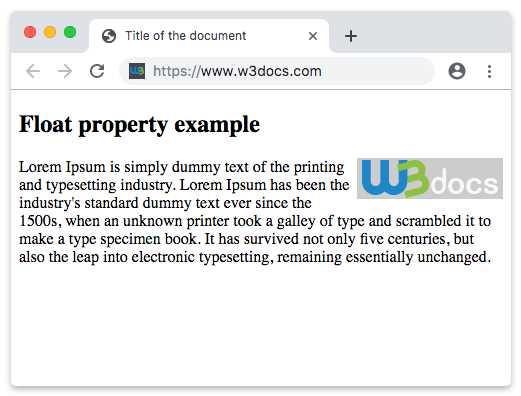
In the following example, the image floats to the left, so the paragraph text wraps along its right edge.
Example of using the float property to float an image:
Example of CSS float Property with left value
<!DOCTYPE html>
<html>
  <head>
    <title>Title of the document</title>
    <style>
      img {
        float: left;
        background: #ccc;
      }
    </style>
  </head>
  <body>
    <h2>Float property example</h2>
    <img src="/uploads/media/default/0001/01/003e5c463668d174ab70bea245c192d81901a4a6.png" alt="W3dcos" />
    <p>
      Lorem Ipsum is simply dummy text of the printing and typesetting industry. Lorem Ipsum has been the industry's standard dummy text ever since the 1500s, when an unknown printer took a galley of type and scrambled it to make a type specimen book. It has survived not only five centuries, but also the leap into electronic typesetting, remaining essentially unchanged.
    </p>
  </body>
</html>Values
| Value | Description | Play it |
|---|---|---|
| none | Means that the element is not floated and it will be displayed where it comes in the text. this is the default value of this property. | Play it » |
| left | Means that the element floats to left. | Play it » |
| right | Means that the element floats to right. | Play it » |
| initial | Makes the property use its default value. | Play it » |
| inherit | Inherits the property from its parents element. |
The collapsed parent problem
A floated element is taken out of normal flow, so its parent no longer counts it when calculating its own height. If a container holds only floated children, it collapses to zero height — backgrounds and borders disappear, and following content can slide up underneath the floats.
<!DOCTYPE html>
<html>
  <head>
    <style>
      .box { border: 2px solid #1a7e3c; }
      .box img { float: left; }
    </style>
  </head>
  <body>
    <!-- The border collapses around the floated image -->
    <div class="box">
      <img src="logo.png" alt="logo" width="80" height="80" />
    </div>
  </body>
</html>The clearfix fix
The classic, dependency-free way to make a parent contain its floats is the clearfix: add a generated pseudo-element that clears the floats. Apply the clearfix class to the parent.
.clearfix::after {
  content: "";
  display: block;
  clear: both;
}You can also force containment with overflow: auto (or hidden) on the parent, or display: flow-root, which exists specifically to create a new block-formatting context with no side effects. See overflow for trade-offs.
When to use float (and when not to)
Use float when you genuinely want content to wrap around an element — typically an image or a pull-quote inside running text. That is what it was designed for.
Avoid float for page layout (sidebars, columns, navigation rows). It was misused for that for years, but it is fragile and needs clearfix hacks. For modern layout, reach for Flexbox for one-dimensional rows/columns or CSS Grid for two-dimensional layouts. See also display and position.