CSS text-align-last Property
Use the text-align-last CSS property to set alignment of the text’s last line. Read about property values and see examples.
The CSS text-align-last property sets the alignment of the last line of a block of text — and only the last line. It is one of the CSS3 properties and works hand in hand with the regular text-align property.
When you justify a paragraph with text-align: justify, every line is stretched to fill the full width — except the last one, which is left short and aligned to the start by default. text-align-last is the property that decides what happens to that final "ragged" line.
The property targets the last formatted line of the block container it is applied to. For example, if a <div> contains a long run of wrapped text, text-align-last styles the single line at the very bottom — the leftover words that did not fill a complete line.
This property is most noticeable when text-align: justify is used and the text wraps to multiple lines. On a single line of text, the last line is the only line, so it behaves identically to text-align.
When to use it
Reach for text-align-last when justified text leaves an awkward final line and you want more control over it:
justify— force the last line to spread across the full width too, so the paragraph forms a clean rectangular block (common in print-style layouts and posters).center— give a justified block a centered closing line, often used for short headings or pull quotes.right/end— push the last line to the opposite edge for a deliberate, asymmetric look.
Because the property is inherited, setting it once on a wrapper applies it to all the block containers inside, unless a child overrides it.
| Initial Value | auto |
|---|---|
| Applies to | Block containers. |
| Inherited | Yes. |
| Animatable | No. |
| Version | CSS3 |
| DOM Syntax | object.style.textAlignLast = "left"; |
Browser Compatibility
| Browser | Support |
|---|---|
| Chrome | 50+ |
| Edge | 12+ |
| Firefox | 49+ |
| Safari | 10.1+ |
| Opera | 37+ |
Syntax
CSS text-align-last syntax
text-align-last: auto | left | right | center | justify | start | end | initial | inherit;Example of the text-align-last property:
CSS text-align-last code example
<!DOCTYPE html>
<html>
  <head>
    <title>Title of the document</title>
    <style>
      .demo {
        text-align: justify;
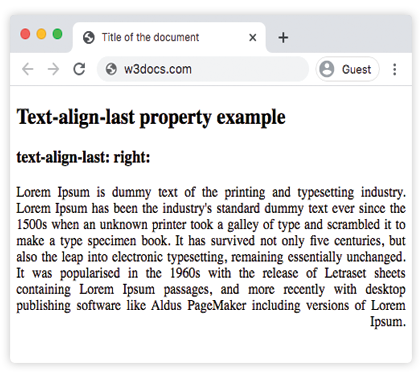
        text-align-last: right;
      }
    </style>
  </head>
  <body>
    <h2>Text-align-last property example</h2>
    <h3>text-align-last: right:</h3>
    <div class="demo">
      Lorem Ipsum is dummy text of the printing and typesetting industry. Lorem Ipsum has been the industry's standard dummy text ever since the 1500s when an unknown printer took a galley of type and scrambled it to make a type specimen book. It has survived not only five centuries, but also the leap into electronic typesetting, remaining essentially unchanged. It was popularised in the 1960s with the release of Letraset sheets containing Lorem Ipsum passages, and more recently with desktop publishing software like Aldus PageMaker including versions of Lorem Ipsum.
    </div>
  </body>
</html>Result
Example of the text-align-last property with the "start", "justify" and "center" values:
CSS text-align-last all values example
<!DOCTYPE html>
<html>
  <head>
    <title>Title of the document</title>
    <style>
      .demo1 {
        text-align: justify;
        text-align-last: start;
      }
      .demo2 {
        text-align: justify;
        text-align-last: center;
      }
      .demo3 {
        text-align: justify;
        text-align-last: justify;
      }
    </style>
  </head>
  <body>
    <h2>Text-align-last property example</h2>
    <h3>Text-align-last: start:</h3>
    <div class="demo1">
      Lorem Ipsum is dummy text of the printing and typesetting industry. Lorem Ipsum has been the industry's standard dummy text ever since the 1500s when an unknown printer took a galley of type and scrambled it to make a type specimen book. It has survived not only five centuries, but also the leap into electronic typesetting, remaining essentially unchanged. It was popularised in the 1960s with the release of Letraset sheets containing Lorem Ipsum passages, and more recently with desktop publishing software like Aldus PageMaker including versions of Lorem Ipsum.
    </div>
    <h3>Text-align-last: center:</h3>
    <div class="demo2">
      Lorem Ipsum is dummy text of the printing and typesetting industry. Lorem Ipsum has been the industry's standard dummy text ever since the 1500s when an unknown printer took a galley of type and scrambled it to make a type specimen book. It has survived not only five centuries, but also the leap into electronic typesetting, remaining essentially unchanged. It was popularised in the 1960s with the release of Letraset sheets containing Lorem Ipsum passages, and more recently with desktop publishing software like Aldus PageMaker including versions of Lorem Ipsum.
    </div>
    <h3>Text-align-last: justify:</h3>
    <div class="demo3">
      Lorem Ipsum is dummy text of the printing and typesetting industry. Lorem Ipsum has been the industry's standard dummy text ever since the 1500s when an unknown printer took a galley of type and scrambled it to make a type specimen book. It has survived not only five centuries, but also the leap into electronic typesetting, remaining essentially unchanged. It was popularised in the 1960s with the release of Letraset sheets containing Lorem Ipsum passages, and more recently with desktop publishing software like Aldus PageMaker including versions of Lorem Ipsum.
    </div>
  </body>
</html>Example of the text-align-last property with the "end" value:
Note that text-align-last is applied to the wrapping <div>, but each <p> inside is its own block container — so the end alignment affects the last line of every paragraph, not just the last paragraph of the group.
<!DOCTYPE html>
<html>
  <head>
    <title>Title of the document</title>
    <style>
      .demo {
        text-align: justify;
        text-align-last: end;
      }
    </style>
  </head>
  <body>
    <h2>Text-align-last property example</h2>
    <h3>text-align-last: end:</h3>
    <div class="demo">
      <p>
        Lorem Ipsum is dummy text of the printing and typesetting industry. Lorem Ipsum has been the industry's standard dummy text ever since the 1500s when an unknown printer took a galley of type and scrambled it to make a type specimen book. It has survived not only five centuries, but also the leap into electronic typesetting, remaining essentially unchanged. It was popularised in the 1960s with the release of Letraset sheets containing Lorem Ipsum passages, and more recently with desktop publishing software like Aldus PageMaker including versions of Lorem Ipsum.
      </p>
      <p>
        Lorem Ipsum is dummy text of the printing and typesetting industry. Lorem Ipsum has been the industry's standard dummy text ever since the 1500s when an unknown printer took a galley of type and scrambled it to make a type specimen book. It has survived not only five centuries, but also the leap into electronic typesetting, remaining essentially unchanged.
      </p>
      <p>
        Lorem Ipsum is dummy text of the printing and typesetting industry. Lorem Ipsum has been the industry's standard dummy text ever since the 1500s when an unknown printer took a galley of type and scrambled it to make a type specimen book.
      </p>
    </div>
  </body>
</html>Values
| Value | Description |
|---|---|
| auto | Uses the value of the text-align property. This is the default value. |
| left | Aligns the last line to the left. |
| right | Aligns the last line to the right. |
| center | Aligns the last line to the center. |
| justify | The last line is justified as the other lines. |
| start | The last line is aligned at the beginning of the line. Left if direction is left-to-right and right if direction is right-to-left. |
| end | The last line is aligned at the end of the line. Right if direction is left-to-right, left if direction is right-to-left. |
| initial | Makes the property use its default value. |
| inherit | Inherits the property from its parent element. |
Practice
Related properties
text-align— aligns all the lines of a block of text.text-justify— controls how the space is distributed when text is justified.direction— sets text direction, which determines whatstartandendmean.