CSS text-stroke-width Property
Use the text-stroke-width CSS property to define the width of the stroke. See the Value, Practice with examples.
The -webkit-text-stroke-width property sets how thick the outline (stroke) drawn around each character should be. It is one half of the text-stroke feature: this property controls the width of the outline, while text-stroke-color controls its color.
A text stroke is painted on top of the normal letter fill, centered on the edge of each glyph. With a larger width the letters look outlined or "hollow"; with a 0 width (the default) no stroke is drawn at all. This makes it a popular way to create bold display headings, knockout text, and decorative titles without switching to an image.
h1 {
  -webkit-text-stroke-width: 2px;
  -webkit-text-stroke-color: #1c87c9;
}Why and when to use it
Reach for text-stroke-width when you want an outline effect that stays crisp at any size and remains real, selectable text:
- Outlined headings — give a heading a colored border for a poster-like look.
- Knockout / hollow text — combine a stroke with text-fill-color
: transparentso only the outline shows and the background shows through the letters. - Readability over images — a thin stroke can separate light text from a busy background, similar to text-shadow but tighter to the glyph.
text-stroke-width is not a standalone standardized property. The standard form is the text-stroke shorthand (CSS Text Decoration Level 4). In practice every current browser still requires the -webkit- prefix, so use -webkit-text-stroke-width for the width and pair it with -webkit-text-stroke-color for the color.
Things to watch out for
- Always set a color too. A width with no
-webkit-text-stroke-colorfalls back tocurrentColor(the element's text color), so the stroke can be invisible against the fill. Set both, or use the text-stroke shorthand:-webkit-text-stroke: 2px #1c87c9;. - Width grows inward and outward. The stroke is centered on the glyph edge, so a wide stroke on small text eats into the letter shapes and hurts legibility. Use larger font-size values for bigger strokes.
- Not animatable. Transitioning the width directly does nothing.
- Provide a fallback. Browsers without
-webkit-text-strokesupport simply ignore it and show the plain text, so the result should still be readable without the stroke.
| Initial Value | 0 |
|---|---|
| Applies to | All elements. |
| Inherited | No. |
| Animatable | No |
| Version | CSS Text Decoration Module Level 4 (vendor-prefixed) |
| DOM Syntax | object.style.webkitTextStrokeWidth = "1px"; |
Syntax
CSS text-stroke-width values
-webkit-text-stroke-width: length | initial | inherit;Example of the text-stroke-width property:
Different units (px, mm) all set the stroke thickness. Here three paragraphs share the same stroke color but use thin, medium, and thick widths so you can compare them.
CSS text-stroke-width code example
<!DOCTYPE html>
<html>
  <head>
    <title>Title of the document</title>
    <style>
      p, h2 {
        margin: 0;
        font-size: 4em;
        -webkit-text-stroke-color: #1c87c9;
      }
      .thin {
        -webkit-text-stroke-width: 1px;
      }
      .medium {
        -webkit-text-stroke-width: 3.5px;
      }
      .thick {
        -webkit-text-stroke-width: 1.3mm;
      }
    </style>
  </head>
  <body>
    <h2>Text-stroke-width property example</h2>
    <p class="thin">Lorem Ipsum </p>
    <p class="medium">Lorem Ipsum</p>
    <p class="thick">Lorem Ipsum</p>
  </body>
</html>Result
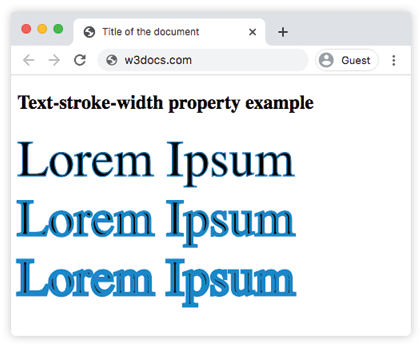
Example of hollow (knockout) text:
Setting the text-fill-color to transparent hides the letter fill, so only the stroke is painted. This is the classic "outline only" headline effect.
<!DOCTYPE html>
<html>
  <head>
    <title>Title of the document</title>
    <style>
      h1 {
        font-size: 5em;
        font-family: sans-serif;
        -webkit-text-fill-color: transparent;
        -webkit-text-stroke-width: 2px;
        -webkit-text-stroke-color: #8ebf42;
      }
    </style>
  </head>
  <body>
    <h1>Outline</h1>
  </body>
</html>Note: where it is supported, you can replace the two -webkit-text-stroke-* declarations with the text-stroke shorthand, for example -webkit-text-stroke: 2px #8ebf42;.
Values
| Value | Description |
|---|---|
| length | Specifies the thickness of the stroke. |
| initial | Makes the property use its default value. |
| inherit | Inherits the property from its parent element. |
Related properties
- text-stroke — the shorthand that sets width and color at once.
- text-stroke-color — sets the color of the stroke.
- text-fill-color — controls the fill of the letters (use
transparentfor hollow text). - text-shadow — an alternative way to add depth or contrast to text.