CSS direction Property
The direction CSS property defines in which direction the text should be. See some example and try it for yourself.
The CSS direction property sets the base writing direction of text and inline content — either left-to-right (ltr, the default) or right-to-left (rtl). It is the property that makes right-to-left scripts such as Arabic, Hebrew, Persian, and Urdu lay out correctly.
This page explains what direction controls, how it differs from the HTML dir attribute, when you actually need it, and the gotchas that trip people up.
What direction affects
Setting direction on a block-level element changes several things at once:
- The base text direction of the element's content.
- The default alignment of text inside that element (
rtlmakes text align to the right,ltrto the left), unless you override it withtext-align. - The order in which table cells flow within a row (rightmost-first for
rtl). - The direction of bidirectional embeddings created together with the
unicode-bidiproperty.
direction also influences the side that list bullets, scrollbars, and overflow appear on, because the inline start of the element flips.
direction vs. the HTML dir attribute
In real documents the direction is usually set with the HTML dir attribute (<html dir="rtl">) rather than the CSS property, because dir carries semantic meaning that assistive technology and the browser's bidi algorithm rely on.
The two are not perfectly equivalent: unlike the HTML dir attribute, the CSS direction property is not inherited into table cells from table columns — table cells live inside rows, not columns, so a cell inherits its direction from the table element itself.
For changing the order of pure visual layout (flex/grid items, margins, padding), prefer modern logical properties and writing-mode. Use direction specifically for the reading direction of text. See writing-mode.
| Initial Value | ltr |
|---|---|
| Applies to | All elements. |
| Inherited | Yes. |
| Animatable | Discrete. |
| Version | CSS2 |
| DOM Syntax | object.style.direction = "rtl"; |
Syntax
Syntax of CSS direction Property
direction: ltr | rtl | initial | inherit;Example: comparing ltr and rtl
The <p> keeps the default ltr direction; the <div> is switched to rtl, so its text starts at the right edge and reads toward the left.
<!DOCTYPE html>
<html>
  <head>
    <title>Title of the document</title>
    <style>
      div {
        direction: rtl;
      }
    </style>
  </head>
  <body>
    <p>As you can see, this text is written with default direction.</p>
    <div>However, this text is written from right to left as we defined.</div>
  </body>
</html>Result

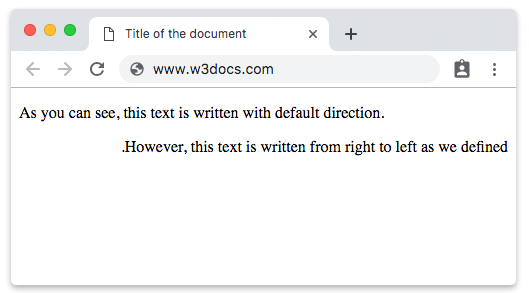
In the example above the rtl value is used, so the text in the <div> flows from right to left and aligns to the right by default.
Example: a right-to-left list and quote
Because direction flips the inline start, list markers and default text alignment move to the right side — exactly what you want for an Arabic or Hebrew snippet.
<!DOCTYPE html>
<html>
  <head>
    <title>Title of the document</title>
    <style>
      .rtl {
        direction: rtl;
        border: 1px solid #ccc;
        padding: 10px;
      }
    </style>
  </head>
  <body>
    <ul class="rtl">
      <li>First item</li>
      <li>Second item</li>
    </ul>
  </body>
</html>The bullets render on the right, and the text aligns to the right — without any text-align rule.
Values
| Value | Description | Play it |
|---|---|---|
| ltr | Means that the direction of text will be from left to right. This is the default value of the property. | Play it » |
| rtl | Means that the direction of text will be from right to left. | Play it » |
| initial | Sets the property to its default value. | Play it » |
| inherit | Inherits the property from its parent element. |
Common gotchas
directionhas no effect on the order of inline boxes by itself. To actually reorder mixed left-to-right and right-to-left text, you also needunicode-bidi(for exampleunicode-bidi: bidi-override).- Alignment vs. direction.
rtlchanges the default alignment, but an explicittext-alignrule still wins. If text aligns the "wrong" way after switching direction, check for a conflictingtext-align. - It is inherited. Set
directiononce on a high-level container (or via<html dir="rtl">) and the whole subtree picks it up, except table cells as noted above.
Related properties
unicode-bidi— fine-grained control over bidirectional text.writing-mode— vertical vs. horizontal flow and block direction.text-align— explicit horizontal alignment of inline content.