CSS stroke-linecap Property
How to use the stroke-linecap CSS property to specify the start and end points of element’s border. Read about the property and see values.
The stroke-linecap property specifies the shape to be used at the open ends of an SVG stroke. It only changes how the two end points of an open path are drawn — it has no effect on the corners where two line segments meet, and no effect on closed shapes that have no open ends.
This page explains what each cap value looks like, how stroke-linecap interacts with CSS specificity, and the special "zero-length path" case that lets you draw a single dot.
When would I use it?
Whenever you draw lines or open paths in SVG and you want control over how the line terminates:
roundis the most common choice for hand-drawn-style strokes, progress bars, and chart lines — it gives a soft, finished look.squareis useful when you want the line to extend slightly past its end point (for example, to make two abutting lines touch cleanly).butt(the default) cuts the line off exactly at the end coordinate — pick it when precise length matters.
A practical trick: a path with zero length (a stroke that starts and ends at the same point) renders as a single dot when stroke-linecap is round or square, and renders as nothing when it is butt. This is the standard way to draw dots in SVG.
CSS or presentation attribute?
stroke-linecap is both a CSS property and an SVG presentation attribute. That gives you two ways to set it:
- As an attribute on the element:
<path stroke-linecap="round" /> - As a CSS declaration:
path { stroke-linecap: round; }
A presentation attribute behaves like the lowest-priority style, so any CSS rule overrides it. Inline style="…" and external stylesheets win over the attribute; among the CSS rules, normal specificity applies.
The stroke-linecap property can be applied to any element but only affects the SVG shape and text-content elements: <path>, <line>, <polyline>, <text>, <textPath>, and <tspan>. It does not affect closed shapes such as <rect>, <circle>, or <polygon>, because those have no open ends.
| Initial Value | butt |
|---|---|
| Applies to | Shapes and text content elements. |
| Inherited | Yes. |
| Animatable | No. |
| Version | SVG 1.1 Specification |
| DOM Syntax | Object.strokeLinecap = "round"; |
Syntax
CSS stroke-linecap syntax
stroke-linecap: butt | square | round | initial | inherit;Example of the stroke-linecap property:
CSS stroke-linecap code example
<!DOCTYPE html>
<html>
  <head>
    <title>Title of the document</title>
  </head>
  <body>
    <h2>Stroke-linecap property example</h2>
    <svg viewBox="0 0 6 4">
      <!-- Effect of the "butt" value -->
      <path d="M1,1 h4" stroke="#8ebf42"
        stroke-linecap="butt" />
      <!-- Effect of the "butt" value on a zero length path -->
      <path d="M3,3 h0" stroke="#8ebf42"
        stroke-linecap="butt" />
      <!--
        the following pink lines highlight the
        position of the path for each stroke
        -->
      <path d="M1,1 h4" stroke="#1c87c9" stroke-width="0.05" />
      <circle cx="1" cy="1" r="0.05" fill="#1c87c9" />
      <circle cx="5" cy="1" r="0.05" fill="#1c87c9" />
      <circle cx="3" cy="3" r="0.05" fill="#1c87c9" />
    </svg>
  </body>
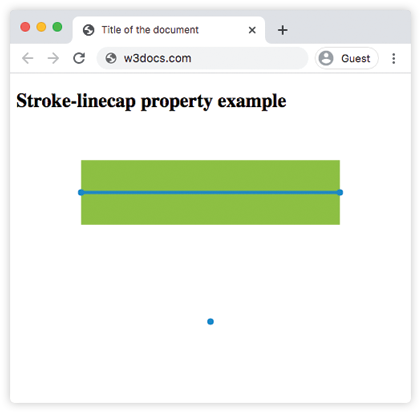
</html>With butt, the green stroke stops exactly at coordinates (1,1) and (5,1) — marked by the blue dots — so its visible length equals the path length. The zero-length path at (3,3) renders nothing at all.
Result
Example of the stroke-linecap property with the "round" value:
CSS stroke-linecap round example
<!DOCTYPE html>
<html>
  <head>
    <title>Title of the document</title>
  </head>
  <body>
    <h2>Stroke-linecap property example</h2>
    <svg viewBox="0 0 6 4">
      <!-- Effect of the "round" value -->
      <path d="M1,1 h4" stroke="#8ebf42" stroke-linecap="round" />
      <!-- Effect of the "round" value on a zero length path -->
      <path d="M3,3 h0" stroke="#8ebf42" stroke-linecap="round" />
      <!--
      the following pink lines highlight the
      position of the path for each stroke
      -->
      <path d="M1,1 h4" stroke="#1c87c9" stroke-width="0.05" />
      <circle cx="1" cy="1" r="0.05" fill="#1c87c9" />
      <circle cx="5" cy="1" r="0.05" fill="#1c87c9" />
      <circle cx="3" cy="3" r="0.05" fill="#1c87c9" />
    </svg>
  </body>
</html>With round, a semicircle of radius stroke-width / 2 is added beyond each end point, so the green line now overshoots the blue dots slightly. The zero-length path at (3,3) becomes a filled circle — this is the dot trick in action.
Example of the stroke-linecap property with the "square" value:
CSS stroke-linecap square example
<!DOCTYPE html>
<html>
  <head>
    <title>Title of the document</title>
  </head>
  <body>
    <h2>Stroke-linecap property example</h2>
    <svg viewBox="0 0 6 4">
      <!-- Effect of the "square" value -->
      <path d="M1,1 h4" stroke="#8ebf42" stroke-linecap="square" />
      <!-- Effect of the "square" value on a zero length path -->
      <path d="M3,3 h0" stroke="#8ebf42" stroke-linecap="square" />
      <!--
        the following pink lines highlight the
        position of the path for each stroke
        -->
      <path d="M1,1 h4" stroke="#1c87c9" stroke-width="0.05" />
      <circle cx="1" cy="1" r="0.05" fill="#1c87c9" />
      <circle cx="5" cy="1" r="0.05" fill="#1c87c9" />
      <circle cx="3" cy="3" r="0.05" fill="#1c87c9" />
    </svg>
  </body>
</html>square looks similar to round in that the stroke extends past the end point by stroke-width / 2, but the added cap is a rectangle instead of a semicircle, giving a flat edge. The zero-length path at (3,3) renders as a small square.
Values
| Value | Description |
|---|---|
butt | Default. Ends the stroke flat, exactly at the end point, adding no extension. A zero-length subpath is not rendered. |
round | Adds a semicircular cap of radius stroke-width / 2 beyond each end point, giving rounded ends. A zero-length subpath renders as a dot. |
square | Adds a rectangular cap that extends stroke-width / 2 beyond each end point, giving flat ends that overshoot the path. A zero-length subpath renders as a small square. |
initial | Resets the property to its default value (butt). |
inherit | Inherits the value from the parent element. stroke-linecap is inherited by default. |
Related properties
stroke-linecap is one of several SVG stroke properties that control how lines are drawn:
stroke— sets the color of the stroke.stroke-width— sets how thick the stroke is (and therefore how big the caps are).stroke-dasharray— turns a solid stroke into dashes; each dash gets its own line caps.stroke-dashoffset— shifts where the dash pattern starts.fill— sets the color used to paint the interior of a shape.