CSS break-inside Property
The CSS break-inside property defines whether any break within the principal box is allowed, avoided or forced. Learn about the property and try examples.
The break-inside CSS property controls whether a fragmentation break (a page, column, or region break) is allowed to fall inside an element's box. Use it to keep a piece of content together so it isn't split across two printed pages or two columns of a multi-column layout.
A common, practical example: in a multi-column article you don't want a figure, a code block, or a heading-plus-first-paragraph to be torn apart with half in one column and half in the next. Setting break-inside: avoid on that element tells the browser to push the whole box to the next column or page rather than splitting it.
This property applies in fragmented contexts only — that is, when content actually flows across fragments:
- Print (
@media print), where content is split across pages. - Multi-column layouts, where content flows across columns (see
column-count). - CSS regions (the
avoid-regionvalue), an older spec with very limited support.
When content is not fragmented (a normal block on screen), break-inside has no visible effect.
Each element boundary is controlled by three related properties:
- Break-after, which applies to the preceding element.
- Break-before, which applies to the following element.
- Break-inside, which applies to the containing element.
The CSS fragmentation spec handles break behavior as follows:
- Forced breaks (e.g.,
always,left,right) specified bybreak-beforeorbreak-aftertake precedence and will occur. - If no forced break is triggered,
break-insidedetermines whether the browser attempts to avoid breaking inside the element. Setting it toavoidprevents page, column, or region breaks within the box.
| Initial Value | auto |
|---|---|
| Applies to | block-level elements. |
| Inherited | No. |
| Animatable | Discrete. |
| Version | CSS3 |
| DOM Syntax | object.style.breakInside = "avoid"; |
Syntax
Syntax of CSS break-inside Property
break-inside: auto | avoid | avoid-page | avoid-column | avoid-region | initial | inherit;Example of the break-inside property:
Example of CSS break-inside Property with avoid value
<!DOCTYPE html>
<html>
  <head>
    <title>The title of the document</title>
    <style>
      .multicol {
        background-color: #eee;
        padding: 10px;
        /* Safari and Chrome */
        -webkit-column-count: 3;
        -webkit-column-rule: 2px dotted #ccc;
        /* Firefox */
        -moz-column-count: 3;
        -moz-column-rule: 2px dotted #ccc;
        /* CSS3 */
        column-count: 3;
        column-rule: 2px dotted #ccc;
      }
      .multicol hr {
        break-inside: avoid;
      }
    </style>
  </head>
  <body>
    <div class="multicol">
      <h2>Lorem ipsum</h2>
      <p>Lorem Ipsum is simply dummy text of the printing and typesetting industry. Lorem Ipsum has been the industry's standard dummy text ever since the 1500s when an unknown printer took a galley of type and scrambled it to make a type specimen book. It has survived not only five centuries, but also the leap into electronic typesetting, remaining essentially unchanged.</p>
      <hr />
      <h2>Lorem ipsum</h2>
      <p>Lorem Ipsum is simply dummy text of the printing and typesetting industry. Lorem Ipsum has been the industry's standard dummy text ever since the 1500s when an unknown printer took a galley of type and scrambled it to make a type specimen book. It has survived not only five centuries, but also the leap into electronic typesetting, remaining essentially unchanged.</p>
    </div>
  </body>
</html>Result

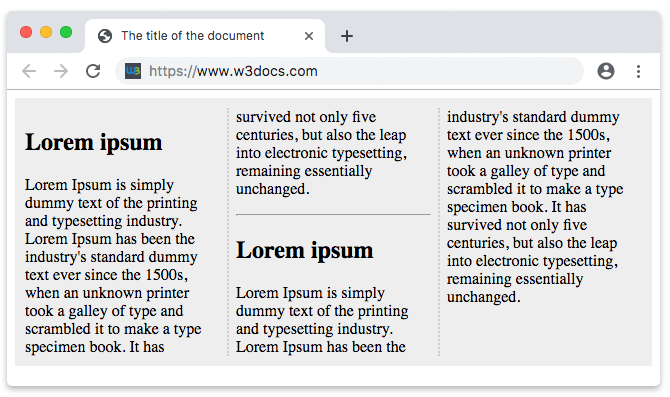
In the example above, the three columns each hold a heading and paragraph, and the <hr> carries break-inside: avoid so the rule is never split between columns.
Values
| Value | Description |
|---|---|
| auto | Default. Allows normal page, column, or region breaks inside the element. |
| avoid | Avoids any page, column, or region break inside the element. |
| avoid-page | Avoids a page break inside the element. |
| avoid-column | Avoids a column break inside the element. |
| avoid-region | Avoids a region break inside the element. |
| initial | Sets the property to its default value (auto). |
| inherit | Inherits the property from the parent element. |
Browser support
break-inside with the values auto and avoid is supported by all modern browsers (Chrome, Edge, Firefox, Safari). The keywords avoid-page and avoid-column have more uneven support, and avoid-region is effectively unsupported because CSS Regions never shipped broadly. For reliable, cross-browser results, prefer break-inside: avoid.
In print-related code you may still see the older page-break-inside: avoid; property. It is the legacy equivalent of break-inside: avoid and is kept for backward compatibility, so it is common to declare both:
.keep-together {
  page-break-inside: avoid; /* legacy */
  break-inside: avoid;      /* modern */
}