CSS border-left-color Property
The border-left-color property is used for defining the color of the left border of an element. See all property values with examples.
The CSS border-left-color property sets the color of an element's left border. It only controls color — the border also needs a style and a width to be visible.
This page covers the syntax of border-left-color, why a border style is required for it to show, and worked examples for every kind of color value (named colors, hex, RGB, HSL, and transparent).
Why a border style is required
A border has three ingredients: style, width, and color. By default the border style is none, which means the browser draws no border at all — so setting only border-left-color produces nothing visible.
To make the left border appear, set a style first with border-style or border-left-style, then apply the color:
.box {
  border-left-style: solid; /* required, otherwise the border is invisible */
  border-left-width: 4px;   /* optional; defaults to medium */
  border-left-color: #1c87c9;
}If you also want to color the top, right, and bottom borders, the border-color shorthand sets all four sides at once. The width is controlled separately with border-width or border-left-width (the default width is medium).
The initial value is currentColor, meaning that, until you set a color, the border takes the element's own color value.
Property summary
| Initial Value | currentColor |
|---|---|
| Applies to | All elements. It also applies to ::first-letter. |
| Inherited | No |
| Animatable | Yes. The color of the left border is animatable. |
| Version | CSS1 |
| DOM Syntax | object.style.borderLeft = "1px solid black"; |
Syntax
border-left-color: color | transparent | initial | inherit;Examples
Coloring the left border differently from the others
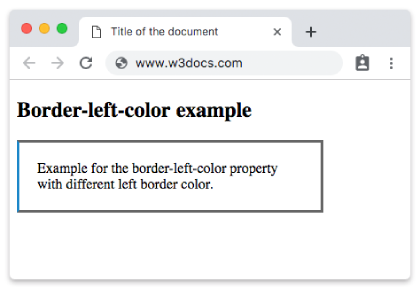
This example draws a solid border on all sides with border-color, then overrides just the left side so it stands out:
<!DOCTYPE html>
<html>
  <head>
    <title>Title of the document</title>
    <style>
      div {
        width: 300px;
        padding: 20px;
        border-style: solid;
        border-color: #666;
        border-left-color: #1c87c9;
      }
    </style>
  </head>
  <body>
    <h2>Border-left-color example</h2>
    <div>Example for the border-left-color property with different left border color.</div>
  </body>
</html>Result:
Using the "transparent" value
A transparent left border is invisible but still occupies the space defined by the border width. This is handy for keeping layouts aligned or for creating visible-on-hover effects:
<!DOCTYPE html>
<html>
  <head>
    <title>Title of the document</title>
    <style>
      h2 {
        padding: 3px;
        text-align: center;
        border: 15px ridge #8ebf42;
        border-left-color: transparent;
      }
    </style>
  </head>
  <body>
    <h2>A heading with a transparent left border</h2>
  </body>
</html>You can set the color as a named color, a hexadecimal code, or an rgb(), rgba(), hsl(), or hsla() value. The examples below show the most common formats.
Named color value
<!DOCTYPE html>
<html>
  <head>
    <title>Title of the document</title>
    <style>
      div {
        padding: 3px;
        border-left-style: solid;
        border-left-color: darkred;
      }
    </style>
  </head>
  <body>
    <div>Border-left-color property with a named color value.</div>
  </body>
</html>Hexadecimal value
<!DOCTYPE html>
<html>
  <head>
    <title>Title of the document</title>
    <style>
      div {
        padding: 3px;
        border-left-style: solid;
        border-left-color: #1c87c9;
      }
    </style>
  </head>
  <body>
    <div>Border-left-color property with a hexadecimal value.</div>
  </body>
</html>RGB value
<!DOCTYPE html>
<html>
  <head>
    <title>Title of the document</title>
    <style>
      div {
        padding: 3px;
        border-left-style: solid;
        border-left-color: rgb(142, 191, 66);
      }
    </style>
  </head>
  <body>
    <div>Border-left-color property with a RGB value.</div>
  </body>
</html>HSL value
<!DOCTYPE html>
<html>
  <head>
    <title>Title of the document</title>
    <style>
      div {
        padding: 3px;
        border-left-style: solid;
        border-left-color: hsl(89, 43%, 51%);
      }
    </style>
  </head>
  <body>
    <div>Border-left-color property with a HSL value.</div>
  </body>
</html>Values
| Value | Description | Play it |
|---|---|---|
| color | Defines the color of the left border. Default color is the color of the current element. Color names, hexadecimal color codes, rgb(), rgba(), hsl(), hsla() can be used. Required value. | Play it » |
| transparent | Applies a transparent color to the left border. The left border will still take up the space defined by the border-width value. | Play it » |
| initial | Sets the property to its default value. | Play it » |
| inherit | Inherits the property from its parent element. |
Related properties
- border-color — shorthand for all four border colors
- border-left-style — sets the style of the left border (required for the color to show)
- border-left-width — sets the width of the left border
- border-right-color, border-top-color, border-bottom-color — color the other sides