CSS ::first-letter Pseudo Element
Use the ::first-letter CSS pseudo-element for selecting and styling the first-letter of the line. Read about the pseudo-element and try examples.
The ::first-letter pseudo-element applies styles to the first letter of the first line in a block-level container. It is most commonly used to create drop caps and other typographic initial-letter effects, like the large ornate letters that open a chapter in a printed book.
The pseudo-element only takes effect when the element's display is block, inline-block, list-item, table-cell, or table-caption. It has no effect on inline elements such as <span> or images, since they don't start a new line.
When punctuation (such as quotes, brackets, or a dash) precedes or immediately follows the first letter, that punctuation is included in the match together with the letter. The pseudo-element targets the first typographic letter unit, so a leading symbol or digit is styled along with the letter that follows it.
CSS3 introduced the double-colon syntax (::first-letter) to distinguish pseudo-elements from pseudo-classes. The older single-colon form (:first-letter) is still accepted by browsers for backward compatibility, but the double-colon form is preferred in modern code.
When to use it
Reach for ::first-letter when you want to:
- Create a drop cap — enlarge and float the opening letter of an article or chapter.
- Apply a distinct color, font, or weight to the leading character of a heading or paragraph.
- Reproduce print-style typography on the web without wrapping the first character in extra markup.
Because the effect is purely presentational, it keeps your HTML clean: there is no need to add a <span class="first"> around the letter.
Allowable properties
Here are the CSS properties that can be used with the ::first-letter pseudo-element:
Font properties: font, font-style, font-feature-settings, font-kerning, font-language-override, font-stretch, font-variant, font-variant-alternates, font-variant-caps, font-variant-east-asian, font-variant-ligatures, font-variant-numeric, font-weight, font-size, font-size-adjust, line-height and font-family.
Background properties: background, background-origin, background-position, background-repeat, background-size, background-attachment, background-blend-mode, background-color, background-image, and background-clip.
Margin properties: margin, margin-top, margin-right, margin-bottom, margin-left.
Padding properties: padding, padding-top, padding-right, padding-bottom, padding-left.
Border properties: shorthands, border-style, border-color, border-width, border-radius, border-image, longhands.
The color property.
The text-decoration, text-shadow, text-transform, letter-spacing, word-spacing (when appropriate), text-decoration-color, text-decoration-line, text-decoration-style, box-shadow, float, vertical-align (only float: none;).
Version
Syntax
CSS ::first-letter syntax example
::first-letter {
  css declarations;
}Example of the ::first-letter pseudo-element:
CSS ::first-letter code example
<!DOCTYPE html>
<html>
  <head>
    <title>Title of the document</title>
    <style>
      p::first-letter {
        font-size: 35px;
        color: #1c87c9;
      }
    </style>
  </head>
  <body>
    <h2>::first-letter selector example</h2>
    <p>Lorem ipsum is simply dummy text...</p>
  </body>
</html>Result
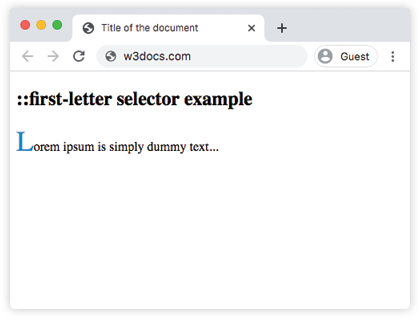
The first letter of the paragraph is rendered at 35px and in blue, while the rest of the text keeps its default size and color.
Example of the ::first-letter pseudo-element with punctuation mark and a digit:
In the following example, the first paragraph begins with a dash and the second with a digit. Notice how the leading dash is styled together with the first letter, while a leading digit is styled on its own as the first character of the line.
::first-letter code example
<!DOCTYPE html>
<html>
  <head>
    <title>Title of the document</title>
    <style>
      p::first-letter {
        font-size: 35px;
        color: #1c87c9;
      }
    </style>
  </head>
  <body>
    <h2>::first-letter selector example</h2>
    <p>-Lorem ipsum is simply dummy text...</p>
    <p>1Lorem ipsum is simply dummy text...</p>
  </body>
</html>Example of a drop cap:
A classic use of ::first-letter is the drop cap, where the opening letter is enlarged and floated so the following lines wrap around it. Combine a large font-size, float: left, and a little padding to achieve the effect.
<!DOCTYPE html>
<html>
  <head>
    <title>Title of the document</title>
    <style>
      p::first-letter {
        font-size: 3em;
        font-weight: bold;
        color: #1c87c9;
        float: left;
        padding-right: 8px;
        line-height: 1;
      }
    </style>
  </head>
  <body>
    <p>
      Drop caps draw the reader's eye to the start of a paragraph. They
      are a long-standing typographic tradition, and CSS lets you add them
      with no extra markup at all.
    </p>
  </body>
</html>Related resources
- CSS ::first-line — style the entire first line instead of just the first letter.
- CSS float — needed to wrap text around a drop cap.
- CSS text-transform — combine with
::first-letterto capitalize the opening character.