CSS text-justify Property
Use the text-justify CSS property to specify how should be spacing behavior between words or characters. Read about property values and see examples.
The CSS text-justify property controls how the browser distributes extra space when justified text is stretched to fill each line. It only takes effect when text-align is set to justify — on its own it does nothing.
This page covers what text-justify does, each of its values, when to reach for it, the browser-support gotchas you need to know, and how it relates to other spacing properties.
What problem it solves
When you set text-align: justify, the browser pads each line so the left and right edges line up flush, like in a newspaper column. There are two ways to add that padding: widen the gaps between words, or widen the gaps between characters. text-justify lets you choose which strategy the browser uses, instead of leaving it up to the default algorithm.
This matters because the right strategy depends on the language. Languages with spaces between words (English, German, French) usually look best with extra word spacing. Languages written without spaces between words (such as Chinese, Japanese, and Korean) only have room to stretch between characters, so inter-character is the natural fit there.
text-justify is one of the CSS3 properties.
| Initial Value | auto |
|---|---|
| Applies to | Block-level elements. |
| Inherited | No. |
| Animatable | No. |
| Version | CSS3 |
| DOM Syntax | object.style.textJustify = "inter-character"; |
Syntax
text-justify: auto | inter-word | inter-character | none | initial | inherit;Because text-justify is inert without justified text, you almost always set the two together:
p {
  text-align: justify;       /* turn justification on */
  text-justify: inter-word;  /* choose how the gaps grow */
}Example of the text-justify property:
CSS text-justify code example
<!DOCTYPE html>
<html>
  <head>
    <title>Title of the document</title>
    <style>
      div {
        text-align: justify;
        text-justify: inter-word;
      }
    </style>
  </head>
  <body>
    <h2>Text-justify property example</h2>
    <div>
      Lorem Ipsum is simply dummy text of the printing and typesetting industry. Lorem Ipsum has been the industry's standard dummy text ever since the 1500s when an unknown printer took a galley of type and scrambled it to make a type specimen book. It has survived not only five centuries, but also the leap into electronic typesetting, remaining essentially unchanged. It was popularised in the 1960s with the release of Letraset sheets containing Lorem Ipsum passages, and more recently with desktop publishing software like Aldus PageMaker including versions of Lorem Ipsum.
    </div>
  </body>
</html>Result
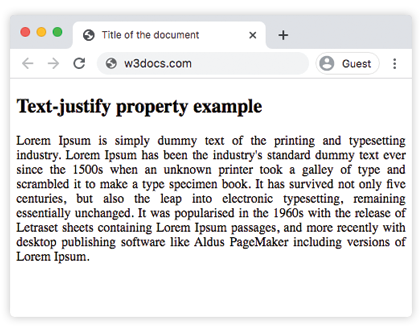
With inter-word the spaces between words grow until each line reaches the container edge. Resize the browser narrower and you'll see the gaps stretch more on lines that are far from filling the width.
Example of the text-justify property with the "inter-character" value:
CSS text-justify with inter-character value example
<!DOCTYPE html>
<html>
  <head>
    <title>Title of the document</title>
    <style>
      div {
        text-align: justify;
        text-justify: inter-character;
      }
    </style>
  </head>
  <body>
    <h2>Text-justify property example</h2>
    <div>
      Lorem Ipsum is simply dummy text of the printing and typesetting industry. Lorem Ipsum has been the industry's standard dummy text ever since the 1500s when an unknown printer took a galley of type and scrambled it to make a type specimen book. It has survived not only five centuries, but also the leap into electronic typesetting, remaining essentially unchanged. It was popularised in the 1960s with the release of Letraset sheets containing Lorem Ipsum passages, and more recently with desktop publishing software like Aldus PageMaker including versions of Lorem Ipsum.
    </div>
  </body>
</html>With inter-character, the extra space is inserted between individual characters rather than only between words. On Latin text the effect is subtle; it becomes essential for CJK scripts where there are no word gaps to widen.
Browser support and gotchas
text-justify has uneven support and a few sharp edges worth knowing before you rely on it:
inter-characteris the most reliable extra value, but the once-commondistributekeyword was renamed tointer-characterand the old name is deprecated.noneis not honored everywhere. Some engines still justify the last line or fall back to the default algorithm, so test rather than assume justification is fully off.- Justified text can create "rivers" — ragged channels of white space running down a paragraph — especially in narrow columns. Pairing justification with
hyphens: autoand a sensible measure (line length) reduces them. - The last line of a justified block is never stretched; it stays left-aligned (or follows
text-align-last).
When in doubt, set text-justify: auto (or leave it unset) and let the browser pick the best strategy for the content's language.
Values
| Value | Description | Play it |
|---|---|---|
auto | Justification algorithm is defined. The browser is allowed to determine whether inter-word or inter-character is better for justification. This is the default value of this property. | Play it » |
inter-word | The browser increases the space between words. This is typical for languages with clear word boundaries. | Play it » |
inter-character | The browser increases the space between characters during justification. | Play it » |
none | Justification is deactivated. | Play it » |
initial | Makes the property use its default value. | Play it » |
inherit | Inherits the property from its parent element. |
Related properties
text-align— the property that must bejustifyfortext-justifyto have any effect.text-align-last— controls the alignment of the final line of a justified block.word-spacing— directly sets the gap between words, independent of justification.letter-spacing— directly sets the gap between characters (tracking).