CSS min-height Property
Use the min-height CSS property to set the minimum height of the content area of an element. Learn more about property values with examples.
The min-height property sets the minimum height of an element. The element can grow taller than this value when its content needs more room, but it can never become shorter than it. In effect, min-height puts a floor under the box's height.
This is useful whenever you want a guaranteed amount of vertical space even when there is little or no content — for example, a hero banner, a card, or a footer that should always look substantial regardless of how much text it holds.
How min-height interacts with height and max-height
The three height properties are resolved together by the browser's sizing rules:
- If the computed
heightis smaller thanmin-height, the element is forced up tomin-height(the minimum wins). - If the computed
heightis larger thanmin-height,min-heighthas no effect. min-heightalways takes priority overmax-height: when the two conflict, the element is at leastmin-heighttall even if that exceedsmax-height.
So the effective height is clamped into the range min-height ... max-height, and content that overflows that range is governed by the overflow property.
The property accepts a CSS length (px, em, rem, vh, etc.) or a percentage.
A percentage min-height is calculated from the height of the parent element. If the parent has no explicitly set height, the percentage is treated as 0 (i.e. it has no effect) — a common source of confusion. Negative values are never accepted.
| Initial Value | 0 |
|---|---|
| Applies to | All elements, except non-replaced inline elements, column groups and table columns. |
| Inherited | No. |
| Animatable | Yes. Height is animatable. |
| Version | CSS2 |
| DOM Syntax | object.style.minHeight = "100px"; |
Syntax
Syntax of CSS min-height Property
min-height: auto | length | percentage | calc() | initial | inherit;Example of the min-height property:
Example of CSS min-height Property with px value
<!DOCTYPE html>
<html>
  <head>
    <title>Title of the document</title>
    <style>
      div {
        min-height: 50px;
        background-color: #8ebf42;
      }
    </style>
  </head>
  <body>
    <h2>Min-height property example</h2>
    <div>The text area's minimum height is defined as 50px.</div>
  </body>
</html>Result
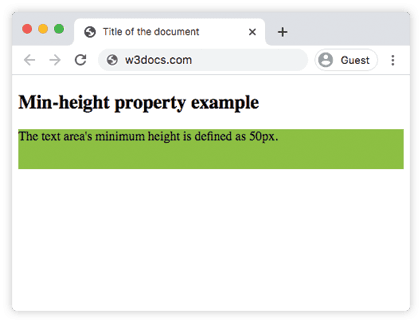
Example of the min-height property specified as "3cm":
Example of CSS min-height Property with cm value
<!DOCTYPE html>
<html>
  <head>
    <title>Title of the document</title>
    <style>
      p {
        background-color: #ccc;
      }
      p.example {
        min-height: 3cm;
      }
    </style>
  </head>
  <body>
    <h2>Min-height property example</h2>
    <h3>Min-height: auto.</h3>
    <p>Lorem Ipsum is simply dummy text of the printing and typesetting industry.</p>
    <h3>Min-height: 3cm.</h3>
    <p class="example">Lorem Ipsum is simply dummy text of the printing and typesetting industry.</p>
  </body>
</html>Using content-based keywords
Besides lengths and percentages, min-height accepts intrinsic-sizing keywords that base the minimum on the content itself:
min-content— the smallest height the content can take without overflowing (roughly the height when wrapped as tightly as possible).max-content— the height the content would take if it were never forced to wrap.fit-content()— clamps to the available space but never exceedsmax-content.
These are handy when you want a box to be "as tall as its content, but never shorter than that," without hard-coding a pixel value.
A common use case: stretching to fill a flex container
min-height: 100vh is a popular pattern for "sticky footer" layouts — it makes a wrapper at least as tall as the viewport so the footer sits at the bottom even on short pages, while still allowing the page to grow when content is long:
.page {
  display: flex;
  flex-direction: column;
  min-height: 100vh; /* at least the full viewport, but can grow */
}

.page main {
  flex: 1; /* pushes the footer to the bottom */
}Because this is a minimum, the layout never clips long content — the box simply expands past 100vh. Pair it with box-sizing: border-box so padding and borders don't add to the computed height unexpectedly.
Values
| Value | Description | Play it |
|---|---|---|
| auto | The browser calculates and selects a min-height for the given element. | Play it » |
| length | Defines the minimum height in px, em, rem, etc. Default value is 0. | Play it » |
| % | Sets the minimum height as a percentage of the parent's height. | |
| calc() | Calculates the minimum height using an expression. | Play it » |
| fit-content() | Sets the minimum height based on the content size, clamped to the available space. | Play it » |
| max-content | Sets the minimum height to the intrinsic maximum height of the content. | Play it » |
| min-content | Sets the minimum height to the intrinsic minimum height of the content. | Play it » |
| initial | Makes the property use its default value. | Play it » |
| inherit | Inherits the property from its parent element. |
Practice
Related properties
height— sets the preferred height of an element.max-height— caps how tall an element can become.min-width— the horizontal counterpart ofmin-height.box-sizing— controls whether padding and borders count toward the height.overflow— decides what happens when content exceeds the box.