CSS text-decoration-skip-ink Property
Use the CSS text-decoration-skip-ink property to specify how underlines and overlines should be drawn. See property values and try examples.
The text-decoration-skip-ink property controls how underlines and overlines behave when they pass through the parts of a letter that hang below the baseline (descenders, like the tails of "g", "y", "p") or rise above it (ascenders). Instead of a line cutting straight through those strokes, the browser can leave small gaps so the line "skips" the ink of the glyph — which is where the name comes from.
This is a readability feature. A solid underline that slices through a "g" or "j" can make text harder to read; skipping the ink keeps the underline visually clean. Modern browsers enable this behavior by default (auto), so this property is mainly used to turn it off (none) when you want a continuous, uninterrupted line.
text-decoration-skip-ink only affects the underline and overline values of the text-decoration-line property. The line-through value sits in the middle of the text rather than crossing descenders, so it is unaffected.
The text-decoration-skip-ink property is part of the broader text-decoration shorthand family, alongside text-decoration-line, text-decoration-color, and text-decoration-style.
| Initial Value | auto |
|---|---|
| Applies to | All elements. |
| Inherited | Yes. |
| Animatable | No. |
| Version | CSS Text Decoration Module Level 4 |
| DOM Syntax | object.style.textDecorationSkipInk = "none"; |
Syntax
CSS text-decoration-skip-ink values
text-decoration-skip-ink: auto | none | initial | inherit;The shorthand also accepts the global initial and inherit keywords. Since the property is inherited and defaults to auto, you rarely need to set it explicitly except to disable ink-skipping.
Example of the text-decoration-skip-ink property
The example below puts the two states side by side: the first paragraph forces a continuous underline (none), while the second lets the browser skip the ink around descenders (auto). Compare how the line behaves under letters like "p".
CSS text-decoration-skip-ink code example
<!DOCTYPE html>
<html>
  <head>
    <title>Title of the document</title>
    <style>
      .ex1 {
        margin: 0;
        font-size: 2em;
        text-decoration: underline #1c87c9;
        text-decoration-skip-ink: none;
      }
      .ex2 {
        margin: 0;
        font-size: 2em;
        text-decoration: underline #1c87c9;
        text-decoration-skip-ink: auto;
      }
    </style>
  </head>
  <body>
    <h2>
        Text-decoration-skip-ink property example
    </h2>
    <h3>
        Text-decoration-skip-ink: none;
    </h3>
    <p class="ex1">
      Lorem ipsum is simply dummy text
    </p>
    <h3>
        Text-decoration-skip-ink:auto;
    </h3>
    <p class="ex2">
      Lorem ipsum is simply dummy text
    </p>
  </body>
</html>Result
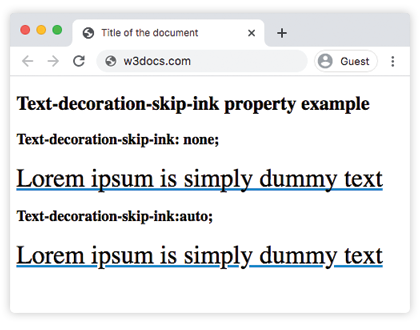
Values
| Value | Description |
|---|---|
| auto | Underlines and overlines are only drawn where they do not touch or closely approach a glyph. This is the default value of this property. |
| none | Underlines and overlines are drawn for all text content including parts that cross over glyph descenders and ascenders. |
| initial | Sets the property to its default value. |
| inherit | Inherits the property from its parent element. |
When to use it
- Keep the default (
auto) for body text and links. It produces the cleaner, more readable underlines that users expect, with gaps automatically placed around descenders. - Use
nonewhen a design calls for a solid, unbroken line — for example, a deliberately heavy underline used as a stylistic accent, or when small gaps look like rendering glitches at a given font size.
A common pattern is to reset it to a known value so the rendering is the same across the browsers that previously defaulted to drawing through glyphs:
a {
  text-decoration-line: underline;
  text-decoration-skip-ink: auto; /* explicitly opt in to skipping */
}Browser support
text-decoration-skip-ink is supported in all modern browsers (Chrome, Edge, Firefox, and Safari). Because the property simply degrades to a normal underline when unsupported, no fallback is needed — older browsers just draw the line straight through the glyphs, which is still perfectly readable.