CSS letter-spacing Property
Know how to use the letter-spacing CSS property which defines the spacing between letters/characters. Also see the values and examples.
The CSS letter-spacing property controls the horizontal spacing (known as tracking) between the characters of a text. It adds space in addition to the default spacing a font already provides, rather than replacing it.
This is most useful for fine-tuning headings, all-caps labels, and logo-style text where the default tracking looks too tight or too loose. For long paragraphs of body text, leave it at normal — even small adjustments hurt readability.
letter-spacing accepts a <length> (px, em, rem, etc.) or the keyword normal. Length values can be negative, which pulls characters closer together. Because the value is a length (not a ratio), using em is handy: the spacing then scales with the element's font size.
The property is animatable, so the spacing changes smoothly when a transition is defined.
The speed of transition is specified by the animation-timing-function.
| Initial Value | normal |
|---|---|
| Applies to | All elements. It also applies to ::first-letter and ::first-line. |
| Inherited | Yes. |
| Animatable | Yes. |
| Version | CSS1 |
| DOM Syntax | object.style.letterSpacing = "5px"; |
Syntax
Syntax of CSS letter-spacing Property
letter-spacing: normal | length | initial | inherit;Example of the letter-spacing property:
Example of CSS letter-spacing Property with normal and negative values
<!DOCTYPE html>
<html>
  <head>
    <title>Title of the document</title>
    <style>
      p {
        letter-spacing: normal;
      }
      .spacing {
        letter-spacing: 4px;
      }
      .spacing-negative {
        letter-spacing: -4px;
      }
    </style>
  </head>
  <body>
    <h2>Letter-spacing property example</h2>
    <p>This is a paragraph.</p>
    <p class="spacing">This is a paragraph.</p>
    <p class="spacing-negative">This is a paragraph.</p>
  </body>
</html>Result
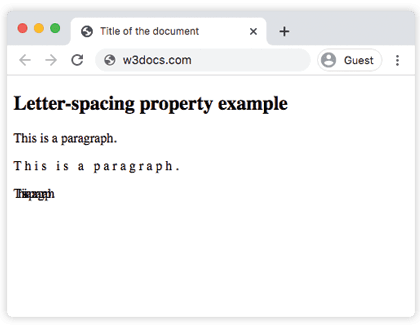
In the example above the first paragraph uses the default normal spacing, the second sets letter-spacing: 4px (characters spread apart), and the third sets a negative value, -4px (characters pulled together, even overlapping).
In the next example letter-spacing is combined with the transition property. Hover over the text to see the spacing animate.
Example of the letter-spacing property with the transition property:
Example of CSS letter-spacing Property with normal and em values
<!DOCTYPE html>
<html>
  <head>
    <title>Title of the document</title>
    <style>
      body {
        background-color: #fff;
        color: #666;
        font-size: 1em;
        font-family: Roboto, Helvetica Sans-serif;
      }
      .example1 {
        background-color: #666;
        color: #eee;
        padding: 1em;
        letter-spacing: .5em;
        -webkit-transition: letter-spacing .5s ease;
        transition: letter-spacing .5s ease;
      }
      .example1:hover {
        letter-spacing: normal;
      }
      .example2 {
        background-color: #eee;
        color: #666;
        padding: 1em;
      }
    </style>
  </head>
  <body>
    <h2>Letter-spacing property example</h2>
    <div class="example1">
      <p>
        Lorem ipsum dolor sit amet, consectetur adipisicing elit. Necessitatibus earum ut alias doloremque esse. Porro maxime dicta veniam molestias sed modi sunt sapiente eum nostrum consequatur accusantium facilis blanditiis nihil.
      </p>
      <div class="example2">
        Lorem ipsum dolor sit amet, consectetur adipisicing elit. Ullam, facilis, sed, consectetur incidunt quia sint accusamus obcaecati quisquam asperiores officiis mollitia explicabo est ratione. Qui id ipsa ratione inventore nam!
      </div>
    </div>
  </body>
</html>When to use letter-spacing
- Uppercase headings and labels. All-caps text is set tightly by most fonts; adding
0.05em–0.1emof spacing makes it easier to read and gives a polished, "designed" look. - Small-caps and acronyms. A touch of extra tracking separates the dense capital glyphs.
- Hover and focus effects. Because the property is animatable, transitioning the spacing creates a subtle reveal effect on links and buttons.
- Avoid it for body copy. Spacing out running paragraphs slows reading. Leave long-form text at
normal.
Additional information
- Modern browsers fully support subpixel (fractional) values such as
0.5px. - Negative values reduce spacing and can make characters overlap — useful for tight logo-style headings, but test carefully.
- Using
emmakes the spacing scale with the element'sfont-size; usingpxkeeps it fixed regardless of font size. letter-spacingis inherited, so child elements pick up the value unless they reset it tonormal.- This property controls spacing between individual characters; to space out whole words instead, use word-spacing.
Values
| Value | Description | Play it |
|---|---|---|
| normal | Means that there won’t be extra spaces between characters. It is the default value of this property. | Play it » |
| length | Defines an extra space between characters. Negative values are allowed. | Play it » |
| initial | Makes the property use its default value. | Play it » |
| inherit | Inherits the property from its parents element. |