CSS bottom property
The CSS bottom property specifies the bottom position of an element in combination with the position property. Find examples and try it yourself.
The CSS bottom property sets the vertical position of a positioned element relative to its containing block. It works only when the element has a position value other than static, and a positive value pushes the element's bottom edge upward, away from the bottom of its reference box.
Note: The bottom property has no effect on elements with position: static (the default), so nothing happens until you also set position.
How position changes the effect
The reference box that bottom measures from depends entirely on the element's position value:
relative—bottomoffsets the element from its normal position.bottom: 20pxmoves it 20px up from where it would otherwise sit, without affecting the layout of surrounding elements.absolute— the element is positioned relative to its nearest positioned ancestor (an ancestor whosepositionis notstatic).bottom: 0pins it to the bottom of that ancestor.fixed— the element is positioned relative to the viewport and stays put while the page scrolls.sticky— the element behaves likerelativeuntil its scroll container reaches a threshold, after which it behaves likefixed.
bottom vs. top
If both top and bottom are set on the same element, top wins when the element has a fixed height (for position: absolute/fixed), because top is resolved first. If the height is auto, setting both top and bottom stretches the element to fill the space between the two offsets — a handy way to make an absolutely positioned box as tall as its container without specifying a height.
Percentage values
A percentage bottom is calculated from the height of the containing block, not the element itself. If the containing block has no explicit height, percentage offsets may resolve to 0 or be ignored, so prefer length units (px, em, rem) when the parent height is unknown.
| Initial Value | auto |
|---|---|
| Applies to | All elements. It also applies to ::first-letter. |
| Inherited | No. |
| Animatable | Yes. The bottom position can be animatable. |
| Version | CSS2 |
| DOM Syntax | object.style.bottom = "10px"; |
Syntax
Syntax of CSS bottom property
bottom: auto | length | percentage | initial | inherit;Example of the bottom property:
Example of CSS bottom property with position absolute value
<!DOCTYPE html>
<html>
  <head>
    <style>
      div.parent {
        position: relative;
        height: 300px;
        width: 80%;
        border: 3px solid #8ebf42;
      }
      div.absolute {
        position: absolute;
        width: 50%;
        bottom: 10px;
        border: 3px solid #8ebf42;
      }
    </style>
  </head>
  <body>
    <h2>Bottom property example</h2>
    <div class="parent">
      The position of this div is set to relative.
      <div class="absolute">This div's bottom edge is placed 10 pixels above the bottom edge of the containing element, and the position is set to absolute.</div>
    </div>
  </body>
</html>Result
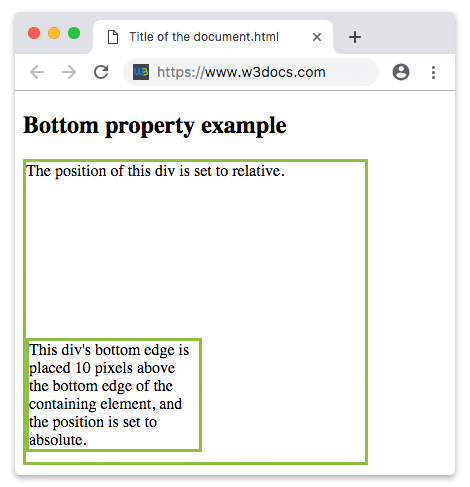
Example of the bottom property with all the positions:
Example of CSS bottom property with all positions
<!DOCTYPE html>
<html>
  <head>
    <style>
      div.parent {
        position: relative;
        height: 180px;
        border: 3px solid #8AC007;
      }
      div.absolute {
        position: absolute;
        width: 50%;
        bottom: 20px;
        border: 3px solid #8AC007;
      }
      div.relative {
        position: relative;
        width: 50%;
        bottom: 2px;
        border: 3px solid #8AC007;
      }
      div.fixed {
        position: fixed;
        width: 50%;
        bottom: 50px;
        border: 3px solid #8AC007;
      }
      div.sticky {
        position: sticky;
        top: 0;
        width: 50%;
        bottom: 10px;
        border: 3px solid #8AC007;
      }
    </style>
  </head>
  <body>
    <h2>Bottom property example</h2>
    <div class="parent">
      This div element has position: relative.
      <div class="absolute"><strong>position: absolute and bottom 20px</strong>
        <br />This div's bottom edge is placed 20 pixels above the bottom edge of the containing element.</div>
    </div>
    <br />
    <div class="parent">
      This div element has position: relative.
      <div class="relative"><strong>position: relative and bottom 2px</strong>
        <br />This div's bottom edge is placed 2 pixels above its normal position.</div>
    </div>
    <br />
    <div class="fixed"><strong>position: fixed and bottom 50px</strong>
      <br />This div's bottom edge is placed 50 pixels from the bottom of the viewport.</div>
    <div class="parent">
      This div element has position: relative.
      <div class="sticky"><strong>position: sticky and bottom 10px</strong>
        <br />This div is sticky.</div>
    </div>
  </body>
</html>Values
| Value | Description | Play it |
|---|---|---|
| auto | This is the default value. It lets the browser calculate the bottom edge position. | Play it » |
| percentage | Defines the element’s position in percentages of the containing block height. | |
| length | Defines the position of the element in px, cm, etc. Negative values are allowed. | Play it » |
| initial | Sets the property to its default value. | Play it » |
| inherit | Inherits the property from its parent element. |
Related properties
The bottom offset is one of four box-offset properties that work together with position:
- top — sets the vertical offset from the top edge of the reference box.
- left — sets the horizontal offset from the left edge.
- right — sets the horizontal offset from the right edge.
A common pattern is pinning an element to a corner, for example position: absolute; bottom: 0; right: 0; to anchor a badge to the bottom-right of its container.