CSS text-orientation Property
Use the text-orientation CSS property to define the orientation of the characters within a line of content. See property values and try examples.
The CSS text-orientation property controls how individual characters are oriented within a line when the text runs vertically. It is the tool you reach for when laying out East Asian scripts (Chinese, Japanese, Korean) in their traditional vertical flow, or when you want a vertical label or heading in a Latin-script design.
On its own, text-orientation does nothing — it only takes effect once the line direction is vertical. You set that direction with the writing-mode property (for example vertical-rl or vertical-lr). Think of the pair as a division of labor: writing-mode decides which way the line flows, and text-orientation decides how each glyph is turned along that line.
This chapter covers what each value does, when you would pick one over another, the gotchas around browser support, and runnable examples you can edit.
Why use it
- Vertical CJK typography. By default (
mixed), Latin characters mixed into vertical Chinese or Japanese text get rotated 90°, which reads awkwardly.uprightkeeps them standing the right way up. - Decorative vertical headings and side labels. Spine-style titles, sidebar tags, and chart-axis labels in Latin scripts often read better upright or laid sideways.
- Faithful rendering of mixed-script content where numbers, acronyms, or loanwords appear inside vertical text.
Values at a glance
text-orientation accepts five script-related values — mixed, upright, sideways, sideways-right, and use-glyph-orientation — plus the global keywords initial and inherit. All of the script-related values only apply in vertical typographic modes.
A few historical notes worth knowing: the old sideways-left value was removed from the specification, sideways-right is now kept only as an alias for sideways, and the non-vertical use cases moved to the sideways-lr / sideways-rl values of the writing-mode property instead.
The text-orientation property has an effect only when writing-mode is vertical (vertical-rl or vertical-lr). In a normal horizontal layout it is ignored.
| Initial Value | mixed |
|---|---|
| Applies to | All elements, except table row groups, rows, column groups and columns. |
| Inherited | Yes. |
| Animatable | No. |
| Version | CSS3 |
| DOM Syntax | object.style.textOrientation = "upright"; |
Syntax
CSS text-orientation values
text-orientation: mixed | upright | sideways | sideways-right | use-glyph-orientation | initial | inherit;Example of the text-orientation property with the "mixed" value:
CSS text-orientation code example
<!DOCTYPE html>
<html>
  <head>
    <title>Title of the document</title>
    <style>
      p {
        writing-mode: vertical-rl;
        text-orientation: mixed;
      }
    </style>
  </head>
  <body>
    <h2>Text-orientation property example</h2>
    <p>Lorem ipsum is simply dummy text.</p>
  </body>
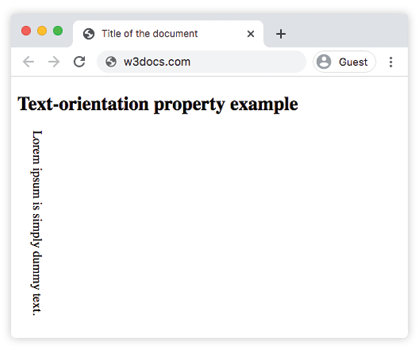
</html>With mixed, the Latin letters stay upright while the line itself flows top-to-bottom and right-to-left. This is the browser default for vertical writing modes, and the one you want for genuine CJK text.
Result
Example of the text-orientation property with the "upright" value:
CSS text-orientation with upright value, example
<!DOCTYPE html>
<html>
  <head>
    <title>Title of the document</title>
    <style>
      p {
        writing-mode: vertical-lr;
        text-orientation: upright;
      }
    </style>
  </head>
  <body>
    <h2>Text-orientation property example</h2>
    <p>Lorem ipsum is simply dummy text.</p>
  </body>
</html>The upright value forces every glyph to stand vertically, regardless of its script. It is the typical choice for a decorative vertical heading in a Latin-script design, and for keeping embedded Latin words readable inside vertical CJK text. Note that upright also forces the bidirectional direction of the text to ltr.
Example: vertical heading next to body text
CSS text-orientation another code example
<!DOCTYPE html>
<html>
  <head>
    <title>Title of the document</title>
    <style>
      body {
        background-color: #ffffff;
        color: #000000;
        font-size: 1.1em;
      }
      .example {
        background: #cccccc;
        color: #fff;
        padding: 3em;
        margin: 40px auto 0;
        width: 400px;
        max-width: 400px;
        display: flex;
      }
      h1 {
        color: #8ebf42;
        margin: 0.15em 0.75em 0 0;
        font-family: 'Bungee Shade', cursive;
        -webkit-writing-mode: vertical-lr;
        -ms-writing-mode: tb-lr;
        writing-mode: vertical-lr;
        text-orientation: upright;
        -webkit-font-feature-settings: "vkrn", "vpal";
        font-feature-settings: "vkrn", "vpal";
      }
      p {
        margin: 0;
        line-height: 1.5;
        font-size: 1.15em;
      }
    </style>
  </head>
  <body>
    <h2>Text-orientation property example</h2>
    <div class="example">
      <h1>Lorem Ipsum</h1>
      <p>
        Lorem Ipsum is dummy text of the printing and typesetting industry. Lorem Ipsum has been the industry's standard dummy text ever since the 1500s when an unknown printer took a galley of type and scrambled it to make a type specimen book. It has survived not only five centuries, but also the leap into electronic typesetting, remaining essentially unchanged.
      </p>
    </div>
  </body>
</html>Browser support and fallbacks
text-orientation is supported in all modern browsers (Chrome, Edge, Firefox, Safari). Two practical notes:
- It is only meaningful alongside a vertical
writing-mode, so always set both together. - Older WebKit builds need the
-webkit-prefix onwriting-mode(you can see this in the example above). Thetext-orientationproperty itself does not need a prefix in current browsers. - Avoid
use-glyph-orientation: it is deprecated and no longer supported in modern browsers.
Values
| Value | Description |
|---|---|
| mixed | Horizontal scripts are laid out upright, while vertical scripts are rotated 90° clockwise. This is the default value of this property. |
| upright | All characters are laid out upright, regardless of their script. It does not affect the direction property. |
| sideways | The characters are laid out as they would be horizontally, but with the whole line rotated 90° clockwise. |
| sideways-right | An alias to sideways that is kept for compatibility purposes. |
| use-glyph-orientation | Deprecated. Previously mapped to the obsolete SVG glyph-orientation-vertical and glyph-orientation-horizontal properties. It is no longer supported in modern browsers. |
| initial | It makes the property use its default value. |
| inherit | It inherits the property from its parents element. |
Related properties
writing-mode— sets the line direction (horizontal or vertical) and is required fortext-orientationto take effect.text-combine-upright— packs a short run of characters (such as a two-digit year) into the space of one upright character in vertical text.direction— controls the bidirectional base direction of text.text-align— aligns inline content along the line, which in vertical modes becomes top/bottom alignment.