CSS content Property
The content property is used with:: before and:: after pseudo-elements to generate content inside an element. Try Content Property examples.
The content property is used with the ::before and ::after pseudo-elements to generate content inside an element. Without an explicit value, those pseudo-elements are not rendered at all, so content is what makes a generated box appear in the first place.
This page covers when and how to use content: inserting plain text, pulling in attribute values with attr(), numbering elements with CSS counters, embedding images and quotes, and the gotchas that trip people up (such as generated text being inaccessible to screen readers).
The property accepts the following values:
- normal
- none
- counter
- attr
- string
- open-quote
- close-quote
- no-open-quote
- no-close-quote
- url
Text inserted with content is not part of the DOM — you cannot select it the way you select normal text, and assistive technology support is inconsistent. Use it for decorative or supplementary content, not for content that must always be available to every reader. The quotes property must be set on the element for open-quote and close-quote to render actual quotation marks.
| Initial Value | normal |
|---|---|
| Applies to | ::before and ::after pseudo-elements. |
| Inherited | No. |
| Animatable | No. |
| Version | CSS2 |
| DOM Syntax | element.style.content = "none"; |
Syntax
Syntax of CSS content Property
content: normal | none | counter | attr | string | open-quote | close-quote | no-open-quote | no-close-quote | url | initial | inherit;Example of the content property:
Example of CSS content Property with normal value
<!DOCTYPE html>
<html>
  <head>
    <title>Title of the document</title>
    <style>
      p::before {
        content: "Name -";
      }
      .country::before {
        content: normal;
      }
    </style>
  </head>
  <body>
    <h2>Content property example</h2>
    <p>My name is John</p>
    <p class="country">I live in Canada</p>
  </body>
</html>Result
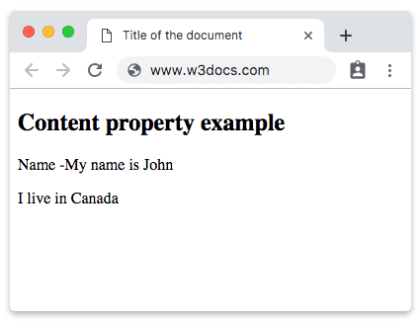
Example of the content property with the "string" value:
Example of CSS content Property with string value
<!DOCTYPE html>
<html>
  <head>
    <title>Title of the document</title>
    <style>
      li:before {
        content: "List item";
      }
      p:after {
        content: " with string value.";
      }
    </style>
  </head>
  <body>
    <h2>Content property example</h2>
    <ul>
      <li>1</li>
      <li>2</li>
      <li>3</li>
    </ul>
    <p>Here is some paragraph</p>
  </body>
</html>In the following example, you can see that open-quote cannot appear without close-quote.
Example of the content property with the "open-quote" value:
Example of the content property with open-quote and close-quote values
<!DOCTYPE html>
<html>
  <head>
    <title>Title of the document</title>
    <style>
      p {
        quotes: open-quote close-quote;
      }
      p::before {
        content: open-quote;
      }
      p::after {
        content: close-quote;
      }
    </style>
  </head>
  <body>
    <h2>Content property example</h2>
    <p>Hello, my name is John</p>
    <p>I am from Canada</p>
  </body>
</html>Example of the content property with the "open-quote" and "no-close-quote" values:
Example of the content property with "open-quote" and "no-close-quote" values:
<!DOCTYPE html>
<html>
  <head>
    <title>Title of the document</title>
    <style>
      p::before {
        content: open-quote;
      }
      p::after {
        content: no-close-quote;
      }
    </style>
  </head>
  <body>
    <p>Example with content property</p>
  </body>
</html>Using the attr() value to read an attribute
attr() pulls the value of an HTML attribute into the generated content. A common use is showing the target of a link, or surfacing a data-* attribute as a tooltip-like label. The attribute value is always treated as a string.
<!DOCTYPE html>
<html>
  <head>
    <title>Title of the document</title>
    <style>
      a::after {
        content: " (" attr(href) ")";
        color: #888;
      }
    </style>
  </head>
  <body>
    <p>Visit <a href="https://www.w3docs.com">W3docs</a> to learn more.</p>
  </body>
</html>This renders the link as Visit W3docs (https://www.w3docs.com) to learn more. — note how a string and attr() are concatenated simply by writing them next to each other.
Using counters to number elements
CSS counters let you generate sequential numbers without touching the HTML. You initialise a counter with counter-reset, advance it with counter-increment, and print it with the counter() function inside content. This is the idiomatic way to number headings, steps, or figures.
<!DOCTYPE html>
<html>
  <head>
    <title>Title of the document</title>
    <style>
      body {
        counter-reset: section;
      }
      h2::before {
        counter-increment: section;
        content: "Section " counter(section) ": ";
      }
    </style>
  </head>
  <body>
    <h2>Introduction</h2>
    <h2>Installation</h2>
    <h2>Usage</h2>
  </body>
</html>Each <h2> is prefixed with Section 1: , Section 2: , and Section 3: automatically.
Inserting an image with the url() value
The url() value embeds an external resource — typically a small icon — into the generated box. This works well for decorative markers, but because the image is not in the DOM it carries no alternative text, so avoid it for meaningful images.
<!DOCTYPE html>
<html>
  <head>
    <title>Title of the document</title>
    <style>
      .external::after {
        content: url("https://www.w3docs.com/build/img/favicon.ico");
        margin-left: 5px;
      }
    </style>
  </head>
  <body>
    <p class="external">A link to an external resource</p>
  </body>
</html>Generated content is decorative by default. Screen readers may skip it or read it inconsistently across browsers, and users cannot copy it. Never put text that the reader must not miss (such as a price or an error message) only inside a content value.
Values
| Value | Description |
|---|---|
| normal | Sets the content to normal. This is the default value. |
| none | Sets the content to nothing. The pseudo-element is not generated. |
| counter | Sets the content to a counter value. |
| attr | Sets the content to the value of an attribute on the selected element. |
| string | Sets the content to a string of text. |
| open-quote | Sets the content to be an opening quote. |
| close-quote | Sets the content to be a closing quote. |
| no-open-quote | Removes the opening quote from the content. |
| no-close-quote | Removes the closing quote from the content. |
| url | Sets the content to a URL pointing to a resource, such as an image, sound, or video. If the image cannot be displayed, it will be either ignored or some placeholder will be displayed. |
| initial | Sets the property to its default value. |
| inherit | Inherits the property from its parent element. |
Related properties
The content property only does something on generated boxes, so it is almost always paired with the pseudo-elements that create them:
- ::before — inserts generated content before an element's own content.
- ::after — inserts generated content after an element's own content.