CSS margin-bottom Property
The margin-bottom CSS property is used for setting the bottom margin of the element. See this property in use.
The CSS margin-bottom property sets the space below an element, between its bottom edge and the next element in the flow. Margin is transparent: it pushes neighbouring content away but never carries a background or border of its own. This page covers the syntax, the accepted units, the surprising-but-important rule of margin collapsing, and how margin-bottom relates to the other margin properties.
Use margin-bottom whenever you want vertical breathing room after an element — for example, spacing between stacked paragraphs, separating a heading from the text under it, or leaving a gap below a card.
Negative values are valid (e.g. margin-bottom: -10px;) and pull the following element upward, allowing it to overlap.
margin-bottom has no effect on non-replaced inline elements such as <span> or <a>. To apply vertical margin to them, set display: inline-block or display: block first.
margin-bottom is one of the four sides controlled by the shorthand margin property; its vertical partner is margin-top.
| Initial Value | 0 |
|---|---|
| Applies to | All elements. It also applies to ::first-letter. |
| Inherited | No. |
| Animatable | Yes. Bottom margin of the element is animatable. |
| Version | CSS2 |
| DOM Syntax | object.style.marginBottom = "70px"; |
Syntax
Syntax of CSS margin-bottom Property
margin-bottom: length | percentage | auto | initial | inherit;You can express the value in several ways:
- length — a fixed size in
px,em,rem,pt,cm, etc.emis relative to the element's own font size,remto the root font size. - percentage — a fraction of the containing block's width (not its height), so a
%bottom margin scales with how wide the parent is. - auto — the browser computes the value; for
margin-bottomthis almost always resolves to0. - initial / inherit — reset to the default (
0) or copy the value from the parent.
Example of the margin-bottom property:
Example of CSS margin-bottom Property with px value
<!DOCTYPE html>
<html>
  <head>
    <title>Title of the document</title>
    <style>
      .bottom {
        margin-bottom: 100px;
      }
    </style>
  </head>
  <body>
    <h2>Margin-bottom property example</h2>
    <p>Lorem Ipsum is simply dummy text of the printing and typesetting industry.</p>
    <p class="bottom">Lorem Ipsum is simply dummy text of the printing and typesetting industry.</p>
    <p>Lorem Ipsum is simply dummy text of the printing and typesetting industry.</p>
  </body>
</html>Result
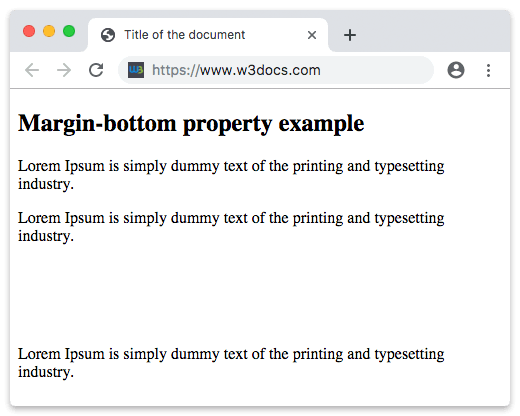
Example of the margin-bottom property defined as "4em":
Example of CSS margin-bottom Property with em value
<!DOCTYPE html>
<html>
  <head>
    <title>Title of the document</title>
    <style>
      .bottom {
        margin-bottom: 4em;
      }
    </style>
  </head>
  <body>
    <h2>Margin-bottom property example</h2>
    <p>Lorem Ipsum is simply dummy text of the printing and typesetting industry.</p>
    <p class="bottom">Lorem Ipsum is simply dummy text of the printing and typesetting industry.</p>
    <p>Lorem Ipsum is simply dummy text of the printing and typesetting industry.</p>
  </body>
</html>Example of the margin-bottom property specified in "px", "em" and "%":
example of CSS margin-bottom Property with px, em and % values
<!DOCTYPE html>
<html>
  <head>
    <title>Title of the document</title>
    <style>
      p.p1 {
        margin-bottom: 5em;
      }
      p.p2 {
        margin-bottom: 20%;
      }
      p.p3 {
        margin-bottom: 20px;
      }
    </style>
  </head>
  <body>
    <h2>Margin-bottom property example</h2>
    <p>A paragraph with no margins specified.</p>
    <p class="p1">Bottom margin is set to 5em.</p>
    <p class="p2">Bottom margin is set to 20%.</p>
    <p class="p3">Bottom margin is set to 20px.</p>
    <p>A paragraph with no margins specified.</p>
  </body>
</html>Margin collapse
A common surprise: when the margin-bottom of one block meets the margin-top of the next, the two don't add up. Instead they collapse into a single margin equal to the larger of the two. Collapsing applies only to vertical (top and bottom) margins of block-level boxes — horizontal margins never collapse.
Margin Collapse
p.one {
  margin: 20px 0;
}

p.two {
  margin: 35px 0;
}In the code above, <p class="one"> has a vertical margin of 20px and <p class="two"> has a vertical margin of 35px. You might expect the gap between them to be 20 + 35 = 55px. Because of margin collapsing, the actual gap is 35px — the larger of the two.
To prevent two margins from collapsing, separate them with something: add a border or padding to the parent, or place the elements in different formatting contexts (for example by setting display: flex or display: grid on the container, where margins never collapse).
Example of a margin collapse:
Example of the Margin Collapse
<!DOCTYPE html>
<html>
  <head>
    <title>Title of the document</title>
    <style>
      p.one {
        margin: 20px 0;
      }
      p.two {
        margin: 35px 0;
      }
    </style>
  </head>
  <body>
    <h2>Margin-bottom property example</h2>
    <p>Lorem Ipsum is simply dummy text of the printing and typesetting industry.</p>
    <p class="one">Lorem Ipsum is simply dummy text of the printing and typesetting industry.</p>
    <p class="two">Lorem Ipsum is simply dummy text of the printing and typesetting industry.</p>
    <p>Lorem Ipsum is simply dummy text of the printing and typesetting industry.</p>
  </body>
</html>Values
| Value | Description | Play it |
|---|---|---|
| auto | Sets the bottom margin. It is the default value of this property. | Play it » |
| length | Defines a bottom margin in px, pt, cm, etc. Default value is 0. | Play it » |
| % | Sets the bottom margin in % of containing element. | Play it » |
| initial | Makes the property use its default value. | Play it » |
| inherit | Inherits the property from its parents element. |
Related properties
margin-top— the vertical counterpart that sets space above an element (and collapses withmargin-bottom).margin— the shorthand that sets all four sides at once.padding-bottom— space inside the element's bottom edge, within its border.box-sizing— controls how width and height are measured; useful context when reasoning about the box model.