CSS top property
The CSS top property specifies the top position of an element in combination with the position property. Find examples and try them yourself.
The CSS top property sets the vertical position of a positioned element, measured from the top edge of a reference box. On its own it does nothing — it only takes effect when the element also has a position value other than the default static.
This page explains how top behaves for each position value, the units you can give it, common gotchas, and how it pairs with bottom, left, and right.
How top works
The reference box that top is measured against — and the meaning of the offset — depends on the element's position:
position: absoluteorfixed—topoffsets the element from the top edge of its containing block (forabsolute, the nearest positioned ancestor; forfixed, the viewport). A largertoppushes the element further down.position: relative—topshifts the element down from where it would normally sit, without affecting the layout of surrounding elements. The space it originally occupied is preserved.position: sticky—topis the distance from the top of the scroll container at which the element "sticks" while scrolling.top: 0makes it stick to the very top.position: static—topis ignored entirely. This is the default, so always setpositionfirst.
If both top and bottom are specified on an absolutely positioned element whose height is auto, the element is stretched to satisfy both; otherwise top wins and bottom is ignored.
Negative values are allowed — top: -20px pulls an absolutely or fixed-positioned element above its reference edge, and pulls a relatively positioned element above its normal spot.
| Initial Value | auto |
|---|---|
| Applies to | Positioned elements. |
| Inherited | No. |
| Animatable | Yes. |
| Version | CSS2 |
| DOM Syntax | Object.style.top = "50px"; |
Syntax
Syntax of CSS top property
top: auto | length | initial | inherit;Example of the top property:
Example of CSS top property with length value
<!DOCTYPE html>
<html>
  <head>
    <title>Title of the document</title>
    <style>
      div {
        background-color: #8ebf42;
        height: 200px;
        width: 600px;
        position: relative;
      }
      p {
        margin: 0;
        color: #eee;
        position: absolute;
        border: 2px solid #666;
      }
      .ex1 {
        top: 0;
      }
      .ex2 {
        top: 50px;
      }
    </style>
  </head>
  <body>
    <h2>Top property example</h2>
    <div>
      <p class="ex1">Some text (top: 0;)</p>
      <p class="ex2">
        Lorem ipsum is simply dummy text...(this text is positioned 50 pixels down from the top edge of the containing positioned element.)
      </p>
    </div>
  </body>
</html>Result
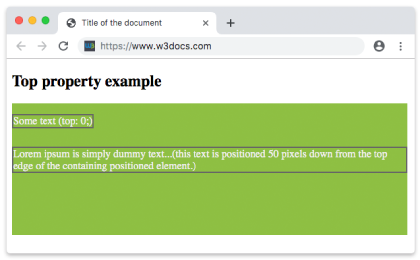
Example of the top property with a negative value:
Example of CSS top property with negative value
<!DOCTYPE html>
<html>
  <head>
    <title>Title of the document</title>
    <style>
      div {
        background-color: #666;
        height: 200px;
        position: relative;
      }
      p {
        margin: 0;
        color: #fff;
      }
      .top {
        position: absolute;
        top: -35px;
        color: #000000;
      }
    </style>
  </head>
  <body>
    <h2>Top property example</h2>
    <div>
      <p>Some text.</p>
      <p class="top">Text with the top property.</p>
    </div>
  </body>
</html>Example of the top property defined in "pt", "%" and "em":
Example of the top property with a "pt", "%" and "em" values:
<!DOCTYPE html>
<html>
  <head>
    <title>Title of the document</title>
    <style>
      div {
        background-color: #8ebf42;
        height: 200px;
        width: 600px;
        position: relative;
      }
      p {
        margin: 0;
        color: #eee;
        position: absolute;
        border: 2px solid #666;
      }
      .ex1 {
        top: 5em;
      }
      .ex2 {
        top: 10pt;
      }
      .ex3 {
        top: 75%;
      }
    </style>
  </head>
  <body>
    <h2>Top property example</h2>
    <div>
      <p class="ex1">Some text (top: 0;)</p>
      <p class="ex2">
        Lorem ipsum is simply dummy text...(this text is positioned 50 pixels down from the top edge of the containing positioned element.)
      </p>
      <p class="ex3">
        Lorem ipsum is simply dummy text...(this text is positioned 50 pixels down from the top edge of the containing positioned element.)
      </p>
    </div>
  </body>
</html>Values
| Value | Descriptions | Play it |
|---|---|---|
| auto | Sets the top edge position. It is the default value of this property. | Play it » |
| length | Sets the top edge position with px, cm etc. Negative values are valid. | Play it » |
| % | Sets the top edge position with % of containing element. Negative values are valid. | Play it » |
| initial | Makes the property use its default value. | Play it » |
| inherit | Inherits the property from its parents element. |
When you use a percentage value, it is calculated relative to the height of the containing block, not its width. So top: 50% on an absolutely positioned element moves it down by half of the parent's height.
Common pitfalls
- Forgetting
position.tophas no effect on astaticelement. If your offset seems ignored, check thatpositionis set torelative,absolute,fixed, orsticky. - Missing positioned ancestor. An
absoluteelement offsets from its nearest positioned ancestor. If none exists, it falls back to the initial containing block (the viewport-sized root). Give the parentposition: relativeto contain it. stickynot sticking.position: stickyonly works while the element scrolls within an ancestor that actually overflows. Atopvalue with no scrollable container, or a parent withoverflow: hidden, will appear to do nothing.- Using both
topandbottom. On anauto-height absolute element they stretch it; otherwisetoptakes priority andbottomis dropped.
Related properties
- position — required for
topto take effect. - bottom, left, right — the other offset properties, used together with
topto place positioned elements. - z-index — controls stacking order when positioned elements overlap.