CSS :first-child Pseudo Class
The :first-child CSS pseudo-class styles the first child of its parent. Learn the syntax, gotchas, and runnable examples.
The CSS :first-child pseudo-class matches an element that is the first child of its parent. It is most often used to style the opening item of a list, the first paragraph of a section, or to remove the top margin/border from the first element in a group.
This page covers the syntax, the one rule that trips most people up, several runnable examples, and how :first-child differs from its close relatives.
The gotcha: "first child" is not "first of that type"
A selector like p:first-child does not mean "the first <p> inside the parent." It means "a <p> that also happens to be the very first child of its parent." If a different element comes before the paragraph, the rule matches nothing.
<div>
<h2>Heading</h2>
<p>This paragraph is NOT styled — the <h2> is the first child.</p>
</div>
<div>
<p>This paragraph IS styled — it is the first child of its <div>.</p>
</div>So p:first-child reads right-to-left as: select <p>, but only when that <p> is the first child of its parent. When you want "the first paragraph regardless of what precedes it," reach for :first-of-type instead.
:first-child vs. related selectors
| Selector | Matches |
|---|---|
:first-child | An element that is the first child of its parent |
:last-child | An element that is the last child of its parent |
:first-of-type | The first element of its type among its siblings |
:only-child | An element that is the only child of its parent |
:nth-child(n) | The nth child, by any formula (2n, 3n+1, etc.) |
:first-child is equivalent to :nth-child(1). The key difference from :first-of-type is the condition: :first-child matches only if the element is the first child of its parent, whereas :first-of-type matches the first element of its specific type among its siblings — regardless of what comes before it.
Version
Syntax
CSS :first-child syntax example
:first-child {
  css declarations;
}Examples
With the <p> tag
Here the first <p> is the first child of <body>, so it is styled. The second <p> follows an <h2>, so it is not.
CSS :first-child code example
<!DOCTYPE html>
<html>
  <head>
    <title>Title of the document</title>
    <style>
      p:first-child {
        background-color: #1c87c9;
        color: #fff;
      }
    </style>
  </head>
  <body>
    <p>Lorem ipsum is simply dummy text...</p>
    <h2>First-child selector example</h2>
    <p>Lorem Ipsum is simply dummy text...</p>
  </body>
</html>With the <li> tag
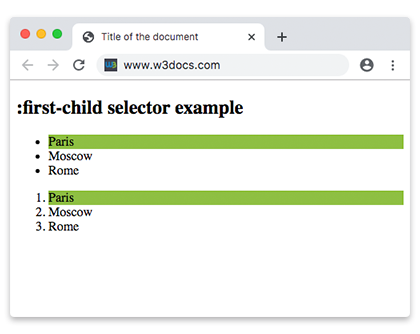
li:first-child highlights the first item in every list. Because both the <ul> and the <ol> reset the child count, the first <li> of each gets the background.
CSS :first-child another code example
<!DOCTYPE html>
<html>
  <head>
    <title>Title of the document</title>
    <style>
      li:first-child {
        background: #8ebf42;
      }
    </style>
  </head>
  <body>
    <h2>:first-child selector example</h2>
    <ul>
      <li>Paris</li>
      <li>Moscow</li>
      <li>Rome</li>
    </ul>
    <ol>
      <li>Paris</li>
      <li>Moscow</li>
      <li>Rome</li>
    </ol>
  </body>
</html>With the <ol> tag
Two <ol> elements sit side by side in <body>. Only the first one is the first child of <body>, so only it receives the background.
Example of the :first-child selector with the HTML ol tag
<!DOCTYPE html>
<html>
  <head>
    <title>Title of the document</title>
    <style>
      ol:first-child {
        background: #8ebf42;
      }
    </style>
  </head>
  <body>
    <ol>
      <li>London</li>
      <li>Paris</li>
      <li>Rome</li>
    </ol>
    <ol>
      <li>London</li>
      <li>Paris</li>
      <li>Rome</li>
    </ol>
  </body>
</html>With the <em> tag
p em:first-child targets an <em> only when it is the first child of a <p>. In each paragraph below the first <em> follows the words "Here is a", so it is not the first child — the rule matches nothing. This is a deliberate illustration of the gotcha above.
Example of the :first-child selector with the HTML em tag
<!DOCTYPE html>
<html>
  <head>
    <title>Title of the document</title>
    <style>
      p em:first-child {
        background: #82b534;
      }
    </style>
  </head>
  <body>
    <h2>:first-child selector example</h2>
    <article>
      <p>Here is a <em>some</em> text. This is a <em>example</em>.</p>
      <p>Here is a <em>some</em> text. This is a <em>example</em>.</p>
      <p>Here is a <em>some</em> text. This is a <em>example</em>.</p>
    </article>
  </body>
</html>With the <ul> tag
:first-child works at every nesting level. The first item of the outer list and the first item of the nested list both match ul li:first-child.
Example of the :first-child selector with the HTML ul tag
<!DOCTYPE html>
<html>
  <head>
    <title>Title of the document</title>
    <style>
      ul li {
        color: blue;
      }
      ul li:first-child {
        color: #8ebf42;
        font-weight: bold;
      }
    </style>
  </head>
  <body>
    <h2>:first-child selector example</h2>
    <ul>
      <li>List Item 1</li>
      <li>List Item 2</li>
      <li>
        List Item 3
        <ul>
          <li>List Item 3.1</li>
          <li>List Item 3.2</li>
          <li>List Item 3.3</li>
        </ul>
      </li>
    </ul>
  </body>
</html>Browser support
:first-child is supported in every modern browser and works in Internet Explorer 9 and later. It is part of CSS Level 2 and remained unchanged through Selectors Level 3 and Level 4, so you can use it without any vendor prefixes.
Related selectors
:last-child— style the last element in a group:first-of-type— the first element of a given type, regardless of what precedes it:only-child— match an element that has no siblings:nth-child()— match by position with a formula (:first-childequals:nth-child(1))