CSS line-break Property
Use the line-break CSS property to specify at which line the text should be cut. Definition of the property, values and examples.
The CSS line-break property controls how lines are broken in Chinese, Japanese, and Korean (CJK) text when the break falls near punctuation or symbols. CJK scripts wrap differently from Latin text: there are no spaces between words, so a line can break almost anywhere between characters. The catch is which characters are allowed to start or end a line. Certain punctuation marks — such as the small kana (ぁ, ゃ), iteration marks, or closing brackets — should not be stranded at the beginning of a line, and line-break decides how strictly the browser enforces those conventions.
This property only affects CJK text. It has no visible effect on Latin, Cyrillic, or other space-separated scripts; for those you usually want word-break, overflow-wrap, or hyphens instead.
When to use it
Reach for line-break when you are typesetting CJK content and need precise control over where lines wrap:
strict— for formal or print-like layouts where you want the tightest, most conservative wrapping rules.normal/loose— for narrow columns (mobile screens, sidebars) where breaking on more characters prevents awkward overflow.auto— let the browser pick a sensible default. This is what you get if you never set the property.
If your text is not CJK, this property does nothing useful — see the related properties above.
| Initial Value | auto |
|---|---|
| Applies to | All elements, but only on block containers. |
| Inherited | Yes. |
| Animatable | No. |
| Version | CSS3 |
| DOM Syntax | object.style.lineBreak = "loose"; |
Syntax
Syntax of CSS line-break Property
line-break: auto | loose | normal | strict | anywhere | initial | inherit;The anywhere value is newer and tells the browser a break is allowed between any two typographic characters, including before and after punctuation — useful inside very narrow, fixed-width containers. Browser support for anywhere is more limited than the other keywords, so test before relying on it.
Examples
The strict value
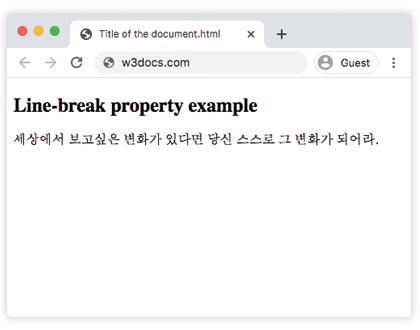
With strict, the browser applies the most restrictive set of CJK line-break rules, keeping punctuation tied to its neighbouring characters.
<!DOCTYPE html>
<html>
  <head>
    <style>
      .korean {
        line-break: strict;
      }
    </style>
  </head>
  <body>
    <h2>Line-break property example</h2>
    <!--Be the change you want to see in the world.-->
    <span class="korean">세상에서 보고싶은 변화가 있다면 당신 스스로 그 변화가 되어라.</span>
  </body>
</html>Result
The normal value
With normal, the browser uses the least restrictive default rules, so the same text can wrap at more points. This is handy when a column is narrow and strict would force overflow.
<!DOCTYPE html>
<html>
  <head>
    <title>Title of the document</title>
    <style>
      p {
        font-size: 16px;
        line-height: 24px;
        line-break: normal;
      }
    </style>
  </head>
  <body>
    <h2>Line-break property example</h2>
    <p>日本語のテキスト例です。行の折り返し位置を確認します。日本語のテキスト例です。行の折り返し位置を確認します。日本語のテキスト例です。行の折り返し位置を確認します。</p>
  </body>
</html>Values
| Value | Description |
|---|---|
| auto | Breaks the text using the browser's default line-break rule. This is the initial value of the property. |
| loose | Uses the loosest line-break rules. Commonly used for short lines, such as in newspaper-style columns. |
| normal | Uses the most common line-break rules. |
| strict | Uses the strictest line-break rules, keeping punctuation tied to neighbouring characters. |
| anywhere | A break is allowed between any two typographic characters. Limited browser support. |
| initial | Sets the property to its default value. |
| inherit | Inherits the property value from the parent element. |
Browser support
The auto, loose, normal, and strict keywords are supported across all modern browsers. The anywhere keyword is newer and not yet supported everywhere, so provide a fallback (for example overflow-wrap: break-word) when you use it.
Related properties
word-break— controls whether words can be broken mid-word, including for CJK and non-CJK text.overflow-wrap— lets long unbreakable strings wrap to prevent overflow.hyphens— adds hyphenation for languages that use it.white-space— controls how whitespace and wrapping are handled overall.