CSS border-top-right-radius Property
The CSS border-top-right-radius property rounds the top-right corner of an element. Learn its syntax, one-value vs two-value usage, and percentages.
The CSS border-top-right-radius property rounds the top-right corner of an element's border box. It is one of the four longhand properties that the border-radius shorthand expands into — the others being border-top-left-radius, border-bottom-right-radius, and border-bottom-left-radius. Use this longhand when you want to round a single corner without affecting the other three.
This property is one of the CSS3 properties.
The shape of the rounding depends on the values you give it:
- Square corner — when the radius is
0(the default), the corner stays sharp. - Circular corner — when you give a single value (or two equal values), the corner is a quarter-circle of that radius.
- Elliptical corner — when you give two different values, the corner is a quarter of an ellipse.
If the element has a background image or background color, it is clipped at the rounded border. How far it is clipped is controlled by the background-clip property.
The property accepts length, percentage, initial, and inherit values, and specifies the horizontal and vertical radii of the rounded upper-right corner. When one value is given, it sets both the horizontal and vertical radii (a circular corner). With two values, the first sets the horizontal radius and the second sets the vertical radius (an elliptical corner). Percentages for the horizontal radius are relative to the box's width, and percentages for the vertical radius are relative to its height. Negative values are not allowed.
| Initial Value | 0 |
|---|---|
| Applies to | All elements. It also applies to ::first-letter. |
| Inherited | No. |
| Animatable | Yes. Top right border is animatable. |
| Version | CSS3 |
| DOM Syntax | object.style.borderTopRightRadius = "25px"; |
Syntax
Syntax of CSS border-top-right-radius Property
border-top-right-radius: length | % | initial | inherit;Let’s try an example where only one value is used. It defines both the horizontal and vertical radii of the ellipse.
Example of the border-top-right-radius property:
Example of CSS border-top-right-radius Property with only one value
<!DOCTYPE html>
<html>
  <head>
    <title>Title of the document</title>
    <style>
      div {
        height: 40px;
        background: #666;
        border: 4px solid #000000;
        border-top-right-radius: 35px;
      }
    </style>
  </head>
  <body>
    <h2>Border-top-right-radius example.</h2>
    <div></div>
  </body>
</html>Result
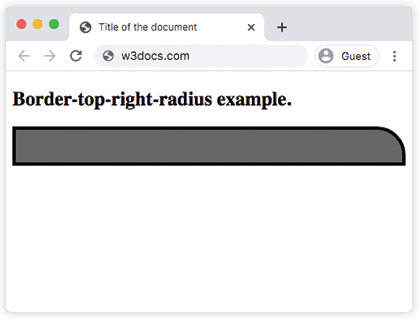
When two values are provided, the first defines the horizontal radius and the second defines the vertical radius, producing an elliptical corner.
Example of the border-top-right-radius property with two values:
Example of CSS border-top-right-radius Property with two values
<!DOCTYPE html>
<html>
  <head>
    <title>Title of the document</title>
    <style>
      div {
        height: 40px;
        background: #666;
        border: 4px solid #000000;
        border-top-right-radius: 35px 10px;
      }
    </style>
  </head>
  <body>
    <h2>Border-top-right-radius example.</h2>
    <div></div>
  </body>
</html>Example of the border-top-right-radius property in percentages:
Example of CSS border-top-right-radius Property with % (percentages) value
<!DOCTYPE html>
<html>
  <head>
    <title>Title of the document</title>
    <style>
      div {
        height: 40px;
        background: #1c87c9;
        border: 4px solid #000000;
        border-top-right-radius: 60% 30%;
      }
    </style>
  </head>
  <body>
    <h2>Border-top-right-radius example.</h2>
    <div></div>
  </body>
</html>When to use it
Reach for border-top-right-radius (rather than the border-radius shorthand) when only the top-right corner should be rounded — for example, the leading corner of a tab, a chat bubble, or a card whose other corners must stay square. To round every corner at once, the border-radius shorthand is shorter:
/* Round only the top-right corner */
border-top-right-radius: 12px;

/* Round all four corners at once */
border-radius: 12px;Values
The table below lists the accepted values.
| Value | Description | Play it |
|---|---|---|
| length | Defines the round shape of the top-right corner. | Play it » |
| % | Defines the round shape of the top-right corner in %. | Play it » |
| initial | Sets the property to its default value. | Play it » |
| inherit | Inherits the property from its parent element. |