CSS height Property
The CSS height property sets the height of the element. Try examples with each of this property’s value.
The CSS height property sets the height of an element's content box — the area where text and child elements live. By default (height: auto) the browser sizes a block element tall enough to fit its content, so you only set height when you need a fixed or relative size instead.
By default the value you give applies to the content box only — it does not include padding, borders, or margins. A <div> with height: 100px; padding: 20px is therefore 140px tall on screen. To make height include padding and border, set box-sizing: border-box — a near-universal best practice. The companion property is width, which works the same way for the horizontal axis.
You can express the height as a length (px, em, rem, vh, cm, …) or as a percentage. The default value is auto.
If the min-height and max-height properties are also set, they clamp height: the element never shrinks below min-height or grows past max-height.
When height is a numeric value and the content is taller than that height, the content overflows its box. The overflow property controls what happens then — clip it, hide it, or add a scrollbar.
Negative values are not accepted.
The percentage gotcha. A percentage height is resolved against the height of the parent element — and only if that parent has an explicit height itself. If the parent's height is auto (the default), a child's height: 50% has no fixed reference and is treated as auto, so it appears to do nothing. To make percentage heights cascade down to the page, give the ancestors an explicit height — commonly html, body { height: 100%; } — or use the viewport unit vh (height: 50vh is always half the viewport, regardless of the parent).
| Initial Value | auto |
|---|---|
| Applies to | all elements |
| Inherited | No. |
| Animatable | Yes. Height is animatable. |
| Version | CSS1 |
| DOM Syntax | object.style.height = "400px"; |
Syntax
Syntax of CSS height Property
height: auto | length | initial | inherit;Example of the height property:
Example of CSS height Property with length value
<!DOCTYPE html>
<html>
  <head>
    <title>The title of the document</title>
    <style>
      div {
        height: 60px;
        background-color: #1c87c9;
        color: #eee;
      }
      p {
        height: 30px;
        background-color: #8ebf42;
        color: #eee;
      }
    </style>
  </head>
  <body>
    <h2>Height property example</h2>
    <div>The height of this div element is set to "60px".</div>
    <p>The height of this paragraph is set to "30px".</p>
  </body>
</html>Result
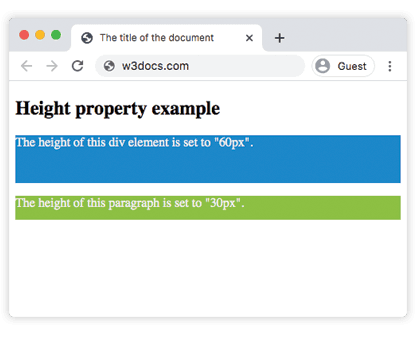
Example of the height property with the HTML <image> tag:
Example of CSS height Property with auto and length values
<!DOCTYPE html>
<html>
  <head>
    <title>The title of the document</title>
    <style>
      body {
        background-color: #ccc;
      }
      .height-normal {
        height: auto;
      }
      .height-big {
        height: 100px;
      }
    </style>
  </head>
  <body>
    <h2>Height property example</h2>
    <p>Here the height is set to "auto"</p>
    <img class="height-normal" src="https://api.w3docs.com/uploads/media/default/0001/01/003e5c463668d174ab70bea245c192d81901a4a6.png" />
    <br />
    <hr />
    <p>The height for this image is defined as "100px".</p>
    <img class="height-big" src="https://api.w3docs.com/uploads/media/default/0001/01/003e5c463668d174ab70bea245c192d81901a4a6.png" />
  </body>
</html>Example of the height property with the "length" value:
Example of CSS height Property when using vh value
<!DOCTYPE html>
<html>
  <head>
    <title>The title of the document</title>
    <style>
      .container {
        height: 50vh;
        border: 2px solid #1c87c9;
        padding: 5px;
      }
    </style>
  </head>
  <body>
    <h2>Height property example</h2>
    <div class="container">
      <p>Here the height is specified as "50vh".</p>
    </div>
  </body>
</html>Example of the height property with all the values:
Example of CSS height Property with auto, vh, % and px values
<!DOCTYPE html>
<html>
  <head>
    <title>The title of the document</title>
    <style>
      .red-container {
        height: 30vh;
        border: 2px solid #f45e30;
        color: #f45e30;
      }
      .blue-container {
        height: 40%;
        width: 30%;
        border: 2px solid #1c87c9;
        color: #1c87c9;
        margin-top: 20px;
      }
      .orange-container {
        height: 100px;
        border: 2px solid #f9fc35;
        color: #f9fc35;
        margin-top: 20px;
      }
      .green-container {
        height: auto;
        border: 2px solid #8ebf42;
        color: #8ebf42;
        margin-top: 20px;
      }
    </style>
  </head>
  <body>
    <h2>Height property example</h2>
    <div class="red-container">
      Height 30vh
      <div class="blue-container">
        Height 40%
      </div>
    </div>
    <div class="orange-container">
      Height 100px;
    </div>
    <div class="green-container">
      Height (auto)
    </div>
  </body>
</html>Intrinsic sizing keywords
Beyond fixed lengths and percentages, modern CSS adds keywords that size an element to its content instead of to a number:
.box {
  height: max-content;   /* tall enough for the content, never wrapping it shorter */
}
.box {
  height: min-content;   /* the smallest height the content can take */
}
.box {
  height: fit-content;   /* like auto, but clamps to fit-content(<length>) when given */
}These are most useful in flex and grid layouts, where you want a track or item to hug its content rather than stretch. They are widely supported in current browsers.
Values
| Value | Description | Play it |
|---|---|---|
| auto | When we use this value, the browser calculates the original height of the image or box. This is the default value of this property. | Play it » |
| length | Defines the height with px, cm, em, rem, vh, etc. | Play it » |
| % | Defines the height with percent. | |
| initial | Makes the property use its default value. | Play it » |
| inherit | Inherits the property from its parent element. |