CSS box-decoration-break Property
The box-decoration-break is a CSS property which allows to decorate fragmented box. Learn more about this property and see examples.
The box-decoration-break CSS property specifies how the background, padding, border, border-image, box-shadow, margin, and clip-path of an element are applied when the box is fragmented — that is, split across more than one line, column, or page.
This page explains what fragmentation means, how the two values (slice and clone) differ, when you would reach for the property, and how to use it with worked examples.
What is a fragmented box?
A box is fragmented when it cannot be drawn as one continuous rectangle. The most common case is an inline element such as a <span> whose text wraps onto several lines, but fragmentation also happens at column breaks (inside a multi-column layout) and at page breaks when printing.
By default, browsers treat the whole element as a single box and only slice it at the line edges. This means decorations such as the border or border-radius are drawn once for the entire element and then cut — so the rounded corners and the right/left border only appear at the very start and very end of the run, not on each line. box-decoration-break lets you change that.
The box-decoration-break property has two main values:
slice(the default) applies decorations to the entire element as if it were not fragmented, then slices the box at the edges of each fragment. Corners, borders, and backgrounds are "cut" where the line wraps.cloneapplies each decoration to every fragment independently. Borders wrap all four edges of each fragment, the border-radius is repeated on every fragment, and the background is fully redrawn for each one.
A quick way to remember it: slice = one box, cut into pieces; clone = each piece is its own complete box.
When to use it
Reach for box-decoration-break: clone when you want a decorated inline element to look consistent on every line — common scenarios include:
- Highlighted / "marker pen" text where each wrapped line should keep its rounded corners and padding.
- Pill or badge styles applied to inline links or tags that may wrap.
- Multi-column or printed layouts where a bordered element crosses a column or page break and you want a complete border on each fragment instead of an open-ended one.
| Initial Value | slice |
|---|---|
| Applies to | All elements (and, conceptually, to each box fragment). |
| Inherited | No. |
| Version | CSS3 |
| DOM Syntax | object.style.boxDecorationBreak = "clone"; |
Syntax
Syntax of CSS box-decoration-break Property
box-decoration-break: slice | clone | initial | inherit | unset;Here is an example with the clone value, where decorations apply to each fragment as if the fragments were individual elements.
Example of CSS box-decoration-break Property with clone value
<!DOCTYPE html>
<html>
  <head>
    <title>Title of the document</title>
    <style>
      span {
        border: 3px solid #1c87c9;
        padding: 0em 1em;
        border-radius: 12px;
        font-size: 20px;
        line-height: 2;
      }
      span.box {
        box-decoration-break: clone;
        -webkit-box-decoration-break: clone;
      }
    </style>
  </head>
  <body>
    <h2>Box-decoration-break example</h2>
    <p>Here the box-decoration-break is set to "clone".</p>
    <span class="box">Box<br />decoration<br />break<br />property<br />example.</span>
  </body>
</html>Result
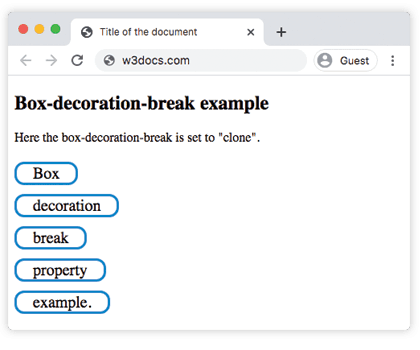
Modern browsers support this property natively without prefixes, but the -webkit- prefix is included in the examples for legacy compatibility.
Let’s see another example where the slice value is applied to the box. Here the box is sliced into pieces.
Example of CSS box-decoration-break Property with slice value
<!DOCTYPE html>
<html>
  <head>
    <title>Title of the document</title>
    <style>
      span {
        border: 3px solid #8ebf42;
        padding: 0em 1em;
        border-radius: 12px;
        font-size: 20px;
        line-height: 2;
        background-color: #ccc;
      }
      span.box {
        -webkit-box-decoration-break: slice;
        box-decoration-break: slice;
      }
    </style>
  </head>
  <body>
    <h2>Box-decoration-break example</h2>
    <p>
      Here the box-decoration-break is set to "slice" which is the default value of this property.
    </p>
    <span class="box">Box<br />decoration<br />break<br />property<br />example.</span>
  </body>
</html>Result
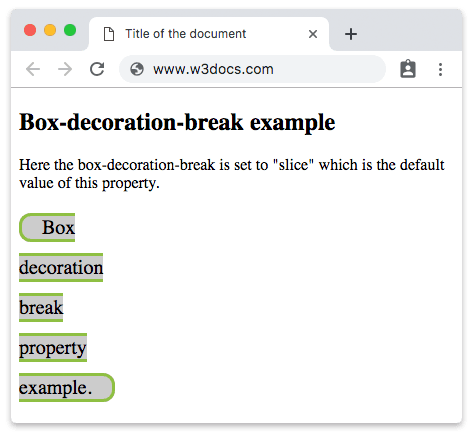
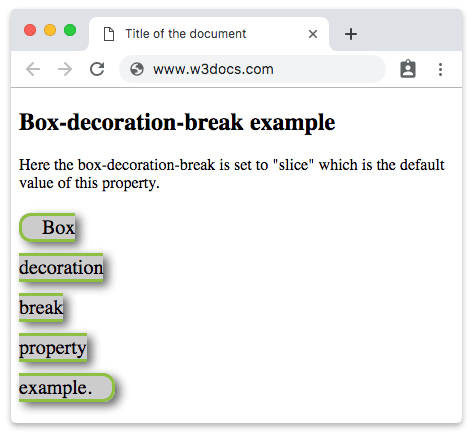
Now let’s see how a box shadow is applied to the sliced box.
Example of CSS box-decoration-break Property with slice value and shadow
<!DOCTYPE html>
<html>
  <head>
    <title>Title of the document</title>
    <style>
      span {
        border: 3px solid #8ebf42;
        padding: 0em 1em;
        border-radius: 12px;
        font-size: 20px;
        line-height: 2;
        background-color: #cccccc;
        box-shadow: 5px 4px 10px #666666;
        box-decoration-break: slice;
        -webkit-box-decoration-break: slice;
      }
    </style>
  </head>
  <body>
    <h2>Box-decoration-break example</h2>
    <p>
      Here the box-decoration-break is set to "slice" which is the default value of this property.
    </p>
    <span>Box<br />decoration<br />break<br />property<br />example.</span>
  </body>
</html>Result
Values
| Value | Description |
|---|---|
| slice | Box decorations are set to the whole element and break at the edges of the element fragments. |
| clone | Box decorations are set to each fragment individually. |
| initial | Sets the property to its default value. |
| inherit | Inherits the property from its parent element. |
| unset | Acts as inherit if the property is inherited, otherwise as initial. |
Browser support and prefixes
box-decoration-break is supported in all modern browsers. Firefox supports the unprefixed property; Chrome, Edge, Safari, and other WebKit/Blink browsers historically required the -webkit-box-decoration-break prefix, so it is good practice to declare both:
-webkit-box-decoration-break: clone;
box-decoration-break: clone;Always place the prefixed property before the standard one so the unprefixed declaration wins where it is supported.
Related properties
- box-shadow — adds shadows that this property can clone per fragment.
- border-radius — rounded corners that
clonerepeats on every line. - CSS columns — multi-column layouts where fragmentation occurs.
- padding and margin — the spacing affected by fragmentation.