CSS padding-right Property
How to use CSS padding-right property to define the padding space on the right of an element. See property values and examples.
The padding-right CSS property sets the width of the padding area on the right side of an element. Padding is the transparent space between an element's content and its border, so increasing padding-right pushes the right border further away from the content (the content itself stays in place; the element grows wider unless box-sizing is set to border-box).
This page covers the accepted values (lengths, percentages, and the CSS-wide keywords), how percentage padding is calculated, and runnable examples for each case. To set the right padding alone use padding-right; to set all four sides at once use the padding shorthand.
Negative values are not valid.
This property doesn't have any effect on inline elements, like <span>.
| Initial Value | 0 |
|---|---|
| Applies to | All elements. An exception is made when the display property is set to table-row-group, table-header-group, table-footer-group, table-row, table-column-group and table-column. It also applies to ::first-letter. |
| Inherited | No. |
| Animatable | Yes. Padding space is animatable. |
| Version | CSS1 |
| DOM Syntax | object.style.paddingRight = "40px"; |
With the help of the padding property you can set paddings on all the sides of an element with a single announcement.
Syntax
Syntax of CSS padding-right Property
padding-right: length | initial | inherit;Example of the padding-right property:
Example of CSS padding-right Property with px value
<!DOCTYPE html>
<html>
  <head>
    <title>Title of the document</title>
    <style>
      p {
        border: 2px solid #000;
        color: #8ebf42;
        padding-right: 100px;
      }
    </style>
  </head>
  <body>
    <h2>Padding-right property example</h2>
    <p>Lorem Ipsum is simply dummy text of the printing and typesetting industry. Lorem Ipsum has been the industry's standard dummy text ever since the 1500s...</p>
  </body>
</html>Result
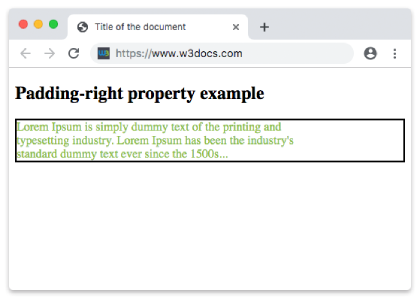
Example of the padding-right property with the "length" value:
Example of CSS padding-right Property with pt value
<!DOCTYPE html>
<html>
  <head>
    <title>Title of the document</title>
    <style>
      p {
        border: 2px solid #000;
        color: #8ebf42;
        padding-right: 100pt;
      }
    </style>
  </head>
  <body>
    <h2>Padding-right property example</h2>
    <p>Lorem Ipsum is simply dummy text of the printing and typesetting industry. Lorem Ipsum has been the industry's standard dummy text ever since the 1500s</p>
  </body>
</html>Example of the padding-right property specified in percentage:
Example of CSS padding-right property with % value:
A percentage value is resolved against the width of the element's containing block, not its height. This means right padding scales as the layout gets wider or narrower, which is useful for fluid, responsive spacing.
<!DOCTYPE html>
<html>
  <head>
    <title>Title of the document</title>
    <style>
      p {
        border: 3px solid #cccccc;
        color: deepskyblue;
        padding: 15px;
        padding-right: 10%;
      }
    </style>
  </head>
  <body>
    <h2>Padding-right property example</h2>
    <p>
      Lorem Ipsum is simply dummy text of the printing and typesetting industry. Lorem Ipsum is simply dummy text of the printing and typesetting industry. Lorem Ipsum is simply dummy text of the printing and typesetting industry.
    </p>
  </body>
</html>Values
| Value | Description | Play it |
|---|---|---|
| length | It sets the right padding in px, pt, cm, etc. Its default value is 0px. | Play it » |
| % | It sets right padding in percent of the width of the containing element. | Play it » |
| initial | Makes the property use its default value. | Play it » |
| inherit | Inherits the property from its parents element. |
When to use padding-right
Reach for padding-right when you need space only on the right edge of a box — for example, to keep text clear of a trailing icon, to leave room for a scrollbar, or to balance asymmetric spacing in a card. If you need equal spacing on every side, prefer the padding shorthand; if you need the gap outside the border instead of inside it, use margin-right.
A few things worth remembering:
- Padding is part of the clickable / background area. The element's background color and background image extend through the padding, unlike margin.
- Negative values are invalid. To pull content the other way, use a negative
margininstead. - It widens the box by default. With the standard
content-boxmodel,padding-rightadds to the element's total width. Setbox-sizing: border-boxto keep the declared width fixed and absorb the padding inward.
Related properties
padding-left— padding on the opposite sidepadding-topandpadding-bottompadding— shorthand for all four sidesmargin-right— space outside the border