CSS overflow Property
The overflow CSS property is used to define how the content should behave in the box. See property values and examples.
The CSS overflow property controls what happens when an element's content is too big to fit inside its box. You decide whether the extra content is simply clipped, shown anyway, or made scrollable.
Overflow only becomes visible when the box has a constrained size. The most common way to constrain it is to set a fixed height (and optionally a width), but a box can also be constrained by a flex or grid layout. If the box can grow freely to fit its content, there is nothing to overflow and the property has no visible effect.
overflow is a shorthand that sets two longhand properties at once:
- overflow-x — controls clipping on the left/right (horizontal) axis.
- overflow-y — controls clipping on the top/bottom (vertical) axis.
When you give overflow one value, both axes get it. With two values, the first applies to overflow-x and the second to overflow-y (for example overflow: hidden scroll;).
Values at a glance
The overflow property accepts these keywords:
visible— the default. Content is not clipped; it spills outside the box and overlaps whatever is next to it.hidden— content that doesn't fit is clipped and becomes invisible. No scrollbar is offered, so the hidden part is unreachable by the user.scroll— content is clipped, and scrollbars are always shown (even when everything fits), which keeps the layout from shifting.auto— content is clipped and scrollbars appear only when needed. This is the usual choice for scrollable panels.overlay— likeauto, but the scrollbars are drawn on top of the content instead of taking up space.
The overlay value is deprecated and should not be used. Use auto instead — modern browsers can draw overlay-style scrollbars based on the user's OS settings.
Choosing a value
- Use
autofor a scrollable region (chat panels, code blocks, modals) — scrollbars show up only if the content actually overflows. - Use
hiddento crop content deliberately, to clip a rounded-corner image, or to contain floats (see below). Remember the clipped content is gone for the user, so don't hide anything they need to reach. - Use
scrollwhen you want a reserved scrollbar gutter so the layout doesn't jump as content changes. - Leave it as
visiblewhen overflow is fine, such as a tooltip or dropdown that intentionally extends past its parent.
Two useful side effects
Containing floats. Setting overflow to anything other than visible makes the element grow tall enough to wrap its floated children. So a parent with overflow: hidden (or auto) and no declared height will stretch to include floated content inside it. Note this does not clear the float — it just contains it. (The modern alternative is display: flow-root, which does the same thing without the clipping side effects.)
Creating a block formatting context (BFC). A non-visible overflow value starts a new block formatting context. This is handy when you want a block element to sit neatly beside a floated element instead of flowing underneath it.
| Initial Value | visible |
|---|---|
| Applies to | Block containers, flex containers and grid containers. |
| Inherited | No. |
| Animatable | No. |
| Version | CSS2 |
| DOM Syntax | Object.style.overflow = "auto"; |
Syntax
CSS overflow syntax
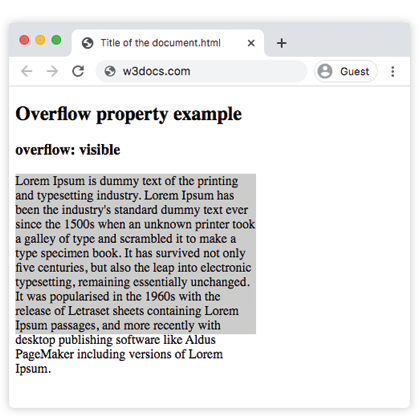
overflow: visible | hidden | scroll | auto | overlay | initial | inherit;Example of the overflow property with the "visible" value
With visible, the paragraph text runs past the bottom of its 200px box instead of being cut off — the default behavior.
CSS overflow code example
<!DOCTYPE html>
<html>
  <head>
    <style>
      p {
        background-color: #ccc;
        width: 300px;
        height: 200px;
        overflow: visible;
      }
    </style>
  </head>
  <body>
    <h2>Overflow property example</h2>
    <h3>overflow: visible</h3>
    <p>Lorem Ipsum is dummy text of the printing and typesetting industry. Lorem Ipsum has been the industry's standard dummy text ever since the 1500s when an unknown printer took a galley of type and scrambled it to make a type specimen book. It has survived not only five centuries, but also the leap into electronic typesetting, remaining essentially unchanged. It was popularised in the 1960s with the release of Letraset sheets containing Lorem Ipsum passages, and more recently with desktop publishing software like Aldus PageMaker including versions of Lorem Ipsum.</p>
  </body>
</html>Result
Example of the overflow property with the "scroll" value
With scroll, both scrollbars appear whether or not they are needed, and the overflowing text becomes reachable by scrolling.
CSS overflow scroll example
<!DOCTYPE html>
<html>
  <head>
    <style>
      p {
        background-color: #ccc;
        width: 300px;
        height: 200px;
        overflow: scroll;
      }
    </style>
  </head>
  <body>
    <h2>Overflow property example</h2>
    <h3>overflow: scroll</h3>
    <p>Lorem Ipsum is simply dummy text of the printing and typesetting industry. Lorem Ipsum has been the industry's standard dummy text ever since the 1500s when an unknown printer took a galley of type and scrambled it to make a type specimen book. It has survived not only five centuries, but also the leap into electronic typesetting, remaining essentially unchanged. It was popularised in the 1960s with the release of Letraset sheets containing Lorem Ipsum passages, and more recently with desktop publishing software like Aldus PageMaker including versions of Lorem Ipsum.</p>
  </body>
</html>Example of the overflow property with the "hidden" value
With hidden, the text that doesn't fit is clipped and there is no scrollbar, so the cut-off part can't be reached.
CSS overflow hidden example
<!DOCTYPE html>
<html>
  <head>
    <style>
      p {
        background-color: #ccc;
        width: 300px;
        height: 200px;
        overflow: hidden;
      }
    </style>
  </head>
  <body>
    <h2>Overflow property example</h2>
    <h3>overflow: hidden</h3>
    <p>Lorem Ipsum is dummy text of the printing and typesetting industry. Lorem Ipsum has been the industry's standard dummy text ever since the 1500s when an unknown printer took a galley of type and scrambled it to make a type specimen book. It has survived not only five centuries, but also the leap into electronic typesetting, remaining essentially unchanged. It was popularised in the 1960s with the release of Letraset sheets containing Lorem Ipsum passages, and more recently with desktop publishing software like Aldus PageMaker including versions of Lorem Ipsum.</p>
  </body>
</html>Example of the overflow property with the "auto" value
auto is the most practical value: a scrollbar shows up only on the axis that actually overflows. This example also shows how overflow-x and overflow-y can be set independently.
CSS overflow auto
<!DOCTYPE html>
<html>
  <head>
    <title>Title of the document</title>
    <style>
      .scroll {
        width: 200px;
        height: 300px;
        border: 1px solid;
        overflow: auto;
        margin-bottom: 10px;
      }
      .scroll-x {
        width: 200px;
        height: 300px;
        border: 1px solid;
        overflow-x: auto;
        overflow-y: hidden;
        margin-bottom: 10px;
      }
      .scroll-y {
        width: 200px;
        height: 300px;
        border: 1px solid;
        overflow-y: auto;
        margin-bottom: 10px;
      }
      .scroll>div {
        width: 400px;
        height: 50px;
        background: #ccc;
      }
      .scroll-y>div {
        width: 200px;
        height: 50px;
        background: #ccc;
      }
      .scroll-x>div {
        width: 400px;
        height: 50px;
        background: #ccc;
        overflow: hidden;
      }
    </style>
  </head>
  <body>
    <h1>Example with Overflow Property</h1>
    <h2>overflow overflow scroll auto</h2>
    <div class="scroll">
      <h2>Overflow Property </h2>
      <div>
        <h2>overflow scroll property</h2>
      </div>
      <p>
        Lorem Ipsum is dummy text of the printing and typesetting industry. Lorem Ipsum has been the industry's standard dummy text ever since the 1500s when an unknown printer took a galley of type and scrambled it to make a type specimen book. It has survived not only five centuries, but also the leap into electronic typesetting, remaining essentially unchanged. It was popularised in the 1960s with the release of Letraset sheets containing Lorem Ipsum passages, and more recently with desktop publishing software like Aldus PageMaker including versions of Lorem Ipsum.
      </p>
    </div>
    <h2>overflow overflow-x auto</h2>
    <div class="scroll-x">
      <h2>Overflow Property </h2>
      <div>
        <h2>overflow scroll-x property</h2>
      </div>
      <p>
        Lorem Ipsum is dummy text of the printing and typesetting industry. Lorem Ipsum has been the industry's standard dummy text ever since the 1500s when an unknown printer.
      </p>
    </div>
    <h2>overflow overflow-y auto</h2>
    <div class="scroll-y">
      <h2>Overflow Property </h2>
      <div>
        <h2>overflow scroll-y property</h2>
      </div>
      <p>
        Lorem Ipsum is dummy text of the printing and typesetting industry. Lorem Ipsum has been the industry's standard dummy text ever since the 1500s when an unknown printer took a galley of type and scrambled it to make a type specimen book. software like Aldus PageMaker including versions of Lorem Ipsum.but also the leap into electronic typesetting, remaining essentially unchanged. It was popularised in the 1960s with the release of Letraset sheets containing Lorem Ipsum passages, and more recently with desktop publishing software like Aldus PageMaker including versions of Lorem Ipsum.
      </p>
    </div>
  </body>
</html>Example of the overflow property with all the values
This example places the same text in five boxes so you can compare every value side by side.
CSS overflow all values example
<!DOCTYPE html>
<html>
  <head>
    <title>Title of the document</title>
    <style>
      div.scroll {
        background-color: #eee;
        width: 300px;
        height: 200px;
        overflow: scroll;
      }
      div.hidden {
        background-color: #eee;
        width: 300px;
        height: 200px;
        overflow: hidden;
      }
      div.auto {
        background-color: #eee;
        width: 300px;
        height: 200px;
        overflow: auto;
      }
      div.visible {
        background-color: #eee;
        width: 300px;
        height: 200px;
        overflow: visible;
      }
      div.overlay {
        background-color: #eee;
        width: 300px;
        height: 200px;
        overflow: overlay;
      }
    </style>
  </head>
  <body>
    <h2>Overflow property example</h2>
    <h3>overflow: scroll</h3>
    <div class="scroll">
      Lorem Ipsum is dummy text of the printing and typesetting industry. Lorem Ipsum has been the industry's standard dummy text ever since the 1 500s when an unknown printer took a galley of type and scrambled it to make a type specimen book. It has survived not only five centuries, but also the leap into electronic typesetting, remaining essentially unchanged. It was popularised in the 1960s with the release of Letraset sheets containing Lorem Ipsum passages, and more recently with desktop publishing software like Aldus PageMaker including versions of Lorem Ipsum.
    </div>
    <h3>overflow: hidden</h3>
    <div class="hidden">
      Lorem Ipsum is the dummying text of the printing and typesetting industry. Lorem Ipsum has been the industry's standard dummy text ever since the 1500s when an unknown printer took a galley of type and scrambled it to make a type specimen book. It has survived not only five centuries, but also the leap into electronic typesetting, remaining essentially unchanged. It was popularised in the 1960s with the release of Letraset sheets containing Lorem Ipsum passages, and more recently with desktop publishing software like Aldus PageMaker including versions of Lorem Ipsum.
    </div>
    <h3>overflow: auto</h3>
    <div class="auto">
      Lorem Ipsum is the dummying text of the printing and typesetting industry. Lorem Ipsum has been the industry's standard dummy text ever since the 1500s when an unknown printer took a galley of type and scrambled it to make a type specimen book. It has survived not only five centuries, but also the leap into electronic typesetting, remaining essentially unchanged. It was popularised in the 1960s with the release of Letraset sheets containing Lorem Ipsum passages, and more recently with desktop publishing software like Aldus PageMaker including versions of Lorem Ipsum.
    </div>
    <h3>overflow: visible</h3>
    <div class="visible">
      Lorem Ipsum is the dummying text of the printing and typesetting industry. Lorem Ipsum has been the industry's standard dummy text ever since the 1500s when an unknown printer took a galley of type and scrambled it to make a type specimen book. It has survived not only five centuries, but also the leap into electronic typesetting, remaining essentially unchanged. It was popularised in the 1960s with the release of Letraset sheets containing Lorem Ipsum passages, and more recently with desktop publishing software like Aldus PageMaker including versions of Lorem Ipsum.
    </div>
    <br />
    <br />
    <h3>overflow: overlay</h3>
    <div class="overlay">
      Lorem Ipsum is the dummying text of the printing and typesetting industry. Lorem Ipsum has been the industry's standard dummy text ever since the 1500s when an unknown printer took a galley of type and scrambled it to make a type specimen book. It has survived not only five centuries, but also the leap into electronic typesetting, remaining essentially unchanged. It was popularised in the 1960s with the release of Letraset sheets containing Lorem Ipsum passages, and more recently with desktop publishing software like Aldus PageMaker including versions of Lorem Ipsum.
    </div>
  </body>
</html>Values
| Value | Description | Play it |
|---|---|---|
| visible | The content is not clipped and renders outside the padding box. This is the default value of this property. | Play it » |
| hidden | The content is clipped to fit the padding box. | Play it » |
| scroll | The scrollbar is added to see the rest of the content. | Play it » |
| auto | Depends on the browser. If content overflows, scrollbar is added. | Play it » |
| overlay | Works the same as auto, but with the scrollbars drawn on top of content instead of taking up space.This deprecated value must not be used anymore, although it may still work. | Play it » |
| initial | Makes the property use its default value. | Play it » |
| inherit | Inherits the property from its parents element. |
Related properties
- overflow-x and overflow-y — set clipping per axis.
- white-space — pair
nowrapwithoverflow: hiddento keep text on one line before clipping it. - display —
display: flow-rootcontains floats without the clipping side effects ofoverflow.