CSS border-top-left-radius Property
The border-top-left-radius is a CSS property which defines the shape of the top left corner of the element. Find some examples here.
The CSS border-top-left-radius property rounds the top-left corner of an element's border box. It is one of the four longhand properties — together with border-top-right-radius, border-bottom-left-radius, and border-bottom-right-radius — that the border-radius shorthand expands into. Use this longhand when you want to round only one corner.
The border-top-left-radius property is one of the CSS3 properties.
The corner can be rounded into a circle or an ellipse, or remain square if no value is specified. If you use a background image or color, it will be clipped to the border shape. The clipping behavior is controlled by the background-clip property.
How the values work
The border-top-left-radius property accepts one or two values, each specified as a <length> or <percentage>:
- One value sets both the horizontal and vertical radii of the corner, producing a circular (quarter-circle) curve.
- Two values set the radii of an ellipse: the first is the horizontal radius, the second the vertical radius.
Percentages for the horizontal radius refer to the element's width, while percentages for the vertical radius refer to its height. Negative values are invalid and the declaration is ignored.
Gotcha: if the sum of the radii on a side exceeds that side's length, the browser scales every corner radius down proportionally so the curves never overlap. So a single huge value like
border-top-left-radius: 9999pxis a safe way to make a corner as round as the box allows.
| Initial Value | 0 |
|---|---|
| Applies to | All elements. It also applies to ::first-letter. |
| Inherited | No |
| Animatable | Yes. The radius of the border is animatable. |
| Version | CSS3 |
| DOM Syntax | object.style.borderTopLeftRadius = "25px"; |
Syntax
Syntax of CSS border-top-left-radius Property
border-top-left-radius: length | % | initial | inherit;Here is an example of border-top-left-radius where only one value is used. When only one value is used, it sets both the horizontal and vertical radii of the ellipse.
Example of the border-top-left-radius property:
Example of CSS border-top-left-radius Property with only one value
<!DOCTYPE html>
<html>
  <head>
    <title>Title of the document</title>
    <style>
      div {
        width: 200px;
        height: 40px;
        background: #8ebf42;
        border: 4px solid #000000;
        border-top-left-radius: 25px;
      }
    </style>
  </head>
  <body>
    <h2>Border-top-left-radius example.</h2>
    <div></div>
  </body>
</html>Result
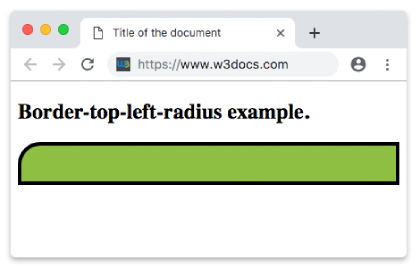
In the following example, the first value sets the horizontal radius and the second sets the vertical radius.
Example of the border-top-left-radius property with two values:
Example of CSS border-top-left-radius Property with two values
<!DOCTYPE html>
<html>
  <head>
    <title>Title of the document</title>
    <style>
      div {
        width: 200px;
        height: 40px;
        background: #ccc;
        border: 4px solid #000000;
        border-top-left-radius: 50px 25px;
      }
    </style>
  </head>
  <body>
    <h2>Border-top-left-radius example.</h2>
    <div></div>
  </body>
</html>The following example uses percentage values. The first value defines the horizontal radius, and the second defines the vertical radius.
Example of the border-top-left-radius property with the "%" value:
Example of CSS border-top-left-radius Property with percentage value
<!DOCTYPE html>
<html>
  <head>
    <title>Title of the document</title>
    <style>
      div {
        width: 200px;
        height: 40px;
        background: #eee;
        border: 4px solid #000000;
        border-top-left-radius: 50% 60%;
      }
    </style>
  </head>
  <body>
    <h2>Border-top-left-radius example.</h2>
    <div></div>
  </body>
</html>Values
| Value | Description | Play it |
|---|---|---|
| length | Defines the rounding of the top-left corner. | Play it » |
| % | Defines the rounding of the top-left corner in percentage. | Play it » |
| initial | Sets the property to its default value. | Play it » |
| inherit | Inherits the property from its parent element. |
When to use the longhand
Reach for border-top-left-radius when only one corner needs rounding — for example a tab, a speech bubble, or a card whose top edge sits flush against a header. To round every corner at once, the border-radius shorthand is shorter:
/* These two rules are equivalent for a single corner */
border-top-left-radius: 25px;
border-radius: 25px 0 0 0;Related properties
- border-radius — shorthand for all four corners.
- border-top-right-radius
- border-bottom-left-radius
- border-bottom-right-radius
- border — sets border width, style, and color.
Browser support
border-top-left-radius is supported in all modern browsers (Chrome, Firefox, Safari, Edge) without a vendor prefix.