CSS background-position-y Property
The background-position-y CSS property specifies the vertical position of a background-image. See examples and try them yourself.
The CSS background-position-y property sets the vertical position of a background image inside its element. It is the vertical half of the background-position shorthand: where background-position takes both a horizontal and a vertical value, background-position-y controls only the up/down placement, leaving the left/right placement to background-position-x.
You reach for it when you want to nudge a background image vertically without re-declaring the horizontal value — for example, pinning a watermark to the bottom of a hero section, or fine-tuning where a pattern starts. When an element has multiple background images, you can give one value per layer, separated by commas, and each value is matched to the corresponding image.
The vertical offset is measured against the background positioning area (by default the element's padding box). A length counts from the top edge downward; a percentage aligns matching points on the image and the area (see Values below).
Negative values are valid — background-position-y: -20px shifts the image up, past the top edge.
| Initial Value | top |
|---|---|
| Applies to | All elements. |
| Inherited | No. |
| Animatable | No. |
| Version | CSS3 |
| DOM Syntax | object.style.backgroundPositionY = "bottom"; |
Syntax
CSS background-position-y values
background-position-y: top | center | bottom | length | percentage | initial | inherit;Example of the background-position-y property with the "top" value:
CSS background-position-y code example
<!DOCTYPE html>
<html>
  <head>
    <title>Title of the document</title>
    <style>
      html {
        min-height: 100vh;
      }
      body {
        padding-top: 30px;
        background: url("https://api.w3docs.com/uploads/media/default/0001/01/0710cad7a1017902166203def268a0df2a5fd545.png") no-repeat;
        background-position-y: top;
      }
    </style>
  </head>
  <body>
    <h2>Background-position-y property example</h2>
  </body>
</html>Result
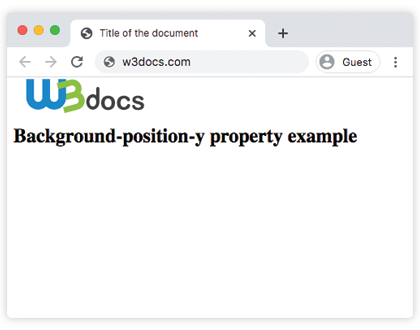
Example of the background-position-y property with the "bottom" value:
CSS background-position-y bottom example
<!DOCTYPE html>
<html>
  <head>
    <title>Title of the document</title>
    <style>
      html {
        min-height: 100vh;
      }
      body {
        background: url("https://api.w3docs.com/uploads/media/default/0001/01/0710cad7a1017902166203def268a0df2a5fd545.png") no-repeat;
        background-position-y: bottom;
      }
    </style>
  </head>
  <body>
    <h2>Background-position-y property example</h2>
  </body>
</html>Example of the background-position-y property with the "center" value:
<!DOCTYPE html>
<html>
  <head>
    <title>Title of the document</title>
    <style>
      html {
        min-height: 100vh;
      }
      body {
        background: url("https://api.w3docs.com/uploads/media/default/0001/01/0710cad7a1017902166203def268a0df2a5fd545.png") no-repeat;
        background-position-y: center;
      }
    </style>
  </head>
  <body>
    <h2>Background-position-y property example</h2>
  </body>
</html>Example of the background-position-y property with the "length" value:
<!DOCTYPE html>
<html>
  <head>
    <title>Title of the document</title>
    <style>
      html {
        min-height: 100vh;
      }
      body {
        padding-top: 30px;
        background: url("https://api.w3docs.com/uploads/media/default/0001/01/0710cad7a1017902166203def268a0df2a5fd545.png") no-repeat;
        background-position-y: 90px;
      }
    </style>
  </head>
  <body>
    <h2>Background-position-y property example</h2>
  </body>
</html>Example of the background-position-y property with the "percentage" value:
Percentages behave differently from lengths. With a length such as 90px, the top of the image is placed 90px below the top of the area. With a percentage, the point at N% down the image is aligned with the point N% down the area — so 0% is top, 100% is bottom, and 50% is center. This is what makes percentage values keep an oversized image visible no matter the container height.
<!DOCTYPE html>
<html>
  <head>
    <title>Title of the document</title>
    <style>
      html {
        min-height: 100vh;
      }
      body {
        padding-top: 30px;
        background: url("https://api.w3docs.com/uploads/media/default/0001/01/0710cad7a1017902166203def268a0df2a5fd545.png") no-repeat;
        background-position-y: 70%;
      }
    </style>
  </head>
  <body>
    <h2>Background-position-y property example</h2>
  </body>
</html>Values
| Value | Description |
|---|---|
| top | Specifies the alignment of the top edge of the background image with the top edge of the background position layer. |
| center | Specifies the alignment of the center of the background image with the center of the background position layer. |
| bottom | Specifies the alignment of the bottom edge of the background image with the bottom of the background position layer. |
| length | Specifies the vertical offset of the background image from the top edge of the background positioning layer. |
| percentage | Specifies the vertical offset of the background image relative to the container. 0% aligns the top edge of the background image with the top edge of the container, 100% aligns the bottom edge with the bottom edge of the container, and 50% vertically centers the background image. |
| initial | Sets the property to its default value. |
| inherit | Inherits the property from its parent element. |
Related properties
background-position— sets the horizontal and vertical position together in one declaration.background-position-x— the horizontal counterpart of this property.- CSS3 properties — overview of the properties introduced in CSS3.