CSS all Property
The all is a CSS property which sets all the properties to their initial and inherit value. See examples.
The CSS all property is a shorthand that resets all of an element's properties at once, apart from unicode-bidi and direction, which control text direction and are deliberately left untouched.
It does not accept a list of property values. Instead, you give it a single CSS-wide keyword (initial, inherit, unset, revert, or revert-layer) and it applies that keyword to every property the element has. This makes it a quick way to wipe out inherited or previously-declared styles in one line.
This page covers the syntax, every accepted value, runnable examples, and when reaching for all actually makes sense.
Why and when to use it
The most common reason to use all is to create a clean styling baseline. For example, when you embed a widget or third-party component into a page, inherited styles (font, color, line-height) can leak in. Setting all: initial or all: revert on the wrapper strips that inheritance so the component starts from a predictable state.
Keep these points in mind:
- It is heavy.
alltouches every property, so use it on small, contained subtrees rather than onbodyor large containers. - It does not reset
directionorunicode-bidi. This is intentional, so text direction is never accidentally broken. - Children are not reset automatically.
allresets the targeted element. Inherited properties (likecolor) still cascade down to children unless the children also reset.
This property is considered a reset shorthand. Unlike multi-value shorthands such as margin or background, it has no longhand version and no sub-properties.
| Initial Value | normal |
|---|---|
| Applies to | All elements. |
| Inherited | No. |
| Animatable | No. |
| Version | CSS3 |
| DOM Syntax | object.style.all = "inherit"; |
Syntax
Syntax of CSS all Property
all: initial | inherit | unset | revert | revert-layer;Example of the all property with revert value:
Example of CSS all Property with revert value
<!DOCTYPE html>
<html>
  <head>
    <title>Title of the document</title>
    <style>
      .example {
        background-color: #8ebf42;
        color: #666;
        all: revert;
      }
    </style>
  </head>
  <body>
    <h2>All property example</h2>
    <p>Here the all: revert; is set.</p>
    <div class="example"> An extrovert is a friendly person who enjoys talking to and being with other people. Extroverts love parties, talking on the phone, and meeting new people. </div>
  </body>
</html>Result
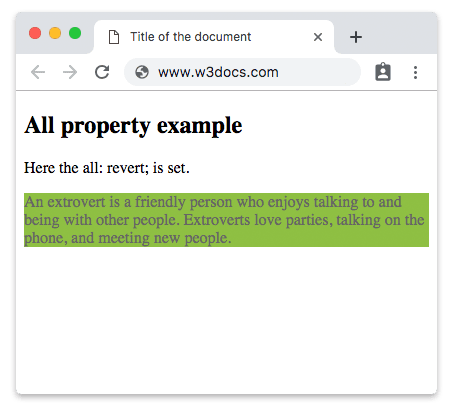
Example of the all property with inherit, initial, and unset values:
Example of CSS all Property with inherit, initial, and unset values
<!DOCTYPE html>
<html>
  <head>
    <title>Title of the document</title>
    <style>
      body {
        font-size: 15px;
        color: #1c87c9;
      }
      .example1 {
        background-color: #8ebf42;
        color: #666;
      }
      .example2 {
        background-color: #8ebf42;
        color: #666;
        all: inherit;
      }
      .example3 {
        background-color: #8ebf42;
        color: #666;
        all: initial;
      }
      .example4 {
        background-color: #8ebf42;
        color: #666;
        all: unset;
      }
    </style>
  </head>
  <body>
    <h2>All property example</h2>
    <hr />
    <p>No all property:</p>
    <div class="example1"> An extrovert is a friendly person who enjoys talking to and being with other people. Extroverts love parties, talking on the phone, and meeting new people. </div>
    <hr />
    <p>all: inherit:</p>
    <div class="example2"> An extrovert is a friendly person who enjoys talking to and being with other people. Extroverts love parties, talking on the phone, and meeting new people. </div>
    <hr />
    <p>all: initial:</p>
    <div class="example3"> An extrovert is a friendly person who enjoys talking to and being with other people. Extroverts love parties, talking on the phone, and meeting new people. </div>
    <hr />
    <p>all: unset:</p>
    <div class="example4"> An extrovert is a friendly person who enjoys talking to and being with other people. Extroverts love parties, talking on the phone, and meeting new people. </div>
    <hr />
  </body>
</html>Values
| Value | Description |
|---|---|
| initial | Sets every property to its specification-defined initial value, ignoring inheritance. |
| inherit | Makes every property take its computed value from the parent element. |
| unset | Acts as inherit for inheritable properties (like color) and as initial for non-inheritable ones (like border). |
| revert | Rolls each property back to the value it would have from the user-agent or user stylesheet, ignoring author styles defined earlier. |
| revert-layer | Reverts each property to the value set in the previous cascade layer. |
unset vs revert
These two are easy to confuse:
unsetremoves the author's value and falls back to inheritance or the spec initial value — it knows nothing about the browser's default stylesheet.revertactively rolls back to the browser's default styling. Soall: reverton an<h2>keeps it looking like a normal bold heading, whileall: unsetstrips it down to plain inline-ish text.
Browser support
all is supported in all modern browsers (Chrome, Firefox, Safari, Edge). The revert keyword arrived later than initial/inherit/unset, and revert-layer requires cascade-layer support, so confirm coverage if you must support older browser versions.