CSS hyphens Property
Use hyphens CSS property to know how to hyphenate the words. Learn more about property values and see examples.
The CSS hyphens property controls how words are split with hyphens when text wraps onto a new line. Hyphenation means breaking a long word at a sensible point and adding a hyphen (-) at the line end, so the text fills narrow columns more evenly instead of leaving large gaps or letting one long word overflow.
This page covers the three values the property accepts (none, manual, and auto), the role of the lang attribute, the soft and hard hyphen characters you can insert by hand, and how hyphens relates to other text-breaking properties.
Why and when to use hyphens
Hyphenation matters most in narrow containers — sidebars, mobile layouts, multi-column text, or any element with a small width. Without it, a single unbreakable word (a long URL, a chemical name, a German compound) can either push past its box or force a ragged right edge with awkward white space. Turning on hyphens: auto lets the browser break such words at valid points and keeps justified or narrow text looking tidy.
You typically reach for hyphens together with text-align: justify, or whenever content is user-generated and you cannot predict word lengths.
hyphens: auto only works when the element's language is known. Set it with the lang attribute (for example <html lang="en">), because the browser needs the language's hyphenation dictionary to decide where breaks are allowed. Without lang, auto behaves like manual.
The rules of hyphenation are not explicitly defined in the specification, so the exact break points can vary from browser to browser.
| Initial Value | none |
|---|---|
| Applies to | All elements. |
| Inherited | Yes. |
| Animatable | No. |
| Version | CSS3 |
| DOM Syntax | Object.style.hyphens = "none"; |
Syntax
Syntax of CSS hyphens Property
hyphens: none | manual | auto | initial | inherit;Example of the hyphens property:
Example of CSS hyphens Property with none, manual and auto values
<!DOCTYPE html>
<html>
<head>
<title>Title of the document</title>
<style>
p {
width: 55px;
border: 1px solid #666;
}
p.none {
hyphens: none;
}
p.manual {
hyphens: manual;
}
p.auto {
hyphens: auto;
}
</style>
</head>
<body>
<h2>Hyphens property example</h2>
<h3>none</h3>
<p class="none">An extreme­ly lengthy sentence</p>
<h3>manual</h3>
<p class="manual">An extreme­ly lengthy sentence</p>
<h3>auto</h3>
<p class="auto" lang="en">An extreme­ly lengthy sentence</p>
</body>
</html>Result
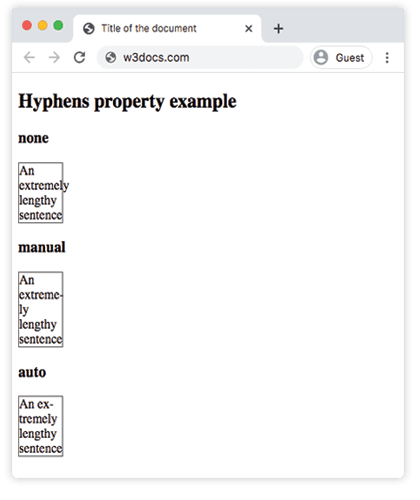
In the given example all three values are included so as to see the differences.
Browser prefixes are no longer required for modern browsers.
Line break opportunities
With the help of the two Unicode characters below we can manually define potential line break points inside of the text:
U+00AD (SHY/Soft hyphen)
This character is rendered invisibly. It points a place, where the browser must break the word, in the case when we need hyphenation. For insertion of SHY use .
U+2010 (HYPHEN/Hard hyphen)
This character points visible line break possibility. The hyphen is rendered even in the case when the line is not broken at that point.
Values
| Value | Description |
|---|---|
| none | No hyphenation. Words are not broken at line breaks, even if the characters suggest line break points. |
| manual | Words are broken only for line-wrapping where there are line break opportunities inside the word. Words are only hyphenated at ‐ or ­. |
| auto | The browser automatically breaks words at appropriate hyphenation points. Words are hyphenated where the algorithm is deciding. The auto value’s behavior depends on the language. |
| initial | Makes the property use its default value. |
| inherit | Inherits the property from its parents element. |
Related text-breaking properties
hyphens is one of several CSS properties that decide where and how text can wrap. They are often combined:
- overflow-wrap — lets the browser break a long word only when it would otherwise overflow its container, without inserting a hyphen.
- word-break — controls whether words can be broken between any characters (useful for CJK text or long strings).
- word-wrap — the legacy alias of
overflow-wrap. - white-space — decides whether sequences of white space collapse and whether text wraps at all.
- line-break — fine-tunes line-breaking rules, mainly for Asian languages.
Use hyphens to add hyphens at valid break points, and overflow-wrap / word-break as a safety net for strings that have no valid hyphenation point.
Browser support
hyphens: auto is supported in all modern browsers. Older versions of Safari and pre-Chromium Edge required vendor prefixes (-webkit-hyphens, -ms-hyphens), but these are no longer needed for current browsers.