CSS empty-cells Property
The empty-cells CSS property defines whether borders and background are shown or not. See the values and try examples with each of them.
The empty-cells property controls whether borders and background are drawn on the empty cells of a table. An empty cell is a <td> or <th> that has no content at all. A cell containing only whitespace (a space, a , or a line break) still counts as non-empty, so the property has no effect on it.
This page explains what empty-cells does, when it actually takes effect, the values it accepts, and the gotchas to watch for.
When the property applies
empty-cells only has a visible effect when cell borders are separated — that is, when the table uses border-collapse: separate (the default). With border-collapse: collapse, adjacent cells share a single border, so there is no separate border or background for an empty cell to hide, and the property is ignored.
Because the default values already are border-collapse: separate and empty-cells: show, empty cells are shown by default and you only need this property to hide them.
| Initial Value | show |
|---|---|
| Applies to | table-cell elements |
| Inherited | No. |
| Animatable | No |
| Version | CSS2 |
| DOM Syntax | object.style.emptyCells = "hide"; |
Syntax
Syntax of CSS empty-cells Property
empty-cells: show | hide | initial | inherit;Example of the empty-cells property:
Example of CSS empty-cells Property with show and hide values
<!DOCTYPE html>
<html>
  <head>
    <title>Title of the document</title>
    <style>
      .show {
        empty-cells: show;
      }
      .hide {
        empty-cells: hide;
      }
      td,
      th {
        border: 1px solid #1c87c9;
        padding: 0.5rem;
      }
      table {
        border-collapse: separate;
      }
    </style>
  </head>
  <body>
    <h2>Empty-cells property example</h2>
    <p>Here the "show" value is used: </p>
    <table class="show">
      <tr>
        <td>Moe</td>
        <td>Larry</td>
      </tr>
      <tr>
        <td>Curly</td>
        <td></td>
      </tr>
    </table>
    <br />
    <p>In this table the "hide" value is used:</p>
    <table class="hide">
      <tr>
        <td>Moe</td>
        <td>Larry</td>
      </tr>
      <tr>
        <td>Curly</td>
        <td></td>
      </tr>
    </table>
  </body>
</html>In the first table the empty bottom-right cell keeps its border. In the second, empty-cells: hide removes that cell's border and background entirely, so the spot reads as blank. Use hide when a table may contain gaps and you want a cleaner look — for example, a schedule or pricing grid where not every slot is filled.
Example with a colored background:
Example of CSS empty-cells Property hide and show values
<!DOCTYPE html>
<html>
<head>
<title>Title of the document</title>
<style>
.show {
empty-cells: show;
}
.hide {
empty-cells: hide;
}
body {
background: #1c87c9;
padding: 25px 0;
color: #fff;
font-size: 2em;
text-align: center;
}
table {
border-collapse: separate;
}
td {
background: #fff;
border: 1px solid #8ebf42;
padding: 10px 15px;
color: green;
}
</style>
</head>
<body>
<p>The empty cells are shown</p>
<table class="show">
<tbody>
<tr>
<td>♦</td>
<td></td>
<td>♦</td>
<td>♦</td>
</tr>
</tbody>
</table>
<p>The empty cells are hidden</p>
<table class="hide">
<tbody>
<tr>
<td>♦</td>
<td></td>
<td>♦</td>
<td>♦</td>
</tr>
</tbody>
</table>
</body>
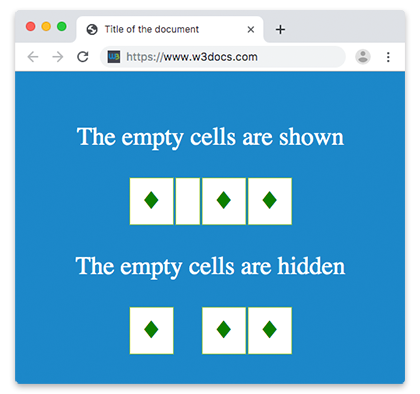
</html>When hide is applied, the empty cell shows neither its white background nor its green border — it blends into the blue page background.
Result
Values
| Value | Description | Play it |
|---|---|---|
| show | The borders and background of empty cells are drawn. This is the default value. | Play it » |
| hide | The borders and background of empty cells are not drawn, so empty cells appear blank. | Play it » |
| initial | Resets the property to its default value (show). | Play it » |
| inherit | Inherits the value from the parent element. Note that empty-cells is not inherited by default. |
Browser support
empty-cells is part of CSS2 and is supported in all modern browsers, including Chrome, Firefox, Safari, Edge, and Opera. No vendor prefixes are required.
Notes and gotchas
- The property is not inherited. Set it on the
table,tr,td, orthyou want it to affect (it cascades visually because cells read it from their own computed style — declaring it on thetableis the common approach). - It has no effect with
border-collapse: collapse, because collapsed borders are shared between cells. - A cell with whitespace, a
, or an empty<img>/element is not empty for this property. Only a cell with literally no content is affected. - To control the gap between separated cells, pair this with
border-spacing.