HTML <table> Tag
The HTML <table> tag defines a table. Learn its structure, accessible captions and header scopes, CSS replacements for old attributes, and examples.
The <table> tag defines an HTML table. It is a container for the elements that build the table's rows, cells, and headers, displaying tabular data — information that has a meaningful relationship across rows and columns.
This page covers how to structure a table correctly, how to make it accessible to screen readers, and which CSS properties replace the old presentational attributes that are no longer valid in HTML5.
Table structure
A table is built from a few cooperating elements:
<tr>defines a table row.<th>defines a header cell — its text is bold and centered by default.<td>defines a data cell.<caption>gives the table a title.<thead>,<tbody>, and<tfoot>group the header, body, and footer rows.<colgroup>lets you apply styling to whole columns.
Grouping rows with <thead> and <tbody> is more than tidy markup: it tells the browser (and assistive technology) which row is the header. It also lets the body scroll while the header stays fixed, and lets you style header and body rows separately.
Use <th> for any cell that labels a row or a column. Its main value is accessibility: screen readers announce the header when reading a data cell, so a user who can't see the grid still knows what each value means. As a bonus, header cells are bold and centered by default and help search engines understand the table's structure.
Syntax
The <table> tag comes in pairs. The content is written between the opening (<table>) and closing (</table>) tags.
Example of the HTML <table> tag:
HTML <table> Tag
<!DOCTYPE html>
<html>
  <head>
    <title>Title of the document</title>
    <style>
      table {
        width: 80%;
        margin: 30px auto;
        border-collapse: collapse;
      }
      th,
      td {
        padding: 10px;
        border: 1px solid #666;
      }
    </style>
  </head>
  <body>
    <table>
      <caption>Upcoming release dates</caption>
      <thead>
        <tr>
          <th scope="col">Month</th>
          <th scope="col">Date</th>
        </tr>
      </thead>
      <tbody>
        <tr>
          <th scope="row">June</th>
          <td>10.06.2018</td>
        </tr>
        <tr>
          <th scope="row">July</th>
          <td>15.07.2018</td>
        </tr>
      </tbody>
    </table>
  </body>
</html>Result
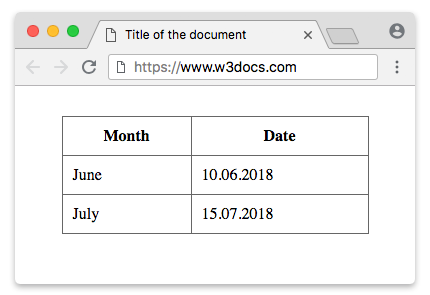
Making tables accessible
A visually formatted grid is easy to scan with your eyes, but a screen reader announces cells one at a time. These features give it the context it needs:
<caption>is the table's accessible name. Place it as the first child of<table>. Screen-reader users hear it when they land on the table, so they know what the data is about before exploring it.<th scope="col">marks a cell as the header for its whole column;<th scope="row">marks it as the header for its row. With these in place, a screen reader can announce "Month: June" instead of just "June", tying each value to its label.
For complex tables — where a cell relates to headers that aren't simply at the top of its column or start of its row (for example, headers that span multiple columns) — scope isn't enough. Use the headers/id pattern: give each <th> a unique id, then list the relevant ids in the headers attribute of each <td>.
<table>
  <caption>Quarterly revenue by region</caption>
  <thead>
    <tr>
      <th id="region">Region</th>
      <th id="q1">Q1</th>
      <th id="q2">Q2</th>
    </tr>
  </thead>
  <tbody>
    <tr>
      <th id="europe" headers="region">Europe</th>
      <td headers="europe q1">120</td>
      <td headers="europe q2">150</td>
    </tr>
  </tbody>
</table>Attributes
The attributes of the <table> tag are not supported in HTML5. For styling tables use CSS properties listed below.
| Attribute | Value | Description | CSS property |
|---|---|---|---|
| align | left center right | Defines how the table must be aligned according to the surrounding text. Not supported in HTML5. | margin |
| bgcolor | rgb(x,x,x) #xxxxxx colorname | Defines the background color for a table. Not supported in HTML5. | background-color |
| border | 1 0 | Defines the size of the frame surrounding the table. Not supported in HTML5. | border |
| cellpadding | pixels | Defines the space between the cell wall and the cell content. Not supported in HTML5. | padding |
| cellspacing | pixels | Defines the space between cells. Not supported in HTML5. | border-spacing |
| frame | void above below hsides lhs rhs vsides box border | Defines which side of the frame surrounding the table must be displayed. Not supported in HTML5. | border-style border-width |
| rules | none groups rows cols all | Defines which parts of inside borders should be visible. Not supported in HTML5. | border (Use this property correspondingly with thead, tbody, tfoot, col or colgroup HTML tags). |
| width | pixels | Defines the width of a table. Not supported in HTML5. | width |
The <table> also supports the Global Attributes and the Event Attributes.
Replacing the old attributes with CSS
The presentational attributes above (border, cellpadding, cellspacing, align, bgcolor, and so on) are obsolete in HTML5. Style the table with CSS instead. This example reproduces a bordered, padded, centered table without any deprecated attribute:
<!DOCTYPE html>
<html>
  <head>
    <title>Title of the document</title>
    <style>
      table {
        /* width="80%" + align="center" */
        width: 80%;
        margin: 30px auto;
        /* cellspacing="0" — collapse the double borders */
        border-collapse: collapse;
        /* bgcolor on the table */
        background-color: #f9f9f9;
      }
      th,
      td {
        /* border="1" */
        border: 1px solid #666;
        /* cellpadding="10" */
        padding: 10px;
        /* align="left" inside cells */
        text-align: left;
      }
    </style>
  </head>
  <body>
    <table>
      <caption>Styled with CSS, not attributes</caption>
      <thead>
        <tr>
          <th scope="col">Month</th>
          <th scope="col">Date</th>
        </tr>
      </thead>
      <tbody>
        <tr>
          <th scope="row">June</th>
          <td>10.06.2018</td>
        </tr>
      </tbody>
    </table>
  </body>
</html>A quick mapping of the most common attributes to their CSS replacements:
border→bordercellpadding→paddingon<th>/<td>cellspacing→border-spacing, orborder-collapse: collapseto remove gapsalign→margin(table) ortext-align(cells)bgcolor→background-colorwidth→width
Don't use tables for layout
A <table> should only hold tabular data — content with real row/column relationships. Don't use it to position page regions like sidebars, navigation, or columns of text. Layout tables confuse screen readers (which try to announce header/cell relationships that don't exist) and are rigid and hard to make responsive.
For page layout, use modern CSS instead:
- CSS Grid for two-dimensional layouts (rows and columns) — the natural replacement for grid-like page structures.
- Flexbox for one-dimensional layouts, such as a row of cards or a navigation bar.
See HTML layout templates for ready-made structures.