HTML <xmp> Tag
The <xmp> renders text between the start and end tags without interpreting the HTML in between and using a monospaced font.
The HTML <xmp> tag is obsolete and deprecated. It has been removed from the HTML standard and must not be used in new pages. This page explains what it used to do, why it was dropped, and how to display literal HTML or preformatted text correctly today.
Historically, <xmp> ("example") rendered the text between its start and end tags exactly as written — in a monospaced font, with whitespace and line breaks preserved — and, critically, without interpreting any HTML inside it. That meant you could paste raw markup like <b>bold</b> and the browser would show the angle brackets instead of rendering bold text.
Do not use <xmp>. It is non-conforming in HTML5 and its behavior is unreliable across browsers. Use <pre> (optionally with <code>) and escape the characters <, >, and & with HTML entities instead. See the modern replacement below.
Why <xmp> was removed
The <xmp> element was deprecated because its "show raw HTML without escaping" behavior is fundamentally hostile to how browsers parse documents:
- Parsing was inconsistent. Because the parser had to switch into a special "raw text" mode to find the closing
</xmp>, browsers disagreed about edge cases — nested tags, comments, and especially the literal string</xmp>appearing inside the content all behaved differently in different engines. - It encouraged unescaped content. Authors relied on
<xmp>to dump HTML straight into a page. A single stray</xmp>in that content would terminate the block early and let the rest of the markup render, which is both a rendering bug and a potential security problem. - A standard, predictable alternative already existed.
<pre>preserves whitespace and uses a monospaced font, and entity-escaping reliably displays literal<and>. Because that combination is well-defined and works the same everywhere,<xmp>was no longer needed.
The closely related <plaintext> tag was removed for the same reasons. For the full list, see Deprecated HTML Tags.
The modern replacement
To show literal HTML, use <pre> and replace each special character with its HTML entity: < becomes <, > becomes >, and & becomes &. The browser decodes the entities back into the visible characters but never treats them as markup.
<!DOCTYPE html>
<html>
<head>
<title>Showing literal HTML with pre</title>
</head>
<body>
<pre>
This is <b>bold</b> in source.
The <b> tag is shown as text, not rendered.
</pre>
</body>
</html>In the rendered page the <pre> block above displays exactly:
This is <b>bold</b> in source.
The <b> tag is shown as text, not rendered.When the preformatted text is specifically a block of source code, wrap it in <code> for clearer semantics:
<pre><code>function greet(name) {
return "Hello, " + name;
}
// Literal HTML still needs escaping here too:
// <div class="box"></div>
</code></pre>The escaping rule is the key difference from <xmp>. Inside <pre> (and everywhere else in normal HTML), a literal <b> would be parsed as a tag, so you must write <b> to display it as text.
Syntax
The <xmp> tag came in pairs. The content was written between the opening (<xmp>) and closing (</xmp>) tags. (Shown for reference only — do not use it.)
Legacy example of the HTML <xmp> tag
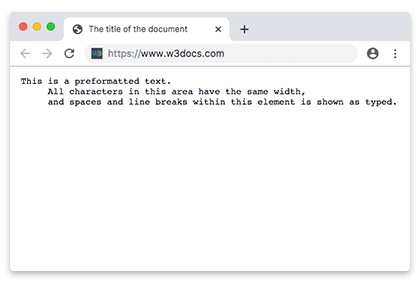
The example below shows how <xmp> was once used. It is kept for historical reference; in modern HTML, replace it with the <pre> approach shown above.
HTML <xmp> Tag
<!DOCTYPE html>
<html>
  <head>
    <title>The title of the document</title>
  </head>
  <body>
    <xmp> This is a preformatted text.
      All characters in this area have the same width,
      and the spaces and line breaks within this element are shown as typed.
    </xmp>
  </body>
</html>Result
Attributes
The <xmp> tag also supports the Global Attributes.
Practice
Related tags
<pre>— the standard element for preformatted, monospaced text.<code>— marks up a fragment of computer code.<plaintext>— another removed tag with similar raw-text behavior.- Deprecated HTML Tags — the full list of obsolete elements to avoid.