HTML <td> Tag
The <td> tag defines a standard data cell in an HTML table. It must be used as a child element of <tr>, which defines a row in a table.
The <td> tag specifies a standard data cell in an HTML table. It must be used as a child element of <tr>, which defines a row in a table. To define a header cell the <th> tag is used.
The <td> tag can contain text, form, image, table etc. The content inside it is left-aligned by default.
If you present tabular data in tables than each data cell must be added individually as a <td> element.
All the rows in the table contain an equal number of cells, which is equivalent to the number of cells in the longest row. If there are less cells in a row, then the browser will automatically fill the row, placing empty cells at the end of it.
If you need to emphasize that there is no data in other cells, then create cell without content where it is necessary.
The cells added by browser have no borders, and if they go after each other, they will be shown as one integrated cell.
Syntax
The <td> tag comes in pairs. The content is written between the opening (<td>) and closing (</td>) tags.
HTML <td> Tag
<table>
  <tr>
    <td>...</td>
  </tr>
</table>Example of the HTML <td> tag:
<!DOCTYPE html>
<html>
  <head>
    <title>Title of the document</title>
    <style>
      table {
        width: 80%;
        margin: 30px auto;
        border-collapse: collapse;
      }
      tr {
        background-color: lightgrey;
      }
      tr:first-child {
        background-color: #1c87c9;
        color: #fff;
      }
      th,
      td {
        padding: 10px;
        border: 1px solid #666;
      }
    </style>
  </head>
  <body>
    <table>
      <tr>
        <th>Month</th>
        <th>Date</th>
      </tr>
      <tr>
        <td>March</td>
        <td>10.09.2018</td>
      </tr>
      <tr>
        <td>June</td>
        <td>18.07.2018</td>
      </tr>
    </table>
  </body>
</html>In this example we use <tr> tag to define table rows, <th> to define header cells, and <td> to define standard data cells.
Spanning columns and rows
The colspan and rowspan attributes are commonly used with the <td> tag to let a single cell stretch across multiple columns or rows.
colspansets how many columns a cell occupies. The value must be a positive integer; the default is1. A cell withcolspan="2"takes up the horizontal space of two normal cells, so the row it belongs to should contain one fewer<td>than the other rows.rowspansets how many rows a cell occupies. The value must be a positive integer; the default is1. A cell withrowspan="2"extends down into the next row, so that next row should omit the<td>that would sit beneath it.
Be careful not to make a span larger than the table allows. If a colspan or rowspan reaches past the edge of the table, browsers clip it to the available columns or rows rather than adding new ones. Conversely, if you forget to remove the cells that a span overlaps, the row ends up with too many cells and the table layout breaks.
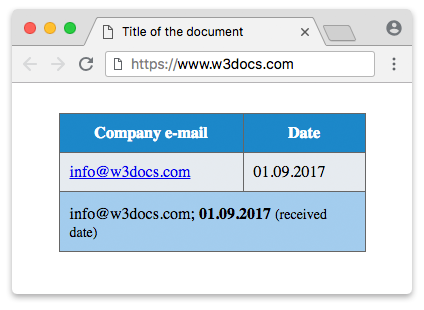
Example of the HTML <td> tag with the colspan attribute:
<!DOCTYPE html>
<html>
  <head>
    <title>Title of the document</title>
    <style>
      table {
        width: 80%;
        margin: 30px auto;
        border-collapse: collapse;
      }
      tr {
        background-color: #e6ebef;
      }
      tr:first-child {
        background-color: #1c87c9;
        color: #fff;
      }
      tr:last-child {
        height: 60px;
      }
      tr:last-child td {
        background-color: #a3cced;
        vertical-align: bottom;
      }
      tr:last-child span {
        font-size: 14px;
      }
      th,
      td {
        padding: 10px;
        border: 1px solid #666;
      }
    </style>
  </head>
  <body>
    <table>
      <tr>
        <th>Company e-mail</th>
        <th>Date</th>
      </tr>
      <tr>
        <td>
          <a href="#">[email protected]</a>
        </td>
        <td>01.09.2017</td>
      </tr>
      <tr>
        <td colspan="2">[email protected];
          <strong>01.09.2017 </strong>
          <span>(received date)</span>
        </td>
      </tr>
    </table>
  </body>
</html>Result
Example of the HTML <td> tag with the rowspan attribute:
<!DOCTYPE html>
<html>
  <head>
    <title>Title of the document</title>
    <style>
      table {
        width: 80%;
        margin: 30px auto;
        border-collapse: collapse;
      }
      th, td {
        padding: 10px;
        border: 1px solid #666;
      }
      thead tr {
        background-color: #1c87c9;
        color: #fff;
      }
      tbody td {
        background-color: #e6ebef;
      }
      .year {
        background-color: #a3cced;
        text-align: center;
      }
    </style>
  </head>
  <body>
    <table>
      <thead>
        <tr>
          <th>Month</th>
          <th>Year</th>
        </tr>
      </thead>
      <tbody>
        <tr>
          <td>March</td>
          <td class="year" rowspan="2">2014</td>
        </tr>
        <tr>
          <td>April</td>
        </tr>
      </tbody>
    </table>
  </body>
</html>Associating cells with headers for accessibility
In a simple table, screen readers can match each data cell to its column and row header automatically. In a complex table — one with multiple levels of headers or with spanned cells — that automatic association breaks down. To keep such tables readable by assistive technology, give every <th> an id, then list the relevant ids in the headers attribute of each related <td>. A cell can reference several headers by separating their ids with spaces.
Example of the HTML <td> tag with the headers attribute:
<!DOCTYPE html>
<html>
  <head>
    <title>Title of the document</title>
    <style>
      table {
        border-collapse: collapse;
        margin: 30px auto;
      }
      th, td {
        padding: 10px;
        border: 1px solid #666;
      }
    </style>
  </head>
  <body>
    <table>
      <tr>
        <th id="name">Name</th>
        <th id="hours">Hours</th>
        <th id="rate">Rate</th>
      </tr>
      <tr>
        <td headers="name">Ann</td>
        <td headers="hours">38</td>
        <td headers="rate">$25</td>
      </tr>
      <tr>
        <td headers="name">Bob</td>
        <td headers="hours">40</td>
        <td headers="rate">$30</td>
      </tr>
    </table>
  </body>
</html>Here each data cell points back to the header that describes it, so a screen reader can announce, for example, "Rate: $25" instead of just "$25".
<td> layout issues
By default, each data cell lines up vertically with the cells in the same column of the other rows. Adding an extra <td> to just one row throws off that alignment, because every following cell in that row shifts over by one column.
For example, this row has three cells while the rest of the table has two, so its cells no longer line up under the headers:
<tr>
  <th>Month</th>
  <th>Total</th>
</tr>
<tr>
  <td>March</td>
  <td>Q1</td>
  <td>120</td>
</tr>The fix is to merge cells with colspan instead of adding an extra column. Here the "March" cell spans both columns above the totals, keeping the grid aligned:
<tr>
  <th>Month</th>
  <th>Total</th>
</tr>
<tr>
  <td colspan="2">March (Q1)</td>
</tr>
<tr>
  <td>April</td>
  <td>120</td>
</tr>Attributes
| Attribute | Value | Description |
|---|---|---|
| abbr | text | Defines an abbreviated version of the content in a cell, or an alternative text. (User-agents, such as speech readers, may present this description before the content itself). Not supported in HTML 5. |
| align | left right center justify char | Aligns the content in a cell. Not supported in HTML 5. |
| axis | category_name | Categorizes cells having similar content. Not supported in HTML 5. |
| background | background | Sets the background in a cell. Not supported in HTML 5. |
| bgcolor | rgb(x,x,x) #xxxxxx colorname | Defines the background color of a cell. Not supported in HTML 5. |
| bordercolor | bordercolor | Sets the color of the border. Not supported in HTML 5. |
| char | character | Aligns the content in a cell to a character. Is used only if attribute align="char". Not supported in HTML 5. |
| charoff | number | Sets the number of characters the content will be aligned from the character specified by the char attribute. Is used only if attribute align="char". Not supported in HTML 5. |
| colspan | number | Defines the number of columns a cell should span. The value of the attribute should be a positive integer. Default value is 1. |
| headers | header_id | Specifies one or more header cells (defined by the <th> tag) a standard cell is related to. |
| height | % pixels | Sets the height of a cell. Not supported in HTML 5. |
| nowrap | nowrap | Specifies that the content inside a cell should not wrap. Not supported in HTML 5. |
| rowspan | number | Specifies the number of rows a cell should span. The value of the attribute should be a positive integer. Default value is 1. It is not recommended to use values higher than 65534, as they will be clipped down to 65534. |
| valign | top middle bottom baseline | Specifies vertical alignment of the content inside a cell. Not supported in HTML 5. Use the CSS vertical-align property instead. |
| width | % pixels | Sets the width of a cell. Not supported in HTML 5. |
The <td> tag supports the Global Attributes and the Event Attributes.
The scope attribute is not valid on <td>; it belongs on the <th> element, where it declares whether a header applies to a column or a row. Use headers on a <td> to point back to its header cells instead.
How to style an HTML <td> Tag
The most common <td> styles control spacing, borders, and alignment. Target td together with th so header and data cells share a consistent look:
table {
  border-collapse: collapse;
}
td {
  padding: 10px;
  border: 1px solid #666;
  text-align: left;
  vertical-align: middle;
}
td:hover {
  background-color: #f1f7fb;
}Related tags
<table>— the container that holds all rows and cells.<tr>— defines a table row; every<td>must sit inside one.<th>— defines a header cell, paired with<td>via theheadersattribute.