HTML <hr> Tag
The HTML <hr> tag marks a thematic break (a change of topic), rendered as a horizontal line. Learn when to use it, CSS styling, attributes, and accessibility.
The HTML <hr> tag represents a thematic break — a shift in topic within a section of content, such as a scene change in a story or a move to a new subject within a reference article. By default the browser renders it as a horizontal line, but its primary purpose is semantic, not decorative.
In HTML5 the <hr> tag carries meaning: it tells browsers and assistive technology that the surrounding paragraphs belong to different topics. In older HTML versions it was treated purely as a presentational rule used to draw a line between content. Today, if you only want a decorative divider with no change of topic, you should use a CSS border on another element instead of an <hr>.
The visual appearance of the line depends on the browser; it is often drawn with a slight 3D ("shaded") effect that you can override with CSS.
When to Use <hr> (and When Not To)
Use <hr> when there is a genuine change of topic:
- Between two distinct sections of a long article or document.
- Between scenes or shifts in a narrative.
- To separate groups of unrelated form fields or list items where a new heading would be too heavy.
Do not use <hr> purely for decoration. If the line is only there to look nice — for example a divider under every avatar in a list — it adds noise for screen-reader users. In that case style a border on an existing element, or add role="presentation" to the rule so it is ignored semantically. For structuring page regions by meaning, see semantic elements in HTML5.
Accessibility: <hr> has the implicit ARIA separator role and is exposed to assistive technologies — many screen readers announce it (for example, as "separator"). That is exactly what you want for a real thematic break, but it is why a purely decorative line should use CSS or role="presentation" instead.
Syntax
The <hr> tag is empty, which means that the closing tag isn’t required. But in XHTML, the (<hr>) tag must be closed (<hr/>).
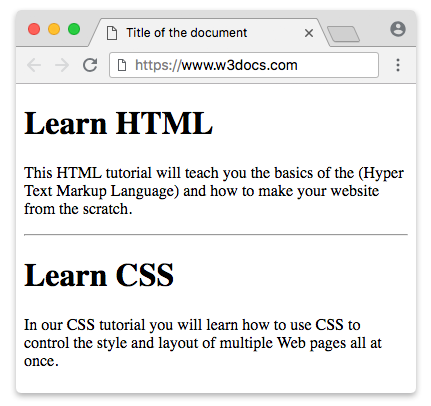
Example of the HTML <hr> tag:
HTML hr tag
<!DOCTYPE html>
<html>
  <head>
    <title>Title of the document</title>
  </head>
  <body>
    <h1>Learn HTML</h1>
    <p>
      This HTML tutorial will teach you the basics of the (Hyper Text Markup Language) and how to make your website from scratch.
    </p>
    <hr />
    <h1>Learn CSS</h1>
    <p>
      In our CSS tutorial you will learn how to use CSS to control the style and layout of multiple Web pages all at once.
    </p>
  </body>
</html>HTML <hr> Size Attribute
The size attribute specifies the height of the line.
Though the size attribute is one of the deprecated attributes, it is still supported in all browsers.
Example of the HTML <hr> tag with the "size" attribute:
<!DOCTYPE html>
<html>
  <head>
    <title>Title of the document</title>
  </head>
  <body>
    <p>A normal horizontal line:</p>
    <hr />
    <p>A horizontal line with a height of 40 pixels:</p>
    <hr size="40" />
  </body>
</html>An alternate way to specify the size of the <hr> tag is using CSS height Property.
Example of the HTML <hr> tag used with the height property:
<!DOCTYPE html>
<html>
  <head>
    <title>Title of the document</title>
    <style>
      hr {
        height: 20px;
      }
    </style>
  </head>
  <body>
    <p>
      A horizontal line with a height of 20 pixels.
    </p>
    <hr />
  </body>
</html>HTML <hr> Width Attribute
The width attribute specifies the width of the line.
The width attribute is also from the list of deprecated attributes, but is supported in all browsers.
Example of the HTML <hr> tag with the width attribute:
<!DOCTYPE html>
<html>
  <head>
    <title>Title of the document</title>
  </head>
  <body>
    <p>A normal horizontal line:</p>
    <hr />
    <p>A horizontal line with a width of 30%:</p>
    <hr width="30%" />
  </body>
</html>Use CSS width Property instead of the width attribute.
Example of the HTML <hr> tag used with the width property:
<!DOCTYPE html>
<html>
  <head>
    <title>Title of the document</title>
    <style>
      hr {
        width: 250px;
      }
    </style>
  </head>
  <body>
    <p>A horizontal line with a width of 250 pixels:</p>
    <hr />
  </body>
</html>HTML <hr> Noshade Attribute
The noshade attribute removes the 3D shading effect from the horizontal line.
The noshade attribute is one of the deprecated attributes, but is supported in all browsers.
Example of the HTML <hr> tag with the noshade attribute:
<!DOCTYPE html>
<html>
  <head>
    <title>Title of the document</title>
  </head>
  <body>
    <p>Shaded horizontal line :</p>
    <hr />
    <p>Noshaded horizontal line:</p>
    <hr noshade />
  </body>
</html>To remove the default 3D ("shaded") look in CSS, give the <hr> a flat border and a transparent background. The default rule is drawn using shaded borders, so replacing it with a single solid border (and clearing the background) produces a plain, flat line — the same result the noshade attribute gave.
Example of the HTML <hr> tag used with the border property:
<!DOCTYPE html>
<html>
  <head>
    <title>Title of the document</title>
    <style>
      hr {
        border: 1px solid #000000;
        background: transparent;
      }
    </style>
  </head>
  <body>
    <p>
      A horizontal line specified with CSS border Property.
    </p>
    <hr />
  </body>
</html>HTML align Attribute
The align attribute specifies the alignment of the line.
The align attribute is one of the deprecated attributes, but is supported in all browsers.
Example of the HTML <hr> tag with the align attribute:
<!DOCTYPE html>
<html>
  <head>
    <title>Title of the document</title>
  </head>
  <body>
    <p>Lorem ipsum is simply dummy text...</p>
    <hr align="left" width="70%" />
  </body>
</html>To position an <hr>, set a width and control its horizontal margin — not text-align. Because <hr> is a block element, text-align does not move it. Use margin-right: auto to push it left, margin-left: auto to push it right, or margin: 0 auto to center it.
Example of the HTML <hr> tag used with the margin property:
<!DOCTYPE html>
<html>
  <head>
    <title>Title of the document</title>
    <style>
      hr {
        width: 50%;
        margin-left: 0;
        margin-right: auto;
      }
    </style>
  </head>
  <body>
    <p>A horizontal line specified with CSS margin property</p>
    <hr />
  </body>
</html>The presentation attributes of the <hr> tag are deprecated in HTML5. For styling, we use CSS instead.
How to Style <hr> Tag
CSS border property is used to style the horizontal line.
Example of the HTML <hr> tag styled with the border property:
<!DOCTYPE html>
<html>
  <head>
    <title>Title of the document</title>
    <style>
      /* blue border */
      hr.one {
        border-top: 1px solid #1c87c9;
      }
      /* Dashed border */
      hr.two {
        border-top: 1px dashed #1c87c9;
      }
      /* Dotted border */
      hr.three {
        border-top: 1px dotted #1c87c9;
      }
      /* Thick border */
      hr.four {
        border: 1px solid #1c87c9;
      }
      /* Large rounded border */
      hr.five {
        border: 15px solid #1c87c9;
        border-radius: 5px;
      }
    </style>
  </head>
  <body>
    <p>Default:</p>
    <hr />
    <p>Styling "hr" tag</p>
    <hr class="one" />
    <hr class="two" />
    <hr class="three" />
    <hr class="four" />
    <hr class="five" />
  </body>
</html>Attributes
| Attribute | Value | Description |
|---|---|---|
| align | left center right | Defines the horizontal alignment of a line. Deprecated in HTML5, but still supported by browsers for backward compatibility. |
| noshade | noshade | Defines that the line will be displayed without 3D effect. Deprecated in HTML5, but still supported by browsers for backward compatibility. |
| size | pixels | Defines the size of a line. Deprecated in HTML5, but still supported by browsers for backward compatibility. |
| width | pixels % | Defines the width of a line. Deprecated in HTML5, but still supported by browsers for backward compatibility. |
The <hr> tag supports the Global Attributes and the Event Attributes.