HTML Character Sets
Learn HTML character sets — ASCII, ANSI, ISO-8859-1, and UTF-8 — and how to declare the encoding with the meta charset tag to display pages correctly.
A character set (or character encoding) is the mapping that tells a browser how to turn the raw bytes of a file into the letters, digits, punctuation, and symbols you see on screen. The browser must know which character set a page uses in order to display it correctly.
UTF-8 is the default character encoding for HTML5. It wasn't always this way. ASCII came first, and ISO-8859-1 was the default character set from HTML 2.0 to HTML 4.01. Each of those older sets could only represent a limited range of characters, which caused problems for non-English text. When UTF-8 arrived alongside HTML5 and XML, it solved most of those issues by covering virtually every writing system in one encoding.
This page walks through the main character sets you may encounter — ASCII, ANSI, ISO-8859-1, and Unicode/UTF-8 — and shows how to declare the encoding in both modern and legacy HTML.
What goes wrong when the encoding is missing or mismatched
If a page doesn't declare its encoding, or declares one that doesn't match how the file was actually saved, the browser guesses — and often guesses wrong. The most common symptom is mojibake: garbled text where accented letters, curly quotes, or emoji turn into strings like é or ’.
Beyond looking broken, an undeclared or mismatched charset can be a security concern: some attacks rely on the browser interpreting bytes under a different encoding than the author intended (for example, UTF-7 based cross-site scripting). Declaring a single, explicit encoding up front removes that ambiguity. The safe modern choice is to always serve content as UTF-8 and state it clearly with <meta charset="UTF-8">.
ASCII
ASCII was the first character encoding standard, which is also called a character set. It is abbreviated from American Standard Code for Information Interchange.
For each storable character, ASCII defined a unique number to support the upper and lower case alphabet (a-z, A-Z), the numbers 0-9, and a handful of special characters. It is based on the English alphabet and encodes 128 characters into a 7-bit binary integer. For example, the capital letter A is code 65 (binary 01000001), a is 97, and the digit 0 is 48. This works because all computer information is ultimately recorded as binary ones and zeros in electronics.
Below, you can see an ASCII chart mapping each character to its decimal, hexadecimal, and binary code.
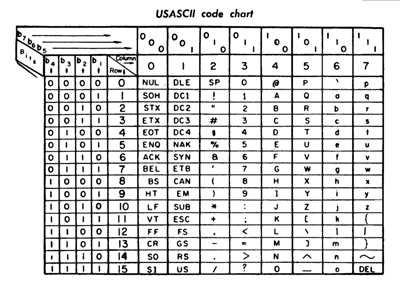
The biggest limitation of ASCII is that it has no non-English letters or accented characters. It is still in use today, especially in mainframe computers, and it forms the foundation that later encodings (including UTF-8) build on.
Click here to see more about ASCII.
ANSI
ANSI, which was also called Windows-1252, was the default character set for Windows up to Windows 95. It is an extension for ASCII, which adds international characters. It supported 256 characters using a full byte (8-bits).
ANSI was supported by all the browsers since it was announced as the default character set of Windows.
ISO-8859-1
ISO-8859-1 became the default character encoding in HTML 2.0, as most countries use characters different from ASCII. It is also an extension to ASCII, just like ANSI, and it adds international characters. ISO-8859-1 also uses a full byte to represent twice as many characters as ASCII.
Click here to see more about ISO-8859-1.
HTML 4 default encoding
In HTML 4, the encoding was declared with an http-equiv <meta> tag. Since ISO-8859-1 was the default, this is how you would state it explicitly:
<meta http-equiv="Content-Type" content="text/html;charset=ISO-8859-1" />Overriding the charset in HTML 4
If an HTML 4 page needs a different character encoding than the ISO-8859-1 default — for instance ISO-8859-8 for Hebrew — you simply change the charset value in the same <meta> tag:
<meta http-equiv="Content-Type" content="text/html;charset=ISO-8859-8" />Most HTML 4 processors also understood UTF-8, which paved the way for it becoming the standard in HTML5.
The HTML5 way
HTML5 replaced the verbose http-equiv form with a short, dedicated attribute:
<meta charset="UTF-8" />Place this tag as early as possible inside the <head> element — ideally as the very first child — so the browser reads the encoding before it parses any text content.
Unicode UTF-8
UTF-8 is the default — and recommended — character encoding for HTML5.
Because the character sets described above are each limited to at most 256 characters, the Unicode Consortium developed the Unicode Standard, a single catalogue that assigns a unique number (called a code point) to almost every character, punctuation mark, and symbol used in the world — across thousands of languages, plus emoji and mathematical symbols. UTF-8 is the most popular way of encoding those code points as bytes.
Why UTF-8 is the modern default
Three properties make UTF-8 the natural choice for the web:
- Universal coverage. It can represent every Unicode code point, so a single page can mix English, Arabic, Chinese, and emoji without switching encodings.
- ASCII-compatible. The first 128 code points are encoded as exactly the same single bytes as ASCII. Any plain-ASCII file is already valid UTF-8, which means decades of older text and tooling keep working.
- Variable-width efficiency. Common characters take just one byte, while less common ones use two, three, or four bytes only as needed. Documents that are mostly English stay compact, yet nothing is left out.
In HTML, the charset attribute on the <meta> tag specifies the encoding:
<!DOCTYPE html>
<html>
  <head>
    <meta charset="UTF-8" />
    <title>UTF-8 example</title>
  </head>
  <body>
    <p>English, Русский, 中文, العربية, 😀</p>
  </body>
</html>Keep <meta charset="UTF-8"> as the first thing in the <head> (within the first 1024 bytes of the document). If it comes too late, the browser may begin parsing text under the wrong encoding before it sees the declaration.
Multi-byte characters and the BOM
In UTF-8 a single character can span several bytes. For example, the euro sign € (Unicode code point U+20AC) is stored as the three bytes E2 82 AC, while a character like A still takes only one byte. This is what "variable-width" means in practice.
You may also come across the BOM (Byte Order Mark), an optional invisible sequence of bytes (EF BB BF for UTF-8) at the very start of a file that signals its encoding. A BOM is not required for UTF-8 and is usually best omitted in HTML, since an explicit <meta charset="UTF-8"> already does the job and a stray BOM can occasionally cause rendering quirks.
To insert specific symbols without worrying about how your editor saves the file, you can also use named or numeric HTML entities (for example € for €).
All HTML5 processors support UTF-8. Note that XML processors strictly require UTF-8 or UTF-16.