HTML <fieldset> Tag
The HTML <fieldset> tag visually groups logically related fields in an HTML form defined with the <form> tag. See, also syntax and examples
The <fieldset> tag groups logically related controls inside an HTML <form>, letting you break a long form into clear sections. By default the browser draws a box around the grouped content. Paired with a <legend>, it is also the correct way to give a group of <input> controls a shared, accessible label.
This page covers the syntax, the role of <legend>, every attribute (name, disabled, form), how to restyle or remove the box, and why <fieldset> matters for accessible radio and checkbox groups.
Syntax
The <fieldset> tag comes in pairs. The content is written between the opening (<fieldset>) and closing (</fieldset>) tags.
Example of the HTML <fieldset> tag:
HTML <fieldset> Tag
<!DOCTYPE html>
<html>
  <head>
    <title>Title of the document</title>
    <style>
      div {
        margin-bottom: 10px;
      }
      label {
        display: inline-block;
        width: 120px;
      }
      fieldset {
        background: #e1eff2;
      }
      legend {
        padding: 20px 0;
        font-size: 20px;
      }
    </style>
  </head>
  <body>
    <form>
      <fieldset>
        <legend>Personal Information:</legend>
        <div>
          <label for="name">Name:</label>
          <input type="text" id="name" />
        </div>
        <div>
          <label for="email">Email:</label>
          <input type="email" id="email" />
        </div>
        <div>
          <label for="date">Date of birth:</label>
          <input type="date" id="date" />
        </div>
        <div>
          <label for="birth-place">Place of birth:</label>
          <input type="text" id="birth-place" />
        </div>
      </fieldset>
    </form>
  </body>
</html>Result
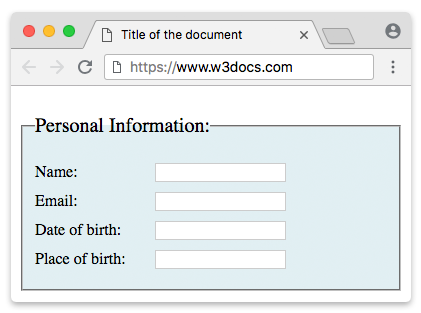
The <legend> element
The <legend> element gives the <fieldset> a caption. Two rules matter:
- It must be the first child of the
<fieldset>. If it appears anywhere else, browsers ignore it as the group's caption. - It is the group's accessible name. Assistive technologies announce the legend text together with each control inside the group. So when a screen-reader user reaches a control, they hear something like "Personal Information — Name, edit text", which tells them which section that field belongs to.
<fieldset>
  <legend>Shipping address</legend>
  <!-- the inputs for this section go here -->
</fieldset>A <fieldset> without a <legend> still draws a box, but the group has no name, so the accessibility benefit is lost. Add a legend whenever the grouping has meaning for the user.
The <fieldset> element for organizing forms
The majority of online forms are hard to use and disorganized. Arranging them into logical sections significantly improves usability. Using the <fieldset> element with the <legend> element creates clear boundaries and makes your forms easier to navigate.
Accessibility: grouping radio buttons and checkboxes
A single text <input> is labelled by its own <label>. But a set of radio buttons or checkboxes needs two levels of labelling: one for the whole question and one for each option. <fieldset> + <legend> is the standard, accessible way to do this — the legend labels the question, and each <label> labels an option.
<fieldset>
  <legend>Choose a shipping method:</legend>
  <div>
    <input type="radio" id="standard" name="shipping" value="standard" />
    <label for="standard">Standard (3–5 days)</label>
  </div>
  <div>
    <input type="radio" id="express" name="shipping" value="express" />
    <label for="express">Express (1–2 days)</label>
  </div>
</fieldset>Here a screen reader announces "Choose a shipping method, Standard, radio button" — the user always knows which question they are answering. Without the <fieldset>/<legend> wrapper, the options read as a disconnected list. Use this pattern for every radio group and for any set of related checkboxes.
Removing or restyling the box
The default border is just a style — it is not required. A very common question is how to remove it. Set border: none on the <fieldset>:
fieldset {
  border: none;
  padding: 0;
  margin: 0;
}You can also give the <legend> and the box any styling you like (background, custom border, rounded corners). The grouping and its accessibility semantics stay intact no matter how you style it, so you can drop the default look without losing the benefit.
Attributes
| Attribute | Value | Description |
|---|---|---|
| disabled | disabled | Disables the whole group. Every form control inside the <fieldset> becomes non-interactive and is not submitted with the form. |
| form | form_id | Associates the fieldset with one or more forms by their id, so it can sit outside the <form> it belongs to. Separate multiple ids with spaces. |
| name | text | The name of the group. It is not submitted with the form; it is mainly used to reference the group from JavaScript. |
The disabled attribute is convenient when a whole section of a form should be turned off at once — for example, hiding payment fields until a checkbox is ticked:
<fieldset disabled>
  <legend>Payment details</legend>
  <label for="card">Card number:</label>
  <input type="text" id="card" />
</fieldset>The form attribute lets a <fieldset> live outside the <form> element and still belong to it:
<form id="signup"></form>

<fieldset form="signup">
  <legend>Account</legend>
  <label for="user">Username:</label>
  <input type="text" id="user" />
</fieldset>The <fieldset> tag supports the Global Attributes and the Event Attributes.