HTML <frameset> Tag
The <frameset> tag defines the structure of a frame, number of columns and rows and its place in a window. Tag description, attributes, using examples.
The <frameset> tag defined the structure of a page split into multiple frames — separate scrollable regions, each loading its own HTML document. It replaced the <body> element and used the rows and cols attributes to lay frames out in a grid.
The <frameset> and <frame> tags are deprecated HTML tags. They were removed from HTML5 and must not be used in new pages. An HTML5 document (one that starts with <!DOCTYPE html>) cannot use a frameset at all. This page documents the legacy element and shows what to use instead.
This page covers what <frameset> did, why it is obsolete, and the modern, accessible replacements: CSS Grid and Flexbox layouts for splitting your own page into panes, and the <iframe> element for embedding another document.
Why <frameset> is obsolete
Framesets were dropped from the web platform because they broke fundamental browser behaviour and accessibility. The main problems:
- Broken navigation, bookmarks, and history. The address bar showed only the outer frameset URL, never the document inside a frame. Users could not bookmark or share what they were actually looking at, and the browser Back button behaved unpredictably.
- Broken printing. Printing a frameset typically produced the wrong frame or a blank page, because there was no single document to print.
- Accessibility failures. Screen readers struggled to convey that the page was several independent documents; keyboard users could get trapped moving focus between frames, and focus order was inconsistent.
- Security (clickjacking). Loading arbitrary pages into frames enabled clickjacking attacks. Modern sites defend against this with the
X-Frame-OptionsandContent-Security-Policyheaders — which often refuse to load inside a frame at all. - Removed from HTML5. Because of all of the above, the HTML5 specification dropped framesets entirely.
Accessibility
Framesets are hostile to assistive technology (AT). A screen reader presents one document at a time, so a window made of several frames has no natural reading order — users must discover and switch between frames manually, with little context about how they relate. Keyboard navigation suffers too: Tab order across frame boundaries is unreliable, and focus can become trapped in a frame the user cannot easily leave. None of these issues exist with a single, well-structured HTML5 document laid out with CSS.
Syntax
The <frameset> tag comes in pairs. The content is written between the opening (<frameset>) and closing (</frameset>) tags.
The <frameset> tag can contain one or several <frame> tags. It is allowed to nest one <frameset> tag in another if it is necessary to divide the windows into smaller ones.
The frameset document uses the <frameset> element instead of the <body> element. The frameset element may not contain any content, but instead it defines and names frames arranged in rows and/or columns.
Example of the HTML <frameset> tag:
<!DOCTYPE HTML PUBLIC "-//W3C//DTD HTML 4.01 Frameset//EN" "http://www.w3.org/TR/html4/frameset.dtd">
<html>
  <head>
    <title>Title of the document</title>
  </head>
  <frameset cols="50%,50%">
    <frame src="https://www.w3docs.com/learn-html/html-basic.html">
    <frame src="https://www.w3docs.com/learn-css/css-syntax.html">
  </frameset>
</html>Result
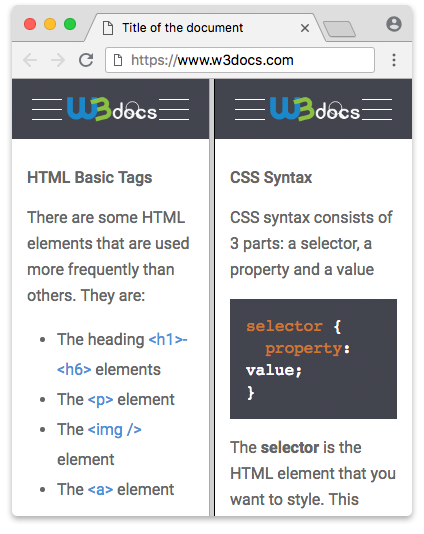
Example of the HTML <frameset> tag with the rows attribute:
<!DOCTYPE HTML PUBLIC "-//W3C//DTD HTML 4.01 Frameset//EN" "http://www.w3.org/TR/html4/frameset.dtd">
<html>
  <head>
    <title>Title of the document</title>
  </head>
  <frameset rows="30%,40%,30%">
    <frame src="https://www.w3docs.com/learn-javascript.html">
    <frame src="https://www.w3docs.com/learn-git.html">
    <frame src="https://www.w3docs.com/learn-php.html">
  </frameset>
</html>Modern replacements
Everything <frameset> did is now done better with CSS and <iframe>.
Split your own page into panes (CSS Grid)
To divide a single document into a sidebar, header, and content area — the classic frameset use case — use CSS Grid. It is one document, so navigation, bookmarks, printing, and screen readers all work normally.
<!DOCTYPE html>
<html lang="en">
  <head>
    <title>Two-pane layout with CSS Grid</title>
    <style>
      body { margin: 0; }
      .layout {
        display: grid;
        grid-template-columns: 200px 1fr;
        height: 100vh;
      }
      .sidebar { background: #f4f4f4; padding: 1rem; overflow: auto; }
      .content { padding: 1rem; overflow: auto; }
    </style>
  </head>
  <body>
    <div class="layout">
      <nav class="sidebar">Sidebar</nav>
      <main class="content">Main content</main>
    </div>
  </body>
</html>A flexible row-and-column layout can also be built with Flexbox.
Embed an external page (<iframe>)
To load a separate web page inside your document — the only thing <frame> offered that CSS does not — use an <iframe>. Unlike framesets, an iframe is a valid HTML5 element, keeps the parent page's URL bookmarkable, and supports sandboxing for security.
<!DOCTYPE html>
<html lang="en">
  <head>
    <title>Embedding with an iframe</title>
  </head>
  <body>
    <h1>My page</h1>
    <iframe
      src="https://www.w3docs.com/"
      title="W3docs home page"
      width="600"
      height="400">
    </iframe>
  </body>
</html>Always give an <iframe> a descriptive title so assistive technology can announce its purpose.
Attributes
In a real frameset only two attributes were standard: rows and cols.
| Attribute | Value | Description |
|---|---|---|
| cols | pixels, %, * | Defines the number and size of frame columns. Removed in HTML5. |
| rows | pixels, %, * | Defines the number and size of frame rows. Removed in HTML5. |
Note: In HTML 4.01,
framebordercould be set on both<frameset>(as the default for its frames) and on each individual<frame>.framespacingwas a non-standard Netscape/Internet Explorer extension and was never part of the HTML specification. Both are obsolete and should not be relied upon.
The <frameset> element also supported the Global Attributes.