HTML <aside> Tag
The HTML <aside> tag defines tangential content, like a sidebar or note, and creates an ARIA complementary landmark for accessibility.
The <aside> tag is one of the HTML5 elements used to define a section containing content that is tangentially related to the main content. It is generally used to enhance an article with additional information or highlighting parts that can be interesting to the user. Content in aside is a stand-alone, non-essential part of the web page, and if you delete it, the main content will not be affected.
Endnotes, comments, lists of terms, reference information, a collection of links, pull-quotes, etc. are examples of information that can be within the <aside> element.
Do not confuse the <aside> element with a sidebar. The sidebar is just a visual element, and the <aside> tag doesn’t systematically look like a sidebar.
Do not use the <aside> element for parenthetical text, as it is intended for tangential content rather than inline or supplementary text within the main flow.
You can use this element for typographical effects for the content that is separated from the main content of the page. For example, it can be used for bibliography, pull quotes, additional information comments and so on.
Why use <aside>? Accessibility and SEO
The real reason to choose <aside> over a plain container is semantics. A page-level <aside> (one placed outside any <article> or <section>) maps to the ARIA complementary landmark role. This has concrete effects:
- Screen readers expose it as a landmark. Users of assistive technology can list and jump directly to "complementary" regions, just as they can with
<nav>and<main>. A generic<div>provides no such landmark. - It clarifies the document outline. Search engines and accessibility tools build a structural map of the page;
<aside>tells them this block is supporting, not primary, content. - It signals intent to other developers. The markup itself documents that the content is tangential and removable.
An <aside> always carries the implicit ARIA role complementary. But when it is nested inside an <article> (or <section>), it is scoped to that content, and screen readers typically do not surface it as a top-level page landmark — it reads as related to the article rather than to the page as a whole.
If a page has more than one <aside>, give each a distinct accessible name with aria-label or aria-labelledby so screen-reader users can tell the landmarks apart:
<aside aria-label="Author bio">…</aside>

<aside aria-labelledby="related-heading">
  <h2 id="related-heading">Related articles</h2>
  …
</aside>Syntax
The <aside> tag comes in pairs. The content is written between the opening (<aside>) and closing (</aside>) tags.
Example of the HTML <aside> tag:
HTML <aside> Tag
<!DOCTYPE html>
<html>
  <head>
    <title>Title of the document</title>
  </head>
  <body>
    <main>
      <p>I like watching Game of Thrones.</p>
    </main>
    <aside>
      <h4>Game of Thrones</h4>
      <p>Game of Thrones is an American fantasy drama television series created by David Benioff and D. B. Weiss. It is an adaptation of A Song of Ice and Fire, George R. R. Martin's series of fantasy novels</p>
    </aside>
  </body>
</html>Result
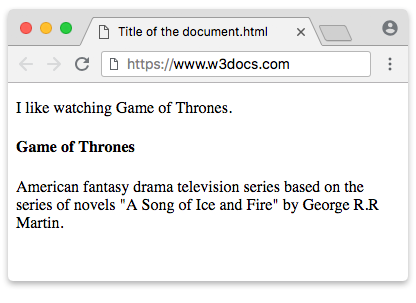
<aside> nested inside an <article>
Here the <aside> sits inside the <article>. The primary content comes first, and the aside follows as a "Did you know?" note that is clearly tangential to that specific article. Because it is nested, browsers and screen readers treat it as related to the article rather than as a page-level landmark.
Example of the HTML <aside> tag with the <article> tag
<!DOCTYPE html>
<html>
  <head>
    <title>Title of the document</title>
  </head>
  <body>
    <h1>Example of the aside tag</h1>
    <article>
      <h2>Game of Thrones</h2>
      <p>Game of Thrones is an American fantasy drama television series created by David Benioff and D. B. Weiss. It is an adaptation of A Song of Ice and Fire, George R. R. Martin's series of fantasy novels.</p>
      <aside>
        <h3>Did you know?</h3>
        <p>The series ran for eight seasons and won numerous Emmy Awards, becoming one of the most-watched shows in television history.</p>
      </aside>
    </article>
  </body>
</html>Page-level sidebar <aside> vs. in-article <aside>
The placement of <aside> changes its meaning. An <aside> placed outside any <article> or <section> is a page-level aside — typically a sidebar of links, ads, or related posts that supports the whole page. An <aside> placed inside an <article> supports only that article.
<body>
  <main>
    <article>
      <h2>How to brew pour-over coffee</h2>
      <p>Heat the water to about 94°C, then pour slowly in circles…</p>

      <!-- In-article aside: tangential to THIS article -->
      <aside>
        <h3>Tip</h3>
        <p>A gooseneck kettle makes the pour much easier to control.</p>
      </aside>
    </article>
  </main>

  <!-- Page-level aside: a sidebar supporting the whole page -->
  <aside aria-label="Related guides">
    <h2>More guides</h2>
    <ul>
      <li><a href="/french-press">French press</a></li>
      <li><a href="/cold-brew">Cold brew</a></li>
    </ul>
  </aside>
</body>You can use more than one <aside> on a page, and they may be nested at different levels. Give each page-level aside an aria-label or aria-labelledby so its landmark is uniquely named.
The difference between the <aside> and <div> tags
The <div> element is a generic container with no semantic meaning — to assistive technology it is invisible structurally, exposing nothing beyond the text inside it. A page-level <aside>, by contrast, exposes a complementary landmark that screen-reader users can navigate to directly. This difference affects accessibility and SEO.
Compare the two approaches for marking up a sidebar:
<!-- Before: no semantics, just a styled box -->
<div class="sidebar">
  <h2>Related links</h2>
  <ul>…</ul>
</div>

<!-- After: a navigable complementary landmark -->
<aside aria-label="Related links">
  <h2>Related links</h2>
  <ul>…</ul>
</aside>When would you still use <div>? Reach for <div> when the wrapper exists purely for styling or layout (a grid cell, a flex wrapper, a card shell) and carries no standalone, tangential meaning. If the block is supporting-but-removable content, prefer <aside>; if it is just a hook for CSS, <div> is correct.
Attributes
The <aside> tag supports the Global Attributes and the Event Attributes.
Example with a global attribute:
<aside class="sidebar-note" id="extra-info">
  <p>Additional context goes here.</p>
</aside>How to style an HTML <aside> Tag
The <aside> element carries no default visual styling, so you typically add your own. The colours below are illustrative — use your project's design tokens or named values in production code rather than raw hex literals:
aside {
  background-color: whitesmoke;
  border-left: 4px solid lightgray;
  padding: 10px;
}Browser support and history
The <aside> element was introduced in HTML5 and is supported by all modern browsers. Before HTML5, developers marked up the same content with a generic container such as <div id="sidebar">, which conveyed no meaning to browsers, search engines, or assistive technology. The semantic <aside> element replaces that pattern.
Related elements
<article>— self-contained content that an<aside>often supports.<main>— the dominant content of the document.<section>— a thematic grouping of content.<nav>— another landmark element, for navigation links.