HTML <rt> Tag
The <rt> tag is used to add annotations at the top and bottom sides of the text, placed in the <ruby> tag.
The <rt> tag carries the annotation — the reading, pronunciation, or translation — inside a <ruby> element. The <ruby> element pairs a run of base text with one or more <rt> annotations, a technique used to show the pronunciation of East Asian characters (Japanese furigana, Chinese pinyin, Korean) or, more generally, any small explanatory note printed alongside text.
By default the browser renders the contents of <rt> in small print above the base text. The base text is everything inside <ruby> that is not wrapped in <rt>.
The <rt> tag is one of the HTML5 elements.
How <rt> works inside <ruby>
A ruby annotation has two parts: the base text and the annotation. The annotation goes in <rt>; the base text is left bare.
<ruby>漢字<rt>かんじ</rt></ruby>Here 漢字 is the base text and かんじ is the reading shown above it. You can annotate each character separately so that each reading sits over its own character:
<ruby>漢<rt>かん</rt>字<rt>じ</rt></ruby>The modern pattern with <rp> fallback
Some browsers (and most plain-text contexts, screen readers, or copy-paste) cannot render ruby annotations. The <rp> ("ruby parenthesis") tag provides fallback parentheses that are shown only when ruby rendering is unavailable. Browsers that do support ruby hide the <rp> content.
This is the canonical, recommended pattern:
<ruby>漢字<rp>(</rp><rt>かんじ</rt><rp>)</rp></ruby>- In a ruby-capable browser, this renders
かんじabove漢字, and the parentheses are hidden. - In a fallback context, it degrades gracefully to the readable text
漢字(かんじ).
Always wrap each <rt> in a pair of <rp> elements when you want robust fallback.
Full example
HTML <rt> Tag
<!DOCTYPE html>
<html lang="en">
  <head>
    <title>Title of the document</title>
  </head>
  <body>
    <ruby>
      漢<rp>(</rp><rt>かん</rt><rp>)</rp>
      字<rp>(</rp><rt>じ</rt><rp>)</rp>
    </ruby>
  </body>
</html>Result
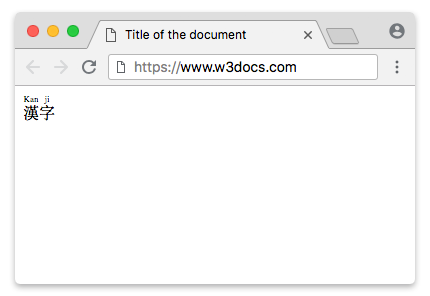
Syntax and tag omission
The <rt> tag comes in pairs, but the closing tag may be omitted when <rt> is immediately followed by another <rt> or by an <rp> element, or when there is no content remaining in the parent <ruby> element.
Note on <rb> and <rtc>
You may see older tutorials use <rb> (ruby base) and <rtc> (ruby text container) to mark up complex, multi-level annotations. These elements have been removed from the HTML standard and are obsolete. They have inconsistent browser support and should not be used in new code.
For the base text, simply leave it bare inside <ruby> rather than wrapping it in <rb>. Stick to the modern <ruby> + <rt> (+ <rp>) pattern shown above.
Styling the annotation position
The CSS ruby-position property controls where the <rt> annotation appears relative to the base text — over (above, the default for most scripts), under (below), or inter-character. For example:
ruby {
  ruby-position: under;
}This moves the reading below the base characters, which is the convention for some languages. ruby-position is supported across all current major browsers.
Browser support
Ruby annotation (<ruby>, <rt>, and <rp>) is supported in all modern browsers, including Chrome, Edge, Firefox, and Safari.
Attributes
The <rt> tag supports the Global Attributes and the Event Attributes.