HTML <q> Tag
The <q> tag is an inline element, defining short quotes. Tag description, attributes and examples of using.
The <q> tag is an inline element used for short quotations that fit within the flow of a sentence and don't span multiple lines. The defining feature of <q> is that browsers automatically add quotation marks around the content — you should not type the quote marks yourself.
For longer, standalone quotations that form their own paragraph, use the block-level <blockquote> element instead.
This page covers when to reach for <q>, how it differs from <blockquote>, the cite attribute, and the <q>-specific way to customize the inserted quotation marks with the CSS quotes property.
Syntax
The <q> tag comes in pairs. The content is written between the opening (<q>) and closing (</q>) tags.
Example of the HTML <q> tag:
HTML <q> Tag
<!DOCTYPE html>
<html>
  <head>
    <title>Title of the document</title>
  </head>
  <body>
    <p>Bernard Show says:
      <q cite="https://www.wikiquote.org/">He who can, does; he who cannot, teaches.</q>
    </p>
  </body>
</html>Result
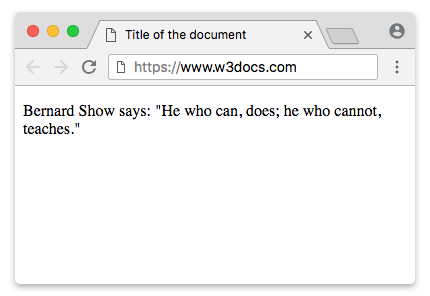
<q> vs <blockquote>
Both elements mark up quoted material, but they serve different purposes:
<q> | <blockquote> | |
|---|---|---|
| Display | Inline — flows inside a sentence | Block-level — its own indented block |
| Length | Short quotes | Longer, standalone quotes |
| Quotation marks | Browser inserts them automatically | None added; you provide your own if needed |
cite attribute | Supported (source URL) | Supported (source URL) |
Use <q> when the quote sits inside running text, and <blockquote> when it stands on its own. Do not type quotation marks inside <q> — the browser supplies them, so typing your own would produce doubled marks.
Example using both <q> and <blockquote>:
<!DOCTYPE html>
<html>
  <head>
    <title>Title of the document</title>
  </head>
  <body>
    <p>As the proverb goes, <q cite="https://www.wikiquote.org/">He who can, does; he who cannot, teaches.</q></p>

    <blockquote cite="https://en.wikipedia.org/wiki/Alice%27s_Adventures_in_Wonderland">
      "We're all mad here. I'm mad. You're mad," said the Cheshire Cat.
    </blockquote>
  </body>
</html>Notice that the <q> text appears with quotation marks the browser added, while the <blockquote> text is set off as an indented block with no marks.
The cite attribute vs the <cite> element
Two similarly named features are easy to confuse:
- The
citeattribute (<q cite="...">) holds a machine-readable URL pointing to the source of the quotation. It is not displayed by the browser — it exists for search engines, screen readers, and scripts. - The
<cite>element is visible text used to mark up the title of a referenced work (a book, song, film, article). It renders in italics by default.
You can use both together — the cite attribute for the machine-readable source, and a visible <cite> element for the human-readable reference:
<p>
<q cite="https://www.gutenberg.org/ebooks/11">We're all mad here.</q>
— <cite>Alice's Adventures in Wonderland</cite>
</p>Automatic quotation marks
The marks around <q> content are not part of the HTML — browsers add them with CSS, using the ::before and ::after pseudo-elements together with the content: open-quote and content: close-quote values. The default user-agent stylesheet looks roughly like this:
q::before {
  content: open-quote;
}
q::after {
  content: close-quote;
}Changing the marks with the CSS quotes property
Because the marks come from open-quote/close-quote, the <q>-specific way to customize them is the CSS quotes property. It lets you define which characters to use without touching the HTML:
<style>
  q {
    quotes: "«" "»";
  }
</style>
<p>He who can, <q>does</q>; he who cannot, teaches.</p>To remove the marks entirely, set quotes: none.
Nested <q> elements
When you nest one <q> inside another, browsers automatically alternate between outer and inner quote styles (for example, double quotes outside and single quotes inside). The quotes property accepts a second pair of strings for the nested level:
<style>
  q {
    quotes: '"' '"' "'" "'";
  }
</style>
<p>
  <q>The teacher said, <q>He who can, does.</q></q>
</p>The first pair ('"' '"') styles the outer level, and the second pair ("'" "'") styles the nested one.
The lang attribute and locale-specific marks
Quotation marks differ by language — English uses "…", French uses «… », German uses „…“. Browsers pick the correct marks based on the element's language, so setting the lang attribute on <q> (or an ancestor) yields locale-appropriate quotes automatically:
<p lang="fr"><q>Bonjour le monde</q></p>
<p lang="de"><q>Hallo Welt</q></p>In a French context the browser renders guillemets («… »), and in a German context the low-high marks („…“).
Attributes
| Attribute | Value | Description |
|---|---|---|
| cite | URL | A machine-readable URL pointing to the source of the quote. It is not displayed to the user. |
| lang | language-code | Specifies the language of the content, which determines the locale-specific quotation marks. |
The <q> tag also supports the Global Attributes and the Event Attributes.
How to style an HTML <q> Tag
Since the quotation marks are generated by open-quote/close-quote, the most <q>-specific styling control is the CSS quotes property:
<style>
  q {
    quotes: "‹" "›";
    font-weight: bold;
  }
</style>
<p>He who can, <q>does</q>; he who cannot, teaches.</p>