HTML <dt> Tag
The <dt> tag is used to denote a term in the definition list. Description of the tag, attributes and examples.
The <dt> tag (short for description term, formerly definition term) denotes the term being defined inside a description list. It is one of the three tags that build such a list, together with <dl> and <dd>:
<dl>wraps the whole list (the description list).<dt>names a term, such as a word in a glossary or a metadata label.<dd>provides the description or value for the preceding term.
Use a description list whenever your content is naturally a set of name/value pairs: a glossary, FAQ questions and answers, key/value metadata, or term definitions. For ordered or bulleted content, use a different list type instead — see the HTML lists overview.
Structural rules
The <dt> element has two requirements you must follow for valid, accessible markup:
<dt>must be a direct child of<dl>. It cannot appear on its own outside a description list (or, in modern HTML, inside a single wrapping<div>directly within the<dl>).<dt>must come before its<dd>. Each group starts with one or more terms (<dt>), followed by one or more descriptions (<dd>). A<dd>describes the<dt>element(s) that precede it.
The <dt> tag comes in pairs: the content goes between the opening <dt> and closing </dt> tags.
Example of the HTML <dt> tag:
HTML <dt> Tag
<!DOCTYPE html>
<html>
  <head>
    <title>Title of the document</title>
  </head>
  <body>
    <dl>
      <dt>Hypertext</dt>
      <dd>A system of text pages that have cross-references.</dd>
      <dt>Hyperlink</dt>
      <dd>A part of a hypertext document that references another item.</dd>
    </dl>
  </body>
</html>Result
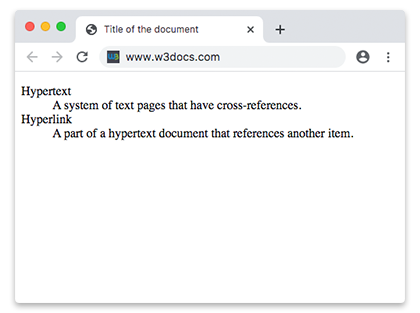
Multiple terms and multiple descriptions
A description group is not limited to one term and one description. You can pair several <dt> and <dd> elements in the same group.
Several <dt> for one <dd> — use this when multiple terms share a single definition, for example synonyms or alternate spellings:
<dl>
  <dt>Firefox</dt>
  <dt>Mozilla Firefox</dt>
  <dt>Fx</dt>
  <dd>A free, open-source web browser developed by the Mozilla Foundation.</dd>
</dl>Several <dd> for one <dt> — use this when a single term has more than one meaning or value:
<dl>
  <dt>Coffee</dt>
  <dd>A hot beverage brewed from roasted coffee beans.</dd>
  <dd>The seeds of the coffee plant.</dd>
</dl>A realistic example: product metadata
Description lists shine for key/value metadata. Here each <dt> is a label and each <dd> is its value:
<dl>
  <dt>Product name</dt>
  <dd>Mechanical Keyboard K3</dd>

  <dt>Manufacturer</dt>
  <dd>Keychron</dd>

  <dt>Connectivity</dt>
  <dd>Bluetooth 5.1</dd>
  <dd>USB-C (wired)</dd>

  <dt>Price</dt>
  <dd>$79.99</dd>
</dl>Note the Connectivity term has two <dd> values — a clean way to list multiple values for one label.
Default rendering
Browsers do not style <dt> in any special way by default: the term renders in normal (non-bold) weight, while each following <dd> is indented under it. The visual hierarchy you usually expect from a glossary — bold terms — comes from CSS, not from the browser's defaults.
Attributes
The <dt> tag supports the Global attributes and the Event Attributes.
How to style an HTML <dt> Tag
The snippet below overrides the default rendering: it makes terms bold and gives them a distinct color, so they stand out from their descriptions.
dt {
  font-weight: bold;
  color: #2c3e50;
}Accessibility
Description lists carry meaning beyond their appearance. Screen readers recognize the <dl>/<dt>/<dd> structure and announce each <dt> as a term together with its associated <dd> description, so users hear the term and its value as a connected pair. Faking the same look with plain paragraphs and CSS loses this relationship. Use a real description list whenever the content is genuinely a set of term/description pairs.