HTML <th> Tag
The HTML <th> tag defines a table header cell. Learn colspan, rowspan, and the scope attribute for accessible tables, with runnable examples.
The <th> tag specifies a header cell in an HTML table. It must be used as a child element of <tr>, which, in turn, is placed inside the <table> tag. To define a standard data cell, the <td> tag is used.
This page covers what <th> does, how to span cells with colspan and rowspan, and — most importantly — how to make table headers accessible with the scope attribute and the id/headers pattern so screen readers can announce the right header for every cell.
The <th> tag can contain text, images, forms, links, or any other HTML element that can be used in the body of an HTML document. The size of the table is automatically adjusted based on the size of its content.
In HTML tables, data is arranged vertically in columns. If you want to display the first row of the table as labels or headings, you must use <th> elements instead of <td> elements for that row. By default, the content of the <th> tag is bold and centered. To change its appearance, you can use CSS styles. Table headings can also be easily styled independently from the rest of the table contents.
Note that all rows in a table should have the same number of cells. If a row has fewer cells, the browser renders the missing cells implicitly. These implicit cells inherit the table's border styles. If you need to indicate that other cells contain no data, create empty cells where necessary. If implicit cells appear consecutively, they may render as a single merged cell.
Syntax
The <th> tag comes in pairs. The content is written between the opening (<th>) and closing (</th>) tags.
HTML <th> Tag
<table>
  <tr>
    <th>...</th>
  </tr>
</table>Example of the HTML <th> tag:
Month and Date — Example of the HTML <th> Tag — W3Docs
<!DOCTYPE html>
<html>
  <head>
    <title>Title of the document</title>
    <style>
      table {
        width: 80%;
        margin: 30px auto;
        border-collapse: collapse;
      }
      thead {
        background-color: #1c87c9;
        color: #fff;
      }
      th,
      td {
        padding: 10px;
        border: 1px solid #666;
      }
    </style>
  </head>
  <body>
    <table>
      <thead>
        <tr>
          <th>Month</th>
          <th>Date</th>
        </tr>
      </thead>
      <tbody>
        <tr>
          <td>June</td>
          <td>18.07.2018</td>
        </tr>
      </tbody>
    </table>
  </body>
</html>Result
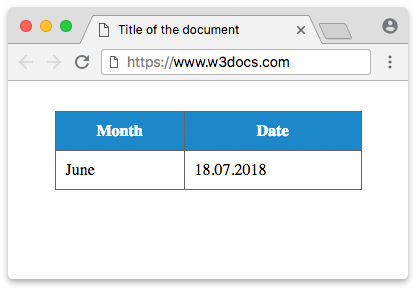
In this example, our headings are "Month" and "Date", which we define using <th> tags. We place both tags inside a <tr> element.
The colspan attribute is generally used with the <th> tag to let the content span over multiple columns. Let’s see this in action.
Example of the HTML <th> tag with the colspan attribute:
Example with a colspan attribute — HTML <th> Tag — W3Docs
<!DOCTYPE html>
<html>
  <head>
    <title>Title of the document</title>
    <style>
      table {
        width: 80%;
        margin: 30px auto;
        border-collapse: collapse;
      }
      tr {
        background-color: #1c87c9;
        color: #ffffff;
      }
      th,
      td {
        padding: 10px;
        border: 1px solid #666;
      }
    </style>
  </head>
  <body>
    <table>
      <thead>
        <tr>
          <th colspan="2">Month and Date</th>
        </tr>
      </thead>
      <tbody>
        <tr>
          <td>Jun</td>
          <td>18.07.2014</td>
        </tr>
      </tbody>
    </table>
  </body>
</html>In this example, the value of the colspan attribute is "2". It means that the single header cell stretches across two columns.
Example of the HTML <th> tag with the rowspan attribute
The rowspan attribute is the vertical counterpart of colspan: it makes a header cell span multiple rows. This is useful when one heading applies to several rows of data.
<!DOCTYPE html>
<html>
  <head>
    <title>Title of the document</title>
    <style>
      table {
        border-collapse: collapse;
        margin: 30px auto;
      }
      th,
      td {
        padding: 10px;
        border: 1px solid #666;
      }
      thead {
        background-color: #1c87c9;
        color: #fff;
      }
    </style>
  </head>
  <body>
    <table>
      <thead>
        <tr>
          <th>Day</th>
          <th>Slot</th>
          <th>Activity</th>
        </tr>
      </thead>
      <tbody>
        <tr>
          <th rowspan="2" scope="rowgroup">Monday</th>
          <td>Morning</td>
          <td>HTML basics</td>
        </tr>
        <tr>
          <td>Afternoon</td>
          <td>CSS basics</td>
        </tr>
      </tbody>
    </table>
  </body>
</html>Here the "Monday" header cell uses rowspan="2", so it covers both the morning and afternoon rows.
The scope attribute
The single most important accessibility feature of <th> is the scope attribute. It tells assistive technology — screen readers in particular — which cells a header describes. Sighted users infer this from layout, but a screen reader reads cells one at a time and needs scope to announce the correct header before each data cell.
scope accepts four meaningful values:
| Value | The header applies to… |
|---|---|
col | every cell in the column below it |
row | every cell in the row to its right |
colgroup | a group of columns (used with <colgroup>) |
rowgroup | a group of rows (e.g. all rows inside one <tbody>) |
A table can have headers in both directions. Column headers live in the <thead> with scope="col"; a row's leading label is a <th scope="row"> inside the <tbody>.
Example of a fully accessible table using scope
<!DOCTYPE html>
<html>
  <head>
    <title>Title of the document</title>
    <style>
      table {
        border-collapse: collapse;
        margin: 30px auto;
      }
      th,
      td {
        padding: 10px;
        border: 1px solid #666;
        text-align: left;
      }
      thead th,
      tbody th {
        background-color: #1c87c9;
        color: #fff;
      }
    </style>
  </head>
  <body>
    <table>
      <caption>Weekly study plan</caption>
      <thead>
        <tr>
          <th scope="col">Day</th>
          <th scope="col">Topic</th>
          <th scope="col">Hours</th>
        </tr>
      </thead>
      <tbody>
        <tr>
          <th scope="row">Monday</th>
          <td>HTML</td>
          <td>2</td>
        </tr>
        <tr>
          <th scope="row">Tuesday</th>
          <td>CSS</td>
          <td>3</td>
        </tr>
      </tbody>
    </table>
  </body>
</html>When a screen-reader user lands on the cell containing 3, it can announce "Tuesday, Hours, 3" because the column header (scope="col") and the row header (scope="row") are both unambiguous.
Accessibility
Why scope matters
A data table is a grid of relationships: each <td> belongs to one or more headers. Sighted users read those relationships visually; screen-reader users do not. Marking header cells with <th> and giving them a correct scope is what lets assistive technology say the right header out loud as the user moves through the table. Without it, a complex table is just a stream of disconnected values.
<th> vs. <td role>
Always use a real <th> element for headers rather than styling a <td> to look bold. A <th> carries header semantics automatically; a plain <td> does not, no matter how it looks. Reaching for role="columnheader" or role="rowheader" on a <td> should be a last resort (for example, when you cannot change the markup). Native <th> with scope is simpler and better supported.
The id / headers pattern for complex tables
scope works well for simple grids, but it cannot express every relationship in tables with irregular spans or multiple header levels. For those, give each header an id and list the relevant header ids on each data cell via the headers attribute (space-separated). This explicitly ties every cell to its headers.
<!DOCTYPE html>
<html>
  <head>
    <title>Title of the document</title>
    <style>
      table { border-collapse: collapse; margin: 30px auto; }
      th, td { padding: 10px; border: 1px solid #666; }
    </style>
  </head>
  <body>
    <table>
      <thead>
        <tr>
          <th id="name">Name</th>
          <th id="q1">Q1</th>
          <th id="q2">Q2</th>
        </tr>
      </thead>
      <tbody>
        <tr>
          <th id="alice" headers="name">Alice</th>
          <td headers="alice q1">120</td>
          <td headers="alice q2">150</td>
        </tr>
        <tr>
          <th id="bob" headers="name">Bob</th>
          <td headers="bob q1">90</td>
          <td headers="bob q2">110</td>
        </tr>
      </tbody>
    </table>
  </body>
</html>Now the cell with 150 is explicitly associated with both the Alice row header and the Q2 column header, so a screen reader can announce "Alice, Q2, 150" with no guesswork.
The abbr attribute
When a header's full text is long, the abbr attribute supplies a short version. Some speech browsers read this abbreviated form (instead of repeating the long heading) every time they announce a cell in that column, which makes navigating wide tables far less tedious.
<th scope="col" abbr="HDI">Human Development Index</th>The visible text stays "Human Development Index", but a screen reader may announce each cell in that column as just "HDI".
Attributes
Only abbr, colspan, rowspan, headers, and scope are valid in HTML5. The rows marked Deprecated below are obsolete presentational attributes — do not use them; achieve the same result with CSS instead.
| Attribute | Value | Description |
|---|---|---|
| abbr | text | Defines an abbreviated version of the content in a header cell. Some user agents, such as speech readers, may announce this short form instead of the full text. |
| colspan | number | Defines the number of columns a cell should span. The value must be a positive integer. Default value is 1. |
| headers | header_id | A space-separated list of header cell ids that describe this cell. Each value must match the id of a header cell. Used for complex tables. |
| rowspan | number | The number of rows a cell should span. The value must be a positive integer. Default is 1. Values above 65534 are clipped to 65534. |
| scope | col / colgroup / row / rowgroup | Declares which cells the header relates to. Essential for table accessibility. |
| align | left / right / center | Deprecated. Aligned the content. Use CSS text-align instead. |
| axis | category_name | Deprecated. Categorized cells with similar content. |
| background | url | Deprecated. Set a background image. Use CSS background instead. |
| bgcolor | rgb(x,x,x) / #xxxxxx / colorname | Deprecated. Set the background color. Use CSS background-color. |
| bordercolor | color | Deprecated. Set the border color. Use CSS border. |
| char | character | Deprecated. Aligned content to a character (only with align="char"). |
| charoff | number | Deprecated. Offset of the alignment character. |
| height | % / pixels | Deprecated. Set the cell height. Use CSS height. |
| nowrap | nowrap | Deprecated. Prevented content wrapping. Use CSS white-space: nowrap. |
| sorted | (various) | Deprecated. Defined a column's sort direction. |
| valign | top / middle / bottom / baseline | Deprecated. Vertical alignment. Use CSS vertical-align. |
| width | % / pixels | Deprecated. Set the cell width. Use CSS width. |
The <th> tag also supports the Global Attributes and the Event Attributes.
How to style an HTML <th> tag
th {
  background-color: #f2f2f2;
  color: #333;
  padding: 8px;
  border: 1px solid #ccc;
}Related tags
<table>— the table container<tr>— a table row<td>— a standard data cell<thead>— groups the header row(s)<tbody>— groups the body rows<caption>— a table title