HTML <plaintext> Tag
The content of the <plaintext> tag is represented as an ordinary text without formatting. Tag description and examples of using.
The <plaintext> tag tells the browser to display everything that follows it as ordinary text, without any HTML formatting. When the parser encounters this tag, it switches to raw text mode and treats all subsequent content in the document as plain text, ignoring every tag that comes after it.
Why <plaintext> is irreversibly dangerous
The critical fact about <plaintext> is that it has no closing tag. There is no </plaintext> that the browser will honor. Once the parser enters <plaintext>, it consumes the rest of the document as literal text — including any markup that follows it, all the way to the end of the file:
- Everything after
<plaintext>is shown as raw text, so any real HTML you wrote after it (paragraphs, scripts, styles) is displayed as source instead of being rendered. - The closing
</body>and</html>tags are also swallowed as text, so the document never closes properly. - You cannot "turn it off." There is no way to exit plain-text mode once it begins, which is why a single
<plaintext>can break an entire page.
For these reasons <plaintext> should be treated as a relic to recognize in old code, not a tool to use.
If <plaintext> were the first element on the page, the entire document response would be treated as plain text. In that situation, serving the file with the text/plain MIME-type is the correct approach — not this tag.
What to use instead
To safely display literal text or code, combine <pre> (which preserves whitespace and line breaks) with <code> (which marks the text as code), and escape the characters that have special meaning in HTML: write < for <, > for >, and & for &. Escaping is what makes the angle brackets render as text instead of being interpreted as tags.
<!DOCTYPE html>
<html>
<head>
<title>Title of the document</title>
</head>
<body>
<p>The code below is shown as literal text:</p>
<pre><code><h1>Main title of the document</h1>
<p>First paragraph of the text</p>
<h2>Subheading</h2></code></pre>
</body>
</html>Unlike <plaintext>, <pre> has a proper closing tag (</pre>), so the literal-text region ends exactly where you want it to and the rest of the page renders normally. You can also apply a monospaced font to any HTML element with the CSS font-family property and the monospace generic value.
For historical context, the <xmp> tag is another deprecated way to show literal text; like <plaintext>, it should not be used. See the full list of deprecated HTML tags to avoid.
Syntax
The <plaintext> tag is not a void element, but its closing tag is forbidden — there is no </plaintext>. The HTML parser stops interpreting markup the moment it encounters the opening tag, consuming the rest of the document as plain text.
Example of the HTML <plaintext> tag:
<!DOCTYPE html>
<html>
 <head>
    <title>Title of the document</title>
 </head>
  <body>
    <p>The tag content looks like this:</p>
    <plaintext>
    <h1>Main title of the document</h1>
    <p>First paragraph of the text</p>
    <h2>Subheading</h2>
  </body>
</html>Result
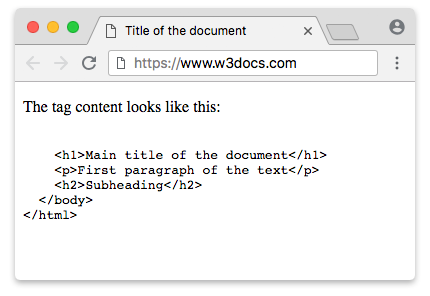
Attributes
The <plaintext> tag supports the Global Attributes.