HTML <br> Tag
The HTML <br> tag is used for a line break. Read information about the usage of the <br> tag, and know how to style it with CSS. Also, see examples.
The HTML <br> tag inserts a single line break. This page explains when a line break is part of your content (and <br> is the right tool), when it is really spacing or layout (and CSS is the right tool), how screen readers handle it, and which alternatives — like <pre> or the CSS white-space property — fit verse and pre-formatted text.
Definition
The HTML <br> tag defines a line break. Unlike the <p> tag, which creates a paragraph break, the <br> tag simply moves the following text to the next line without adding extra vertical space.
The key rule: use <br> only when the line break is part of the content itself — text that is inherently line-structured, such as a postal address, a poem, or song lyrics. If a break starts a new thought, that is a paragraph, so use <p>. If a break is about spacing or visual layout, that is a presentation job for CSS, not <br>.
Syntax
The <br> tag is a void element in HTML5, which means it does not require a closing tag. However, in XHTML, it must be self-closed (<br />).
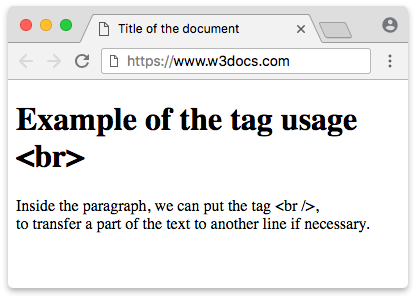
Example of the HTML <br> tag:
br tag example
<!DOCTYPE html>
<html>
<head>
<title>Title of the document</title>
</head>
<body>
<h1>Example of the <br> tag usage.</h1>
<p> Inside the paragraph, we can put the tag <br />, <br /> to transfer a part of the text to another line if necessary.</p>
</body>
</html>Usage
Reach for <br> only when the line break belongs to the content. The classic cases are postal addresses, poems, and song lyrics, where the line structure carries meaning.
Example: an address with <address> and <br>
A street address is the textbook use of <br>: each line is genuinely a separate line of the same block, not a separate paragraph. The <address> element provides the contact-information semantics, and <br> lays out the lines.
<!DOCTYPE html>
<html>
  <head>
    <title>Title of the document</title>
  </head>
  <body>
    <address>
      Jane Doe<br />
      123 Main Street<br />
      Springfield, IL 62704<br />
      USA
    </address>
  </body>
</html>Example: poems and song lyrics
<!DOCTYPE html>
<html>
<head>
<title>Title of the document</title>
</head>
<body>
<h1>Example of the <br> tag usage</h1>
<blockquote>
But I'm not the only one<br />
I hope some day you'll join us<br />
And the world will live as one.<br />
</blockquote>
<cite>John Lennon "imagine"</cite>
</body>
</html>When not to use <br>
<br> is for line structure, not for spacing or layout. Two common misuses:
- Separating paragraphs. A break between two distinct thoughts is a paragraph boundary — wrap each block in
<p>. - Creating vertical gaps. Stacking several
<br>tags to push content down is a presentation hack. Spacing belongs to CSS, via themarginproperty.
Do not use <br> to separate paragraphs or to add spacing. Use <p> elements together with the CSS margin property to control vertical space.
Accessibility: why stacked <br><br> is harmful
Screen readers announce each <br> as a line break. When you stack several to fake a gap — for example <br><br><br> — the reader hears "line break, line break, line break", which is noise that conveys no meaning and interrupts the reading flow. Worse, the empty lines have no semantic relationship to the surrounding text, so assistive technology cannot help the user understand the document structure.
The correct fix is to express the gap as spacing in CSS. Replace this:
<p>First paragraph.</p>
<br /><br /><br />
<p>Second paragraph.</p>with this:
<style>
  .gap-below {
    margin-bottom: 3rem;
  }
</style>

<p class="gap-below">First paragraph.</p>
<p>Second paragraph.</p>The CSS version keeps the two paragraphs as proper paragraphs and lets margin handle the visual distance, so screen readers announce nothing extra.
Alternatives for verse and pre-formatted text
When a whole block is line-structured, controlling breaks with CSS or <pre> is often cleaner than littering the markup with <br> tags. A quick decision framework:
- A few intentional breaks inside flowing text (an address, a one-off line in a paragraph): use
<br>. - A block where the line breaks in your source are the breaks you want, but spacing should collapse (e.g. verse): set
white-space: pre-lineon the container so newlines in the HTML become real line breaks without any<br>. - Text where every space and line break must be preserved exactly (code, ASCII art): use the
<pre>element, which renders content in a monospace font and honors all whitespace.
<style>
  .poem {
    white-space: pre-line;
  }
</style>

<p class="poem">
  Roses are red
  Violets are blue
</p>Here the line breaks come from the source text, and white-space: pre-line turns them into visible breaks — no <br> needed.
Attributes
The <br> tag once accepted a clear attribute to control how the break interacted with floated elements. That attribute was removed in HTML5 and must not be used.
| Attribute | Value | Status |
|---|---|---|
clear | all / left / right / none | Removed in HTML5 — do not use |
To stop content from wrapping alongside a floated element, use the CSS clear property instead:
.below-float {
  clear: both;
}The <br> tag supports the Global Attributes and the Event Attributes.