HTML <script> Tag
The HTML <script> tag embeds or links JavaScript in a page. Learn src, async vs defer, type="module", placement, and attributes with examples.
The HTML <script> tag declares client-side script — almost always JavaScript — in an HTML document. Scripts add interactivity: form validation, dynamic content updates, image manipulation, and responding to user events. The tag can either contain the script inline (between the opening and closing tags) or load an external file via the src attribute. For a broader overview of adding scripts to a page, see HTML scripts.
If you connect an external file with scripts, don’t embed script into the same <script> tag.
The HTML <script> tag can be placed in the <head> element, as well as within the <body> element. Scripts that must be executed first are often placed in the <head> element with defer, or at the end of the <body> element. The <script> tag can be used in an HTML document many times.
Syntax
The <script> tag always comes in pairs — an opening <script> and a closing </script>. Inline code goes between them; for an external file, leave the tag empty and point src at the file:
<script>
  // inline JavaScript here
  console.log("Hello from inline script");
</script>

<script src="app.js"></script>Inline script example
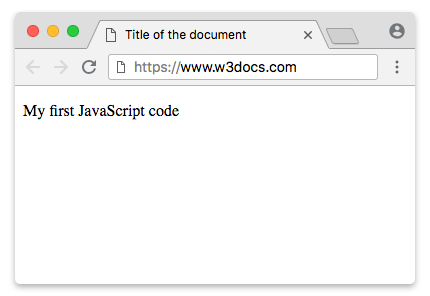
For selecting an HTML element, JavaScript commonly uses the document.getElementById() method:
<!DOCTYPE html>
<html>
  <head>
    <title>Title of the document</title>
  </head>
  <body>
    <p id="example"></p>
    <script>
      document.getElementById("example").innerHTML = "My first JavaScript code";
    </script>
  </body>
</html>Loading an external script
In real projects you almost always keep JavaScript in a separate .js file and load it with src. This keeps your HTML clean, lets the browser cache the script, and allows the same file to be reused across pages:
<script src="app.js" defer></script>A few things to note:
- Don't mix the two. When
srcis present, any code written between the tags is ignored. Use either inline code or asrc, not both in the same tag. type="text/javascript"is unnecessary. JavaScript is the default scripting language in modern HTML, so you can omittypeentirely. Only settypewhen you actually needtype="module"(see below).charsethas no effect on external scripts today. The character encoding is taken from the file's HTTPContent-Typeheader (and the page's own encoding), so thecharsetattribute on<script>is obsolete — don't rely on it.
async vs. defer
By default, when the browser hits a <script src="..."> while parsing HTML, it stops parsing, downloads the script, runs it, and only then continues. That blocks rendering. The async and defer boolean attributes fix this — both download the script in parallel without blocking parsing — but they differ in when the script runs:
| Attribute | Blocks parsing? | When it runs | Order |
|---|---|---|---|
| (none) | Yes | Immediately when encountered | In document order |
defer | No | After HTML is fully parsed, just before DOMContentLoaded | In document order |
async | No | As soon as it finishes downloading | Whoever finishes first (out of order) |
<!-- Runs after the page is parsed, in order. Safe for code that touches the DOM. -->
<script src="app.js" defer></script>

<!-- Runs as soon as it loads, order not guaranteed. Good for independent scripts
     like analytics that don't depend on other scripts or the parsed DOM. -->
<script src="analytics.js" async></script>Use defer when scripts depend on the DOM or on each other (the common case). Use async for standalone, order-independent scripts such as tracking pixels.
async and defer are boolean attributes — their mere presence turns them on. Write them bare (defer), not in the old XHTML style defer="defer". The same applies to other boolean attributes like disabled and checked. Both attributes are ignored on inline scripts (those without src).
Script placement: <head> vs. end of <body>
Where you put <script> matters because a plain script blocks parsing:
<head>withdefer— the modern recommendation. The download starts early while the HTML is still parsing, and execution waits until the DOM is ready. You get fast loading without blocking.- End of
<body>— the classic approach. By the time the parser reaches the script, the entire DOM already exists, so the script can safely query elements. No attribute needed.
<head>
  <script src="app.js" defer></script>
</head>
<body>
  <!-- page content -->
</body>Avoid a plain <script src> (no async/defer) in <head>, since it blocks the page from rendering until the script downloads and runs.
ES modules with type="module"
Setting type="module" turns the script into an ES module. Module scripts behave differently from classic scripts:
- They support
import/export, so you can split code across files. - They are deferred by default — module scripts always wait until the HTML is parsed (no
deferneeded). - They always run in strict mode, and have their own top-level scope (variables don't leak to the global object).
<script type="module" src="main.js"></script>

<script type="module">
  import { greet } from "./greet.js";
  greet("World");
</script>To support very old browsers that don't understand modules, you can pair a module with a nomodule fallback script — modern browsers run the module and ignore the fallback, older ones do the reverse.
A note on XHTML and legacy markup
In modern HTML you don't need a type attribute, and you don't wrap inline script content in a CDATA section. That //<![CDATA[ ... //]]> wrapper only mattered in XHTML, where script content was parsed as markup and special characters like < and & had to be escaped or protected. If you're writing standard HTML, you can ignore it.
Attributes
| Attribute | Value | Description |
|---|---|---|
src | URL | URL of an external script file (relative or absolute). |
async | (boolean) | The external script is fetched in parallel and run as soon as it's available, without blocking parsing. |
defer | (boolean) | The external script is fetched in parallel and run, in order, after the HTML is parsed. |
type | media type | Usually omitted (JavaScript is the default). Set to module to load an ES module. |
charset | charset | Obsolete — has no effect; encoding comes from the file's HTTP Content-Type. |
crossorigin | anonymous | use-credentials | Configures CORS for the external script request. |
integrity | hash | Subresource Integrity hash used to verify the fetched script. |
The <script> tag supports the Global Attributes and the Event Attributes.