HTML <ins> Tag
The <ins> tag defines a part of the text which has been inserted into the document. Tag description, attributes and examples.
The HTML <ins> tag marks a span of text that has been inserted into a document. It is a semantic, editorial element: it does not merely underline text, it records that an addition was made. Browsers render the content as underlined by default, but you can change that with the CSS text-decoration property.
<ins> is almost always paired with its counterpart, the <del> tag, which marks text that has been removed. Together they describe an edit — what was taken out and what was added in its place. This is exactly the information you want to preserve in:
- Changelogs and release notes — showing what was added in a new version.
- Legal and contractual documents — recording amendments without losing the original wording.
- Tracked changes / document diffs — the "redline" view editors are used to from word processors.
Because <ins> is purely about marking up an edit, reach for a different element when you only want a visual effect: use <u> for non-textual annotation styling, <em> or <strong> for emphasis, and <mark> to highlight relevant text.
Syntax
The <ins> tag comes in pairs. The content is written between the opening (<ins>) and closing (</ins>) tags.
<ins>This text was added.</ins>Example of the HTML <ins> tag:
HTML <ins> Tag
<!DOCTYPE html>
<html>
  <head>
    <title>Title of the document</title>
  </head>
  <body>
    <p>She likes <del datetime="2023-01-01">violets</del> <ins datetime="2023-10-01">snowdrops</ins>.</p>
  </body>
</html>Result
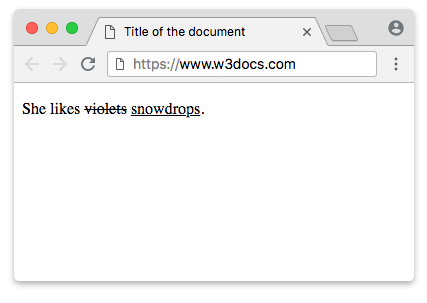
Pairing <ins> with <del> to show a document diff
The most common use of <ins> is to display a "redline" of an edit: the old text struck through and the new text underlined, side by side. The <del> content is the removed wording; the <ins> content is the replacement.
<!DOCTYPE html>
<html>
  <head>
    <title>Document diff</title>
  </head>
  <body>
    <p>
      The meeting is scheduled for
      <del>Monday</del>
      <ins>Wednesday</ins>
      at
      <del>9:00 AM</del>
      <ins>10:30 AM</ins>.
    </p>
  </body>
</html>By default the <del> parts appear with a line through them and the <ins> parts appear underlined, so the reader can see at a glance what changed.
The cite and datetime attributes
Both <ins> and <del> accept two attributes that record why and when an edit happened. They carry no visible effect on their own — they are machine-readable metadata that editing tools and assistive technology can surface.
cite— a URL pointing to a document (an issue, a ticket, a meeting note) that explains the reason for the insertion.datetime— the date, and optionally the time, when the text was inserted.
The datetime value follows the same format as <time>: YYYY-MM-DDThh:mm. The date part (YYYY-MM-DD) is required; the time part is optional. If you include a time, separate it from the date with the literal letter T, and you may add seconds and a time-zone offset (for example 2023-10-01T14:30:00Z).
<p>
  Price:
  <del datetime="2023-09-30" cite="/changelog#price-update">$49</del>
  <ins datetime="2023-10-01T09:00" cite="/changelog#price-update">$59</ins>
</p>| Value | Meaning |
|---|---|
2023-10-01 | Date only — 1 October 2023 |
2023-10-01T09:00 | Date and local time — 09:00 |
2023-10-01T09:00:00Z | Date, time, and UTC time zone |
Wrapping block-level content
<ins> is transparent content: it can wrap inline text or entire blocks (flow content) such as paragraphs and list items, as long as the surrounding context allows those blocks. This makes it possible to mark a whole paragraph or several list items as newly inserted.
<!DOCTYPE html>
<html>
  <head>
    <title>Inserted block</title>
  </head>
  <body>
    <h2>Release 2.0 — what's new</h2>
    <ins datetime="2023-10-01">
      <p>Added dark mode and keyboard shortcuts.</p>
      <ul>
        <li>Press <kbd>?</kbd> to view all shortcuts.</li>
        <li>Toggle the theme from the settings menu.</li>
      </ul>
    </ins>
  </body>
</html>Styling and accessibility
Most screen readers do not announce <ins> and <del> by default, so a user relying on audio may miss that an edit occurred. Adding an aria-label to <ins> is not a reliable solution — aria-label is not standard on this element and support is inconsistent.
The recommended approach is to expose the edit through CSS generated content, using the ::before and ::after pseudo-elements. The inserted label becomes part of the rendered text, which screen readers can read out, and you keep the visual styling in one place.
<!DOCTYPE html>
<html>
  <head>
    <title>Accessible ins styling</title>
    <style>
      ins {
        background-color: #d4f7d4;
        text-decoration: none;
        border-bottom: 2px solid green;
      }
      ins::before {
        content: " [inserted: ";
      }
      ins::after {
        content: "] ";
      }
    </style>
  </head>
  <body>
    <p>The deadline is <ins datetime="2023-10-01">next Friday</ins>.</p>
  </body>
</html>Attributes
| Attribute | Value | Description |
|---|---|---|
| cite | URL | Indicates the URL of a document that explains the reason for the insertion. |
| datetime | YYYY-MM-DDThh:mm | Defines the date (and optional time) of the insertion. |
The <ins> tag also supports the Global Attributes and the Event Attributes.
Related tags
<del>— marks text that has been removed (the counterpart to<ins>).<s>— represents content that is no longer accurate or relevant (not an edit).<mark>— highlights text for reference or relevance.<u>— non-textual underline styling, with no editorial meaning.