HTML <tbody> Tag
The <tbody> tag defines the body content of an HTML table. It is used along with <thead> and <tfoot> elements. See examples.
The <tbody> tag defines the body content (a set of rows) of an HTML table, creating a separate semantic block within it. It is used along with the <thead> and the <tfoot> tags, which specify the header and footer of the table respectively. Together, these three elements group a table into its head, body, and foot — making the markup easier to read, easier to style, and accessible to assistive technology.
The <tbody> tag must be used as a child of the <table> element, after the <caption> and <colgroup> (if any) and after the <thead> element. In HTML5, the <tfoot> element may come either before or after the <tbody> element — both are valid, and <tfoot> is always rendered at the bottom regardless of its position in the source.
Why <tbody> matters
Even if you never write a <tbody> tag, the browser creates one for you. When you place <tr> rows directly inside a <table>, the parser automatically wraps them in an implicit <tbody>. This has practical consequences:
- CSS selectors. Because of the implicit
<tbody>, a descendant selector liketable > tbody > trmatches rows even when you didn't write the tag, whiletable > trmatches nothing. Knowing this prevents confusing "my selector doesn't work" bugs. - Row grouping. A table can hold multiple
<tbody>elements, letting you split a long table into logical sections (for example, by year or category) that you can style and scroll independently. - DOM scripting. Every
<table>exposes atBodiescollection in JavaScript (table.tBodies[0]), giving you direct access to each body group without walking through child nodes. - Printing. When a long table spans multiple printed pages, browsers repeat the
<thead>and<tfoot>on each page while the<tbody>content flows from page to page.
The <thead>, <tbody>, and <tfoot> elements do not affect the table layout by default. Use CSS properties to customize the look of the table.
When printing a document, the <thead> and <tfoot> elements will define the information that can be the same or very similar on each page of a multi-page table, while the content of the <tbody> tag will vary from page to page.
In case of using <tbody>, you can't have <tr> elements (table rows) which are children of the <table> element, but are not included within the <tbody>. If you use non-header and non-footer rows they must be inside of the <tbody> element.
More than one <tbody> elements can be used for each table as long as they are all successive. This will separate the rows in large tables into sections and you will be able to format each of them separately.
Syntax
The <tbody> tag comes in pairs. The content is written between the opening (<tbody>) and closing (</tbody>) tags.
HTML <tbody> Tag
<table>
  <thead> ... </thead>
  <tfoot> ... </tfoot>
  <tbody>
    <tr>
      <td> ... </td>
    </tr>
  </tbody>
</table>Example of the HTML <tbody> tag:
HTML <tbody> Tag
<!DOCTYPE html>
<html>
  <head>
    <title>Title of the document</title>
    <style>
      th, td {
        padding: 10px;
        border: 1px solid #666;
      }
    </style>
  </head>
  <body>
    <table style="width:80%; margin:30px auto; border-collapse:collapse;">
      <thead style="background-color:#1c87c9; color:#fff;">
        <tr>
          <th>Month</th>
          <th>Savings</th>
        </tr>
      </thead>
      <tfoot style="background-color:grey;">
        <!-- <tfoot> is placed after <thead>, but is shown on the bottom of the table. -->
        <tr>
          <td>Total</td>
          <td>1500</td>
        </tr>
      </tfoot>
      <tbody style="background-color:lightgrey;">
        <tr>
          <td>January</td>
          <td>500</td>
        </tr>
        <tr>
          <td>February</td>
          <td>1000</td>
        </tr>
      </tbody>
    </table>
  </body>
</html>Result
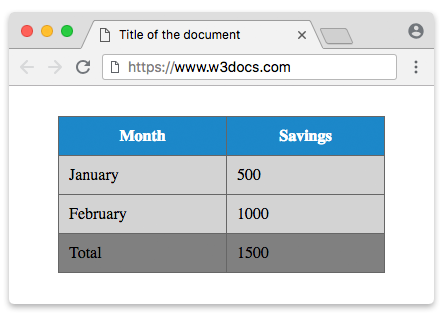
Example of the HTML <tbody> tag with the <thead> and <tfoot> tags:
HTML <tbody> Tag
<!DOCTYPE html>
<html>
  <head>
    <title>Title of the document</title>
    <style>
      table {
        width: 60%;
        margin: 30px auto;
        border-collapse: collapse;
      }
      thead {
        background-color: #8ebf42;
        color: #fff;
      }
      tbody {
        background-color: #f3ebeb;
      }
      tfoot {
        background-color: #ccc7c7;
      }
      th,
      td {
        padding: 10px;
        border: 1px solid #666666;
      }
    </style>
  </head>
  <body>
    <table>
      <thead>
        <tr>
          <th>Month</th>
          <th>Savings</th>
        </tr>
      </thead>
      <tbody>
        <tr>
          <td>January</td>
          <td>1500</td>
        </tr>
        <tr>
          <td>February</td>
          <td>1000</td>
        </tr>
      </tbody>
      <tfoot>
        <tr>
          <td>Total</td>
          <td>2500</td>
        </tr>
      </tfoot>
    </table>
  </body>
</html>Example of multiple <tbody> elements
You can use several <tbody> elements in one table to group rows into separate sections. Here each quarter is its own body group, and each group gets its own background color:
<!DOCTYPE html>
<html>
  <head>
    <title>Title of the document</title>
    <style>
      table {
        width: 60%;
        margin: 30px auto;
        border-collapse: collapse;
      }
      th,
      td {
        padding: 10px;
        border: 1px solid #666666;
        text-align: left;
      }
      thead {
        background-color: #1c87c9;
        color: #fff;
      }
      tbody:nth-of-type(odd) {
        background-color: #f3ebeb;
      }
      tbody:nth-of-type(even) {
        background-color: #e3f0fb;
      }
    </style>
  </head>
  <body>
    <table>
      <thead>
        <tr>
          <th>Month</th>
          <th>Savings</th>
        </tr>
      </thead>
      <tbody>
        <tr>
          <td>January</td>
          <td>500</td>
        </tr>
        <tr>
          <td>February</td>
          <td>1000</td>
        </tr>
      </tbody>
      <tbody>
        <tr>
          <td>March</td>
          <td>750</td>
        </tr>
        <tr>
          <td>April</td>
          <td>1200</td>
        </tr>
      </tbody>
    </table>
  </body>
</html>Accessibility
The <tbody>, <thead>, and <tfoot> elements help screen readers convey a table's structure. For the most accessible table, pair them with header cells that use the scope attribute, so assistive technology can announce which header a data cell belongs to:
<table>
  <thead>
    <tr>
      <th scope="col">Month</th>
      <th scope="col">Savings</th>
    </tr>
  </thead>
  <tbody>
    <tr>
      <th scope="row">January</th>
      <td>500</td>
    </tr>
  </tbody>
</table>Use scope="col" for column headers (typically inside <thead>) and scope="row" for row headers inside the body.
Attributes
| Attribute | Values | Description |
|---|---|---|
| align | right left center justify char | Specifies the alignment of the content inside <tbody> element. Not supported in HTML5 |
| bgcolor | bgcolor | Sets the background color of the rows inside <tbody> element. Not supported in HTML5. |
| char | character | Specifies the alignment of the content inside the <tbody> element to a character. Is used only when the attribute align="char". Not supported in HTML5. |
| charoff | number | Specifies the number of characters the content inside the <tbody> element will be aligned from the character specified by the char attribute. Is used only when the attribute align="char". Not supported in HTML5. |
| valign | top bottom middle baseline | Specifies a vertical alignment of the content inside the <tbody>element. Not supported in HTML5. |
The <tbody> tag also supports the Global Attributes and the Event Attributes.
CSS replacements for the deprecated attributes
The presentational attributes above are obsolete in HTML5. Use CSS instead:
| Old attribute | Use this CSS instead |
|---|---|
align="center" | text-align: center; |
valign="top" | vertical-align: top; |
bgcolor="#eee" | background-color: #eee; |
How to style an HTML <tbody> tag
Target the <tbody> element directly in your stylesheet to give the table body its own background, borders, and cell alignment:
tbody {
  background-color: #f3ebeb;
  border: 2px solid #1c87c9;
}

tbody td {
  text-align: center;
  vertical-align: top;
}

/* Zebra-stripe the body rows */
tbody tr:nth-of-type(even) {
  background-color: #e3f0fb;
}See styling tables with CSS for more techniques.